Well, we have a new version of POTA.app, and I must tell you, there’s a lot to like!
A couple of months ago Tom Martin was a guest on the Q5 podcast hosted by Kevin, W1DED. They were discussing the long-awaited redesign of the POTA website.
According to Tom, the project had been in development for some time. Unfortunately, when your developers and designers are volunteers, finding time for a project of this magnitude can be difficult. Believe me, I can appreciate that!
One particularly interesting part of the discussion concerned the use of artificial intelligence. According to the interview, one of the developers provided their requirements to Claude AI, which reportedly produced working code in about a week. That’s an interesting story in itself. You can watch the interview on YouTube.
The new website is available at next.pota.app, and I’ve been spending some time exploring it. The following are only my observations, not an official all-inclusive guide to the new site.
First Impressions
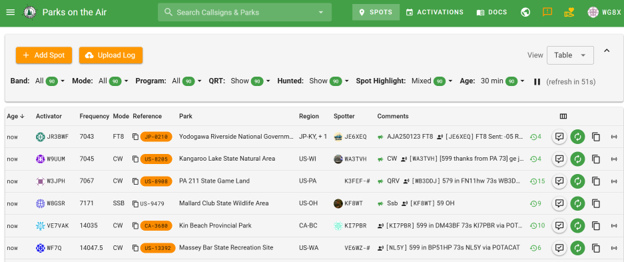
At first glance, the new spotting page looks familiar. If you’ve been using POTA for any length of time, you shouldn’t have much trouble finding your way around. But looking a bit closer, you’ll discover some very useful improvements.
The first thing I noticed was that some of the park references on the spotting page were displayed in orange. This indicates a park that I’ve never hunted before. This only works when logged in to my account. This is a great feature for hunters. I may never attempt to hunt every POTA reference, but it’s still nice to know at a glance which parks I need are on the air.
As an activator, another feature I enjoy is the ability to view the comments people leave when spotting my station. Sometimes there will be greetings from friends. Other times, there’s useful information. By clicking on the next column, a window opens which will display all those spots, including the Reverse Beacon Network (RBN) spots. The RBN spots can be switched off, but I like to leave them visible so I can see where my signal is being heard.
Another column indicates whether you’ve already hunted that station today. That’s handy when you’re moving quickly through the spotting page looking for new contacts. There’s also a button that allows you to re-spot a station. The spotting window opens with the station information already filled in, leaving the comments field available for your input. If an operator changes modes or goes QRT, they can note that in the comments field, and it will be placed in the proper field when their spot is published.
Another useful addition is the ability to copy parts of the spotting information. You’re able to copy the callsign, park reference, park name, frequency or other spotting details. This makes transferring information to your logging program a bit easier.
Then, there’s a small icon at the far right that resembles a broadcast or wireless signal symbol. Clicking this takes you to the station’s RBN activity page. It includes a map where you can see where that station’s signal is being received.
It’s obvious that considerable thought went into redesigning the spotting page. Kudos to everyone involved!

Navigation & Other Improvements
Across the top of the page, you’ll find several additional icons and navigation options. One that particularly caught my attention is the donation icon. I’m glad to see that this has been placed in a more prominent location. POTA provides an incredible service to the amateur radio community, and this makes it easier for people to show their appreciation.
The orange feedback icon is next to the donation button. Especially since the website is in beta mode, having this icon in a prominent location is important.
Next is the language selector. Since POTA is an international program, the ability to view the website in a variety of languages could make it more accessible to operators around the world.
The familiar documentation, spotting and activation pages haven’t changed yet. In case this is a new term, a spot is essentially a short-term announcement that a station is operating from a particular park and frequency. A planned activation, on the other hand, can be entered days ahead of time and can appear as a spot once the RBN picks up your digital or CW signal.
Finding Parks Just Got Easier
Next, I clicked on the Parks List. What an improvement! The navigation has been cleaned up considerably. When I open the page, it even selects my current country and state based on my location data on my device. If I want to look instead at another state, I can use the dropdown menu.
I didn’t immediately find a way to display every park in the United States at once, although I can imagine that loading such a large list might be rather demanding. Fortunately, the ability to download park lists is available.
The New Map Is Fantastic!
As nice as the Parks List is, it leads us to what might be my favorite feature of the entire redesign. I really can’t say enough about the new map. Those familiar yellow dots marking park locations are gone! They’ve been replaced with tree icons. At first, that might seem like a minor cosmetic change, but it isn’t.


The map uses trees of different colors and symbols to communicate information about your operating history at each park. Depending on the symbol, you can determine whether you’ve hunted a park, activated it, done both, or never worked it at all. Other indicators identify your achievements such as Kilo, Repeat Activator, and Repeat Hunter. There’s a legend in the lower-left corner explaining what everything means. Rather than trying to describe every symbol here, I’ve included a screenshot of the legend.


If you zoom in on a map area that interests you, the map becomes an incredibly useful planning tool. You can see which parks you’ve already activated, which ones you’ve hunted, and which ones would be entirely new experiences. Clicking on a park provides additional information, including its reference number. There’s also a sidebar that shows up on my computer showing the parks currently visible on the map. This makes it remarkably easy to explore an area and identify possible operating locations.
The Rove Planner
Another section that caught my attention was the Rove Planner. This allows you to create operating plans, add and remove parks, change the order of the parks in the planner, and more!
For a test, I entered one of my upcoming southwestern Pennsylvania roves into the Rove Planner. The process was surprisingly easy. While exploring the map, I discovered a Pennsylvania State Game Land that I’d overlooked during my original planning. Just like that, my six-stop rove became a seven-stop rove, with a Pennsylvania State Park cabin serving as my base camp. It also allowed me to rearrange the activation sequence to take advantage of a more efficient route.

You can make your plans public or not. It’s your choice! You can also examine plans that have been made public by others.
Let’s think about that for a moment.
Not long ago, I wrote an article about planning and executing a POTA rove. I discussed researching parks, determining a route, and organizing the trip to make the best use of available operating time. Now POTA has incorporated a tool that could simplify a considerable portion of that process.
I wouldn’t go so far as to throw out everything I wrote in that earlier article. After all, there’s more to planning a successful rove than drawing a line between parks. But this new tool certainly deserves a closer look.
For those of us who enjoy activating multiple parks in a single outing, the Rove Planner could be a game changer. I suspect I’ll be spending quite a bit of time experimenting with it. For someone who enjoys planning portable operating trips, both the map and Rove Planner are worth spending some time with. Frankly, it’s another good reason to make a donation to POTA.
Top Activators
The Top Activators page is familiar territory. You can view the leading activators of all time or select individual years going back to 2016. Clicking the column headings allows you to sort by phone, CW, data, total contacts, number of parks, or number of activations. There’s nothing particularly revolutionary here, but the information is presented in a clean, useful format.
Your Activations, Hunts & Logs
The My Activations, My Hunter Log, and My Log Uploads sections will look familiar to longtime users. There are some additional icons and indicators that appear to make it easier to keep track of your operating activity, including identifying logs that might still need to be uploaded. That’s a useful improvement, particularly if you’re someone who operates frequently or visits several parks during a single outing.
Another welcome change is the inclusion of manual log entry as a regular website feature. This functionality had previously been in beta testing, but it now appears to be an integral part of the site.
If you prefer keeping a paper log while operating and entering your contacts afterward, you can do that directly through the POTA website. Not everyone wants to carry a laptop or use electronic logging in the field, so it’s nice to have another option.
Final Thoughts—For Now
I’ve only scratched the surface of the new POTA website, and I’m already impressed. There’s so much new functionality that I’m having trouble deciding which improvement I like best.
The spotting page is more informative. The map is outstanding. The Rove Planner looks extremely promising, and I can’t wait to get a few months’ use under my belt. Again, thanks to all who worked on this.
73 all—now to go out and activate something. DE WG8X
The post A First Look at the New POTA Website appeared first on OnAllBands.
OnAllBands