Helmut, DF7EE will again be active from Madeira as CT9/DF7EE during October 20-27, 2026. Participation in the CQ WW SSB contest as CQ3W. His license covers 60m, so activity on this band is also planned. QSL both calls via Club Log OQRS. This post appeared first on: DX-World Want to know more about it? Read More
Author: Source Author
-
3B8M – Mauritius
[INFO] – This year for the CQWW CW contest, KX7M, 4O3A, E70A and YT1CI will be active as 3B8M. Info and pics from previous years displayed below. [NOVEMBER 26 / PICS] – 3B8M QTH at low tide. There’s actually 14 antennas built with 15 Spiderbeam poles. Pictures by Ashwin 3B8GL from a helicopter. Ashwin is […] This post appeared first on: DX-World Want to know more about it? Read More
-

HAARP Notice of Transmission
The following is a message from the HAARP Program Office:
The High-frequency Active Auroral Research Program (HAARP) will be conducting a research campaign September 8 – 11 UTC, with operating times specified in the table below. Operating frequencies will vary, but all HAARP transmissions will be between 2.8 MHz and 10 MHz. Actual transmit days and times are highly variable based on real-time ionospheric and/or geomagnetic conditions. All information is subject to change.
Note that, because the experiments generally require real-time schedule and frequency adjustments based on ionospheric conditions, no frequencies are specified in the table below. The included transmission notice supplement contains information on the frequencies HAARP is authorized to transmit. HAARP transmissions will only occur on our authorized frequencies. There are no specific data collection requests by investigators, but reception reports are appreciated and may be submitted to our online form at https://haarp.gi.alaska.edu/form/reception-reports.
Transmission Schedule
September 8
0100-0500
1700-2230September 9
1400-1800September 10
1200-1600September 11
0200-0700For updates on ionospheric conditions in Gakona, please consult ionograms from the HAARP Diagnostic Suite: https://haarp.gi.alaska.edu/diagnostic-suite
Resources for Reading Ionograms
Understanding HF Propagation and Reading Ionograms from Bootstrap Workbench:
https://www.youtube.com/watch?v=oTFKNCo3Cl8Reading Your Ionogram-Keeping It Simple from John (VE6EY):
https://play.fallows.ca/wp/radio/shortwave-radio/reading-your-ionogram-keeping-it-simple/Source: HAARP
Amateur Radio Daily
-
P29XZ – Papua New Guinea
[INFO] – Xu, BG5DON is again active from Port Moresby, Papua New Guinea as P29XZ. He has been working on 10m FT8 as of today. He was previously active when time permitted in April/May this year. Earlier info and pics by Xu listed below. [NOVEMBER 21] – I returned to PNG, but setting up the […] This post appeared first on: DX-World Want to know more about it? Read More
-
5H3MB – Tanzania
Maurizio IK2GZU / 5H3MB informs DX-World that from October 19 to November 19, he will return to Tanzania for a volunteer period at the Ikelu hospital in the South Highlands of the country. As usual, in his free time, he will be active on HF; SSB, CW, RTTY & FT8. Setup: FT-891, amplifier, dipoles and […] This post appeared first on: DX-World Want to know more about it? Read More
-
S79/DL2SBY – Seychelles
[INFO] – Kasimir, DL2SBY will again be active from the Seychelles as S79/DL2SBY during September 11-21, 2026. He mentions the QTH is on the north side of Mahé Island, about 100m from the saltwater, with a clear view from northeast to northwest. Activity on 80-6m; CW, SSB, FT8 (MSHV). Equipment as follows: 2x ICOM IC7300. […] This post appeared first on: DX-World Want to know more about it? Read More
-
ZD8GB – Ascension Island
[INFO] – Gerry, G3WIP will again be active from Ascension Island as ZD8GB during September 5-7, 2026. QRV on 40-10m; SSB & FT8 (via OQ-100 SAT). Previous activities listed below. QSL via EA5GL. [MAY 4, 2025] – For approx 2.5 days, Gerald G3WIP will again be active from Ascension Island as ZD8GB starting on May […] This post appeared first on: DX-World Want to know more about it? Read More
-
Contesting 101: Radio Frequency Interference and the Contest Station
Editor’s Note: OnAllBands is pleased to post a series of articles written by accomplished amateur radio contester and DX Engineering customer/technical support specialist Kirk Pickering, K4RO. The articles, originally published in the National Contest Journal from 2008-11 and updated with current information, offer valuable insights for both contesters new and old.
***
Spending considerable time tracking down RFI, I was reminded of how important it is to deal with the myriad unintentional radiators in and around the house. Several books have been written about RFI, and I suggest reading up on the subject in detail. I will attempt to cover the basics of finding and fixing RFI problems in the contest station and hopefully give you some idea where to start.
Truly Quiet Band
I remember my first time operating at W4AN, Bill Fisher’s place located in northern Georgia. There was a national forest for miles around, and there was no trace of line noise or other interference of any kind. I’m sure that the great antennas and hilltop location played a large role, but even the weakest of signals seemed to pop up out of an incredibly low noise floor. Bill mentioned something about how quiet things were that night, and how important that was to his station’s success. I remember driving home the day after the contest and wondering just how many of those noise-level QSOs were made possible by the quiet receiving location.
Back home at my own station, a closer inspection was in order. I was surprised to find several types of noise across every HF band. I heard power line noise, with its characteristic buzz. It was centered around harmonics of 60 Hz and often covered entire bands. There were little “birdies” and whistles which appeared at regular intervals across an entire band or even several bands. Lots of nice juicy frequencies were made completely unusable by warbling tones that wandered up and down the band, covering 3-5 kHz wherever they happened to land at the moment. Compared to W4AN’s place, half of my usable band segments were essentially useless, littered with all kinds of noise. Where was I to begin?
Editor’s Note: Take a moment to also read this OnAllBands article by Ward Silver, N0AX, “Troubleshooting Hum, Buzz, Crosstalk, and RF Pickup.”
Noise Is Everywhere
It turns out that hunting and eliminating noise sources is an ongoing process which really has no defined end point. With the advent of today’s computerized consumer marketplace, almost every device contains at least one oscillator, plus a noisy switching power supply. Unfortunately, this means that new noise sources continue to appear with each passing month. Population density also plays a role. I have noticed a significant increase in the noise floor where I live. A steady sprawl of housing developments has sprung up around what used to be a semi-rural environment. Each house may contain a dozen or more oscillators—from computers to TVs to cell phone chargers and so forth. It is impractical, if not impossible, to silence every noise source in a neighborhood.
Consider that RFI noise hunting is a bit like peeling an onion. You work on it one layer at a time, starting with the most troublesome sources, then working your way down into the noise floor from there.
Power Line Noise
After listening to all the different noises on the bands, I tried to determine which source appeared to be the worst offender. There was a loud buzzing sound on all of the bands above 10 MHz, and it was wiping out entire bands at a time. After asking some questions and playing the interference to a few of my contesting pals over the phone, the consensus was that I had the dreaded “power line noise” problem. Further reading revealed that this was a fairly common type of interference caused by high voltage arcing, which creates a spark gap transmitter.
Learning the probable cause was helpful, but I still needed to identify the source. AA4NU came to the rescue with his homebrew 130 MHz Yagi and VHF AM Aircraft receiver. I was able to walk around the neighborhood with the Yagi in search of the noisy telephone pole. (Yes, I still receive strange looks from the neighbors when doing this.) With a little bit of practice, I was able to find areas where the noise seemed to peak and narrowed down the search area to a couple of likely poles. After checking on several successive days, I was convinced it was not just an intermittent issue, and the pole was making a lot of noise every day. The next step was to contact the utility company, ask for their assistance with locating the exact source, then attempt to correct it.
Locally Generated RFI
The second-most troublesome source of interference I heard was a wide band drifting “warbling” sound. The noise was S7 to S9 in strength and covered about 3-5 kHz at a time. The warbles would drift up and down the bands, rendering random frequencies unusable at random intervals. Unfortunately, the interference was not audible at 135 MHz, so the noise-sniffer Yagi was not going to help. By process of elimination, I eventually determined that the noise disappeared when I unplugged the computer monitor.
The best way to determine if a noise is being generated locally within your house is to use a battery-powered radio connected to your antenna system. If your antenna relay system requires power, it will also have to be run from a battery. Shut down all power to the house using the main breaker. Make sure that any UPS or other battery-powered devices are disconnected and powered down. If the interference goes away, then you need look no further than your own home to find the source.
You’ve Got to Find It to Fix It
The two examples listed above are common problems but represent only a fraction of the types of interference sources. The main thing to keep in mind is that locating the source of the problem is the primary objective. I have found that one of the most helpful tools to have available is a handheld receiver covering the frequencies of interest. Several VHF-UHF handie talkies now include wideband HF receivers. The HT can be carried anywhere and be used to “sweep” a room’s electronic devices. When I hear a new RFI source at my station, the first thing I do is grab the handheld receiver and tune it to the same frequency as the interference. Then I go around the house trying to find the source.
An S-meter and attenuator are very helpful to zero in on the source once I get closer. Also, AM mode is a must for tracking down power line noise. New tools are available which allow a visual wideband inspection of noise sources. One of the current experts in the field of RFI sniffing is Don Kirk, WD8DSB. Don has contributed a lot of useful information on solving RFI problems. His work is invaluable.

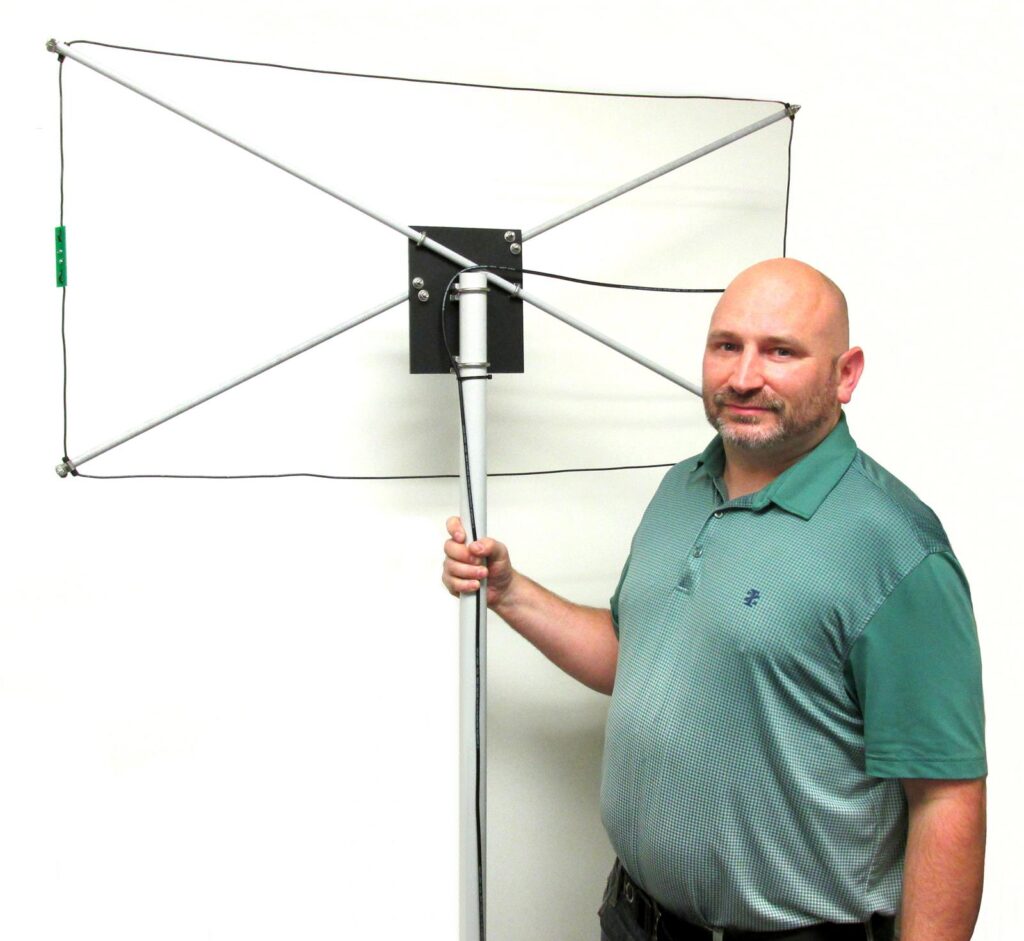
The DX Engineering NOISELOOP Portable Receive Flag Antenna Kit, based on a design by Don Kirk, WD8DSB, is an excellent tool for locating noise sources from 1.8 through 30 MHz. It may be used while walking or stationary with your portable HF receiver. (Image/DX Engineering) Fixing the Interference
Once we have successfully located the source of the interference, the next step is to try to cure it. In the case of power line noise, there is not much the contester can do besides enlist the help of the utility company. Do NOT try to climb the pole or use a sledgehammer on it. The best approach is to not touch the pole at all; there could be loose hardware which could pose a safety hazard. Record the pole’s identification number (most have some such marking) and its location. Contact your utility company with the information and give them as much information as you can about the pole and your efforts to locate the problem.
Experience varies greatly from region to region, but forming a helpful alliance is your goal. Courtesy and patience tend to work far better than angry threats and abusive behavior.
In the case of other types of interference, we have a few more options available. Once we have located the offending piece of gear, the most obvious option is to replace the device or just unplug it during contests. Usually this is not an option—especially if the device is part of the contest station or something that other members of the household need to use while you are in front of the radio. The number one cure used by most hams today is some form of common-mode choke, usually constructed from ferrite beads or toroidal cores. Ferrite beads and cores are now available in a large variety of physical configurations and ferrite mixes. A lot of research has been done in this area, and the consensus seems to be that the type “31” Mix is the most useful at HF frequencies.
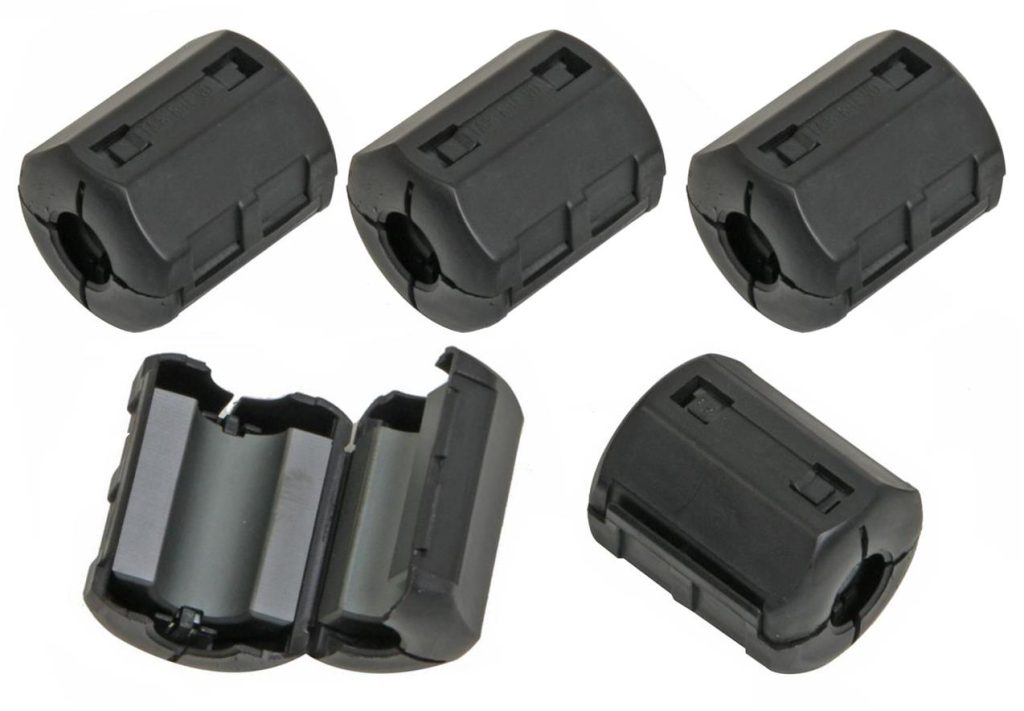
DX Engineering offers many RFI Suppression Kits. The above kit (DXE-CSB31-525-5) includes five Mix 31 snap-on ferrite beads. (Image/DX Engineering) Note that the effectiveness of common-mode chokes at specific frequencies is directly related to the number of cable turns which pass through the ferrite material. The information published by K9YC and W1HIS are required reading to gain an understanding of common-mode chokes and why they matter.
Common Sources
Here are some of the RFI sources I have found over the years:
- Telephone pole arcing insulator
- Telephone pole lightning arrestor
- Track lighting
- Battery charger
- Anything with a switching power supply
- Ethernet routers (especially above 10 MBPS)
- Computers

DX Engineering’s ISO-PLUS Ethernet RF Filters provide common-mode RF interference and EMI noise filtering of radio frequencies from well below 1 MHz to over 100 MHz with no effect on digital throughput. (Image/DX Engineering) 
(Image/DX Engineering) See you on the bands, and don’t forget to submit your log to the contest sponsor. It helps you, helps the sponsor, and helps the sport of contesting.
The post Contesting 101: Radio Frequency Interference and the Contest Station appeared first on OnAllBands.
OnAllBands
-
PJ2/K5SL – Curaçao
Randy, K5SL will be active from Curaçao (holiday-style) as PJ2/K5SL during September 18-26, 2026. QRV on 40-17m; CW only. Generally active in his mornings and late afternoons. QSL via H/c. This post appeared first on: DX-World Want to know more about it? Read More
-

APRS Connect: A Messaging-First APRS Client for Android, Free Over APRS-IS
The following is a message from APRS Connect:
APRS Connect is a new APRS client for Android, built around conversations rather than a packet console. It is free to install and use over APRS-IS. APRS Connect Pro, a subscription after a 7-day free trial, adds radio connections, offline map downloads, the radar layer, track export, extra beacon profiles and capture replay. An iOS version is in progress.
Most of what answers on APRS is a bot that expects exact wording. APRS Connect keeps a directory of 22 of them and gives each a guided screen instead of a command to memorize: WXBOT and WXNOW weather, the REPEAT repeater finder, WHO-IS lookup, the SMS, email, Winlink and WhatsApp gateways, the QRX missed-message mailbox, APSPOT and APRS2SOTA self-spotting, and ANSRVR group nets. The exact packet each button will send can be shown before it goes out, and you can always type a command by hand instead. #APRSThursday and other ANSRVR groups appear as a single net room rather than a thread per stranger, and APRS OTA ops can be hosted and chased from one screen.
Messages are kept as one thread per station, with delivery state on every message and automatic retries. All of this is in the free app.
With Pro, the app connects to KISS TNCs over Bluetooth Classic, Bluetooth LE, USB serial, or TCP, or to a radio’s speaker and mic through a built-in AFSK 1200 audio modem with VOX or wired PTT. Several links can run at once as named channels, alongside APRS-IS, and every received frame is tagged with the link that carried it.
The map is a vector basemap rendered on the phone. Every tile you view is cached and redraws with no connection; whole regions download ahead of a trip with Pro. Every frame heard is stored and decoded field by field in the packet log, which can be filtered and exported as a capture file.
More at https://aprsconnect.com, with what is free and what Pro adds at https://aprsconnect.com/docs/free-and-pro and the full feature list at https://aprsconnect.com/features. Google Play: https://aprsconnect.com/get/89x5bv.
Source: APRS Connect
Amateur Radio Daily