
By Alex Carter, CannedRocket / SSTV Signal Desk
An empty Slow Scan Television receive window does not tell you whether the problem is the signal, audio route or decoder. Before changing several settings at once, try recovering a known picture from an unchanged local recording. This is useful preparation for a receiving session, and does not require a radio.
The Robot 36 exercise at SSTV.org.uk provides a generated audio WAV and its reference card. The recording is mono, 48 kHz, 16-bit PCM and 38.315 seconds long, including the identification header and surrounding silence. The expected image is 320 by 240 pixels, with a circle, colour bars, grayscale and an R36 label. This is generated practice audio, not an ISS recording.
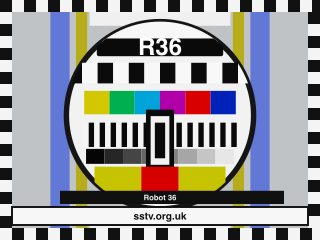
- Download the original WAV. Hearing it play in a browser does not mean the decoder is receiving that audio.
- Select a decoder’s supported file-input path and open the saved recording from the beginning. Include the mode-identification header, use normal playback speed and leave looping off.
- Let the complete frame finish, then compare recognisable features with the reference. An analog image need not have pixel-identical edges or colours.
- Keep the original audio with the saved picture, decoder version and input settings. That makes a later help request reproducible.
In SSTV Signal Desk on Mac, the retained demonstration uses Open Replay. The iPhone/iPad guide uses Open audio, then Open Audio File. File import and live microphone reception are separate paths. A successful file decode checks that recording and decoder path; it does not prove antenna, radio, microphone or weak-signal performance.
If audio is present but no frame starts, check the beginning of the recording and the SSTV signal category before increasing gain. If an edited file sounds slower or changes duration, check whether its sample-rate label was changed without actually resampling it. A properly converted 44.1 kHz file is different from 48 kHz samples merely relabelled as 44.1 kHz.
Once the known file works, add the live audio path one stage at a time and retain a recording when possible. For an ISS session, check a dated official ARISS announcement rather than treating an old tutorial as the current schedule.
The walkthrough and sample are at https://sstv.org.uk/receive/first-decode/. SSTV Lite and SSTV Signal Desk (Pro) are available for iPhone, iPad and Mac. Lite includes unlimited built-in practice; saving a complete imported image can use a free reception, so check its remaining allowance first.
Disclosure: CannedRocket develops the apps and publishes SSTV.org.uk. The linked Mac video is a retained SSTV Signal Desk 2.0 file-replay demonstration, not a new 2.0.4 device test or an on-air reception.
Source: SSTV.org.uk
Amateur Radio Daily