Category: News

  • E51RAR – Cook Islands

    Chris, WA7RAR will be active from Rarotonga, Cook Islands as E51RAR during April 12-22, 2027. QRV holiday-style on 20-10M, CW & SSB. He’ll be operating from a cottage located on the beach on the northern tip of the island as well as at least one POTA registered site nearby. Equipment will include a Yaesu FT-710 […]

    The post E51RAR – Cook Islands first appeared on DX-World. This post appeared first on:​ DX-World Want to know more about it? Read More

  • 9G – Ghana

    Nick, G3RWF plans to be active from Ghana during the CQWW CW contest (Nov 28-29). Callsign not yet known; it could be 9G5N or 9G5NH. QRV as SBLP (either 15 or 20m). Possibly some activity before the contest. QSL via LoTW.

    The post 9G – Ghana first appeared on DX-World. This post appeared first on:​ DX-World Want to know more about it? Read More

  • DX-WORLD Weekly Bulletin

    [#688] The latest FREE NON-SUBSCRIPTION DX-World Weekly Bulletin written by Bjorn ON9CFG is available to download. Click below to get the newest edition which this week runs to 18 pages. Previous bulletins can all be found here. Please contact Bjorn with any updates or errors. DOWNLOAD THE LATEST BULLETIN 

    The post DX-WORLD Weekly Bulletin first appeared on DX-World. This post appeared first on:​ DX-World Want to know more about it? Read More

  • Before a Station Becomes a Silent Key: Preserving the Knowledge Behind the Equipment

    Before a Station Becomes a Silent Key: Preserving the Knowledge Behind the Equipment

    Read More

    By Robert B. Davidheiser, Sr., Ph.D. (W5RBD)

    A radio station is more than a collection of equipment. Its operator knows which cable goes where, how the accessories work together, and what has changed over the years. Much of that knowledge may never have been written down.

    Signal & Legacy Services LLC helps amateur-radio operators document their stations while they are active and enjoying the hobby. The work includes identifying equipment, organizing a technical inventory, recording connections and operating context, and keeping that information useful as a station changes.

    When an operator becomes a Silent Key, that documentation can help family members and executors understand what is present and make informed decisions about the next steps. It also provides a starting point for conversations with their own advisers.

    The practical message for operators is simple: start with an equipment list, label important connections, photograph the station, and tell a trusted family member where the records are kept. Review those records when equipment is added, replaced, or removed.

    Signal & Legacy provides paid technical advisory and station-documentation services. It does not buy, sell, or broker equipment. Information about the service is available at https://www.signalandlegacy.com/.

    Submitted by Robert B. Davidheiser, Sr., Ph.D., W5RBD
    Signal & Legacy Services LLC
    Contact: robert@signalandlegacy.com

    Source: Signal & Legacy Services

    ​ Amateur Radio Daily

  • AIRA to Host Virtual Seminar on the Role of Amateur Radio in Civil Protection

    AIRA to Host Virtual Seminar on the Role of Amateur Radio in Civil Protection

    Read More

    The International Amateur Radio Association (AIRA) has announced its second technical event, focusing on the intersection of amateur radio and emergency response. The special event, titled “Emergency Communications: The Role of Amateur Radio in Civil Protection,” is scheduled to take place virtually on Friday, November 20, 2026, from 9:00 PM to 10:30 PM.

    The session will feature guest speaker João Paulo Saraiva (CT1EBZ), representing APROSOC (Civil Protection Association). The presentation aims to highlight how radio operators and emergency response teams can collaborate effectively, underscoring the event’s theme: “Amateur Radio and Civil Protection: A partnership at the service of society!”

    Organizers emphasize that the gathering is designed to promote knowledge sharing, discussion, and cooperation among participants.

    Event Details & Access

    • Date & Time: Friday, November 20, 2026 | 21:00 – 22:30
    • Platform: Microsoft Teams
    • Meeting ID: 931 138 424 803 2
    • Passcode: m89Ff6
    • Organizer: AIRA

    Members of the amateur radio community and the general public interested in emergency communications are invited to join the session.

    Source: AIRA

    ​ Amateur Radio Daily

  • PJ6/DL8DYL & PJ6/DL9DRA – Saba

    QRV since yesterday (November 10th), Irina DL8DYL and Ralf DL9DRA are active from Saba as PJ6/homecalls. Activity has been on 40-30-20-17m CW. Length of stay is unknown. QSL via homecalls/buro. 

    The post PJ6/DL8DYL & PJ6/DL9DRA – Saba first appeared on DX-World. This post appeared first on:​ DX-World Want to know more about it? Read More

  • Bark + SDR: Phone Pushes for Satellite Recordings, Repeater Traffic, WSJT-X Decodes and Long Recordings

    Bark + SDR: Phone Pushes for Satellite Recordings, Repeater Traffic, WSJT-X Decodes and Long Recordings

    Read More

    The following is a message from BG7BAG Radio:

    BG7BAG Radio has published four short, free how-tos that use an iPhone push app called Bark to tell an SDR operator when something worth hearing has happened, without sitting at the computer.

    Each how-to includes a small Python script, on the operator’s own recording computer, that pushes through a relay the reader deploys to their own Cloudflare account. The scripts are published on GitHub, and the articles are in English with a Chinese version below.

    They build on an earlier Bark relay setup:
    https://bg7bag.com/one-app-two-websites-instant-ham-radio-reminders/

    Source: BG7BAG Radio

    ​ Amateur Radio Daily

  • ON4UN Low Band’s DX Challenge?

    Sometimes AI has its place! Six years ago a post was published on DX-World Facebook page mentioning that John’s, ON4UN (sk) legacy should be honoured. Many comments appeared in support of this in 2020, and more have been evident today since we re-published the original post. However, during these intervening years there is still no […]

    The post ON4UN Low Band’s DX Challenge? first appeared on DX-World. This post appeared first on:​ DX-World Want to know more about it? Read More

  • 6W/IV3FSG – Senegal

    [NEWS] – Previously active in September/October 2023, Elvira IV3FSG is again QRV from Senegal (this activity comes after the recent Italian DX Team DXpedition – 6W/I2YSB & 6W/IK2HKT). Her activity has been limited to 10 & 12m. Previous news below.  [SEPTEMBER 21] – Elvira, IV3FSG will again be active from Thies, Senegal as 6W/IV3FSG during […]

    The post 6W/IV3FSG – Senegal first appeared on DX-World. This post appeared first on:​ DX-World Want to know more about it? Read More

  • Before the Next SSTV Pass, try one Known Recording

    Before the Next SSTV Pass, try one Known Recording

    Read More

    By Alex Carter, CannedRocket / SSTV Signal Desk

    An empty Slow Scan Television receive window does not tell you whether the problem is the signal, audio route or decoder. Before changing several settings at once, try recovering a known picture from an unchanged local recording. This is useful preparation for a receiving session, and does not require a radio.

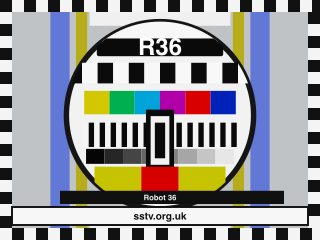
    The Robot 36 exercise at SSTV.org.uk provides a generated audio WAV and its reference card. The recording is mono, 48 kHz, 16-bit PCM and 38.315 seconds long, including the identification header and surrounding silence. The expected image is 320 by 240 pixels, with a circle, colour bars, grayscale and an R36 label. This is generated practice audio, not an ISS recording.

    1. Download the original WAV. Hearing it play in a browser does not mean the decoder is receiving that audio.
    2. Select a decoder’s supported file-input path and open the saved recording from the beginning. Include the mode-identification header, use normal playback speed and leave looping off.
    3. Let the complete frame finish, then compare recognisable features with the reference. An analog image need not have pixel-identical edges or colours.
    4. Keep the original audio with the saved picture, decoder version and input settings. That makes a later help request reproducible.

    In SSTV Signal Desk on Mac, the retained demonstration uses Open Replay. The iPhone/iPad guide uses Open audio, then Open Audio File. File import and live microphone reception are separate paths. A successful file decode checks that recording and decoder path; it does not prove antenna, radio, microphone or weak-signal performance.

    If audio is present but no frame starts, check the beginning of the recording and the SSTV signal category before increasing gain. If an edited file sounds slower or changes duration, check whether its sample-rate label was changed without actually resampling it. A properly converted 44.1 kHz file is different from 48 kHz samples merely relabelled as 44.1 kHz.

    Once the known file works, add the live audio path one stage at a time and retain a recording when possible. For an ISS session, check a dated official ARISS announcement rather than treating an old tutorial as the current schedule.

    The walkthrough and sample are at https://sstv.org.uk/receive/first-decode/. SSTV Lite and SSTV Signal Desk (Pro) are available for iPhone, iPad and Mac. Lite includes unlimited built-in practice; saving a complete imported image can use a free reception, so check its remaining allowance first.

    Disclosure: CannedRocket develops the apps and publishes SSTV.org.uk. The linked Mac video is a retained SSTV Signal Desk 2.0 file-replay demonstration, not a new 2.0.4 device test or an on-air reception.

    Source: SSTV.org.uk

    ​ Amateur Radio Daily