
1. QRV: Are You Ready?
I had no idea AllStar was going to figure so prominently in my radio week. The firewall for my node 588416 on 44Net was important to get done. Building an AllStar node and adding DVSwitch Server and an AMBE stick was on my long-standing to-do list, and I’m pretty pleased with the result.
Then I enabled audio prompts on my AllStar node 578494…but they didn’t work. When I investigated, I found a few gotchas you should be aware of if you’re going to do this. The audio prompts and DTMF commands add usability to an AllStar node.
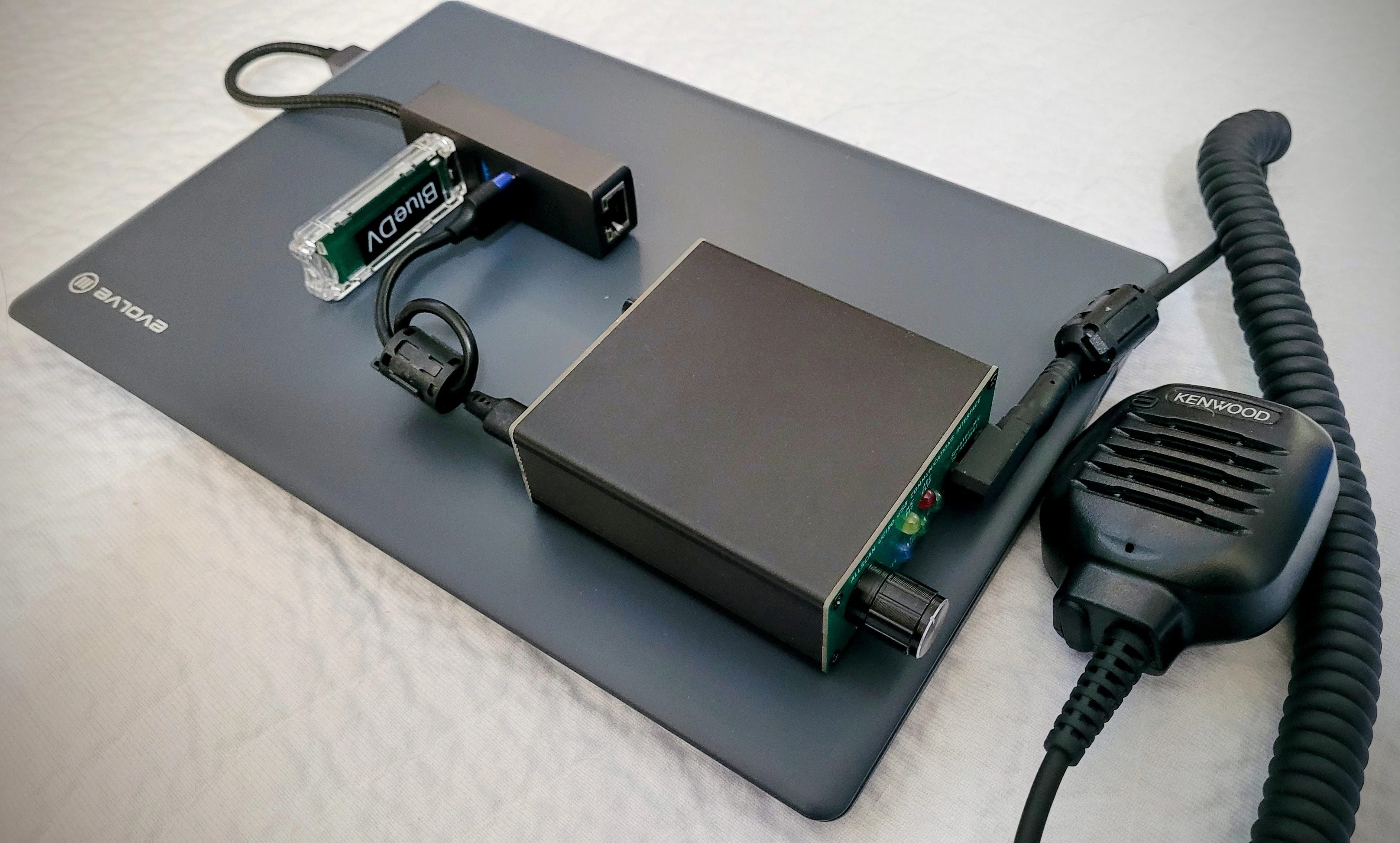
While working with node 578494, the node authentication check threw scary-looking errors at me, so I wrote up what they all mean.
While I was fiddling with the audio prompts, I thought I might as well install my click-three-times shutdown script on the node. But I found that my published directions were not as clear as they could be, so I updated that information on GitHub.
I modified my node information page on GitHub that I described last week three times. I added a status indicator, made the starter pages easier to implement, and then made a front door for the pages. All of this is free to do on GitHub.

2. Thank You
I’m sending a big Random Wire/EtherHam thank you to Brian and Mike for their support. It helps a great deal and I appreciate it.
Random Wire and EtherHam.com will stay free for readers, but running them still costs money. The Random Wire newsletter now reaches more than 2,400 subscribers, up about a third in the past year, and drew 161,000 views over that time. These subscribers are engaged, technically minded amateur radio operators who build, test, and buy gear. If you’d like to support this work, email me at tsalzer@pm.me or visit the Support page.
3. New on EtherHam
3.1 Your Firewall Reflects the Moment You Built Your System
This is the third article about putting AllStar node 588416 on 44Net, and it may not be the last. If the series is a tent, Part 1 put it up: the hardware, the tunnel, the certificate, and the remote administration. Part 2 was the first anchor, two one-line router fixes. This article is the second anchor: the firewall, and the logging that shows you what it’s doing.
The big takeaway: if your system has changed since you set up its firewall, the firewall probably hasn’t kept up, and it’s time to review it.
I proved that to myself again last night. While preparing for the next step, I found two leftover rules for a SIP phone that is no longer connected. The rules didn’t do what I thought they did, so I deleted them.
Today, I’m adding a second protective layer in front of the node’s own Uncomplicated Firewall (UFW). The MikroTik router will get an allowlist, so new connections arriving over the 44Net tunnel reach node 588416 only on the ports it actually serves. Everything else gets dropped at the router, before UFW ever sees it. If I write that up, it will become Part 4.
3.2 Reviving an Evolve III as an AllStarLink/DVSwitch Hub
I went looking for my old Winlink-in-a-box station, contained in a heavy-duty Pelican briefcase. When I opened the case, I found an old Evolve III laptop hiding in a document slot. This was a hot item several years ago and I remember picking one up to experiment with. What I didn’t remember was where I had stashed it. And then I recalled something from my ham radio to-do list: install DVSwitch Server and document not only how to install and configure it, but how to control it. I did that on the Evolve laptop. This is that story.
3.3 Don’t Panic: Reading The AllStarLink Node Authentication Check
Ever have that feeling like the bottom is falling out of your stomach when you see an AllStar error message? If so, this article is for you. AllStarLink 3 includes a handy tool, asl-node-auth-check, that tells you whether your node is registered and whether other nodes can reach it. It’s genuinely useful, but its report is full of “Error” and “Warning” lines, and many of those scary messages aren’t problems at all. On my own node, it flagged five errors in one afternoon, even though the node was working. Some of those pointed to things worth fixing. Others were false alarms, and one was AllStarLink’s own server telling me to slow down.
This new EtherHam article sorts every message the tool can print into three groups: normal, “the check couldn’t run,” and real problems worth fixing, with what to do about each. It also shows the three lines to look for first, and how to see exactly what address and port AllStarLink gives other nodes when they look you up. It starts at 10,000 feet over Indonesia, with a warning light and a pilot who wasn’t worried. Read it here: Don’t Panic: Reading The AllStarLink Node Authentication Check.
3.4 Teaching My AllStar Node to Say Its Own IP Address

I have written a lot about AllStarLink over the past year, and it turns out I can lose track of my own work. I went looking on EtherHam for the post where I explained how to make a node announce its IP address at boot. It isn’t there. It was a single sentence in Random Wire 145, back in August 2025, and the DTMF commands behind it were in Random Wire 142. Both track back to a post David Gleason NR9V wrote in April 2025 in his AllScan AllStar App & Nodes group on Facebook.
But information on Facebook can be hard to find, so I documented all of the steps in this article, personally tested on my own AllStar node 578494. This content is based on David’s great work and his AllScan app. Read it at Teaching My AllStar Node to Say Its Own IP Address.
3.5 Weekly Report
Another jam-packed weekly report for your consumption. What a wonderful time to be involved in amateur radio. There is activity in all aspects of our great hobby. The weekly report captures some of the items, but there is far more activity than I can possibly report here.
4. Shutdown Script: Tested Again, Instructions Updated
I installed my three-key-up shutdown script on another AllStar node this week: node 578494, the Evolve III laptop from the article above.
Three key-ups, a “goodbye,” and a clean power-down. The script worked as written, but the install instructions on GitHub had a few rough spots, including a reboot step buried mid-sentence where it was easy to miss. I’ve rewritten the install section as explicit, numbered steps with the commands spelled out, added a hand test you can run before turning on the service, and expanded the troubleshooting notes. The updated instructions are at github.com/EtherHamRadio/asl-shutdown-monitor.
5. A Free Front Door for KJ7T Nodes
I have to laugh at myself, because after I published AllStar Node Info Pages: A Step-by-Step Guide, I added a postscript. Then I added a second postscript. And finally, an update. Technically, that’s a postscript, a postscript to the postscript, and a postscript to the postscript to the postscript. Whew!
Here’s the shorthand version: I posted the article, then added a live status indicator for a node, then realized I could make the starter script easier to implement. Finally, I saw I needed a front door for my individual node pages so I built that, too.
Let me start with the latest postscript, the one I called an update. In that addition, I finally gave my AllStar node pages a home page. Up until now, kj7t.github.io/588416, /578494, /578493, and /588418 each stood alone. I had built some documentation but provided no top-level home for the information. This week I built a proper landing page at the root (https://kj7t.github.io/), with a personal introduction and a directory tying all four nodes together, plus some information about my HF, mobile, and APRS setups. This is a small project, but it’s the kind of thing that turns a pile of pages into an actual site. It was also rather enjoyable to put this information into one space.
The first postscript
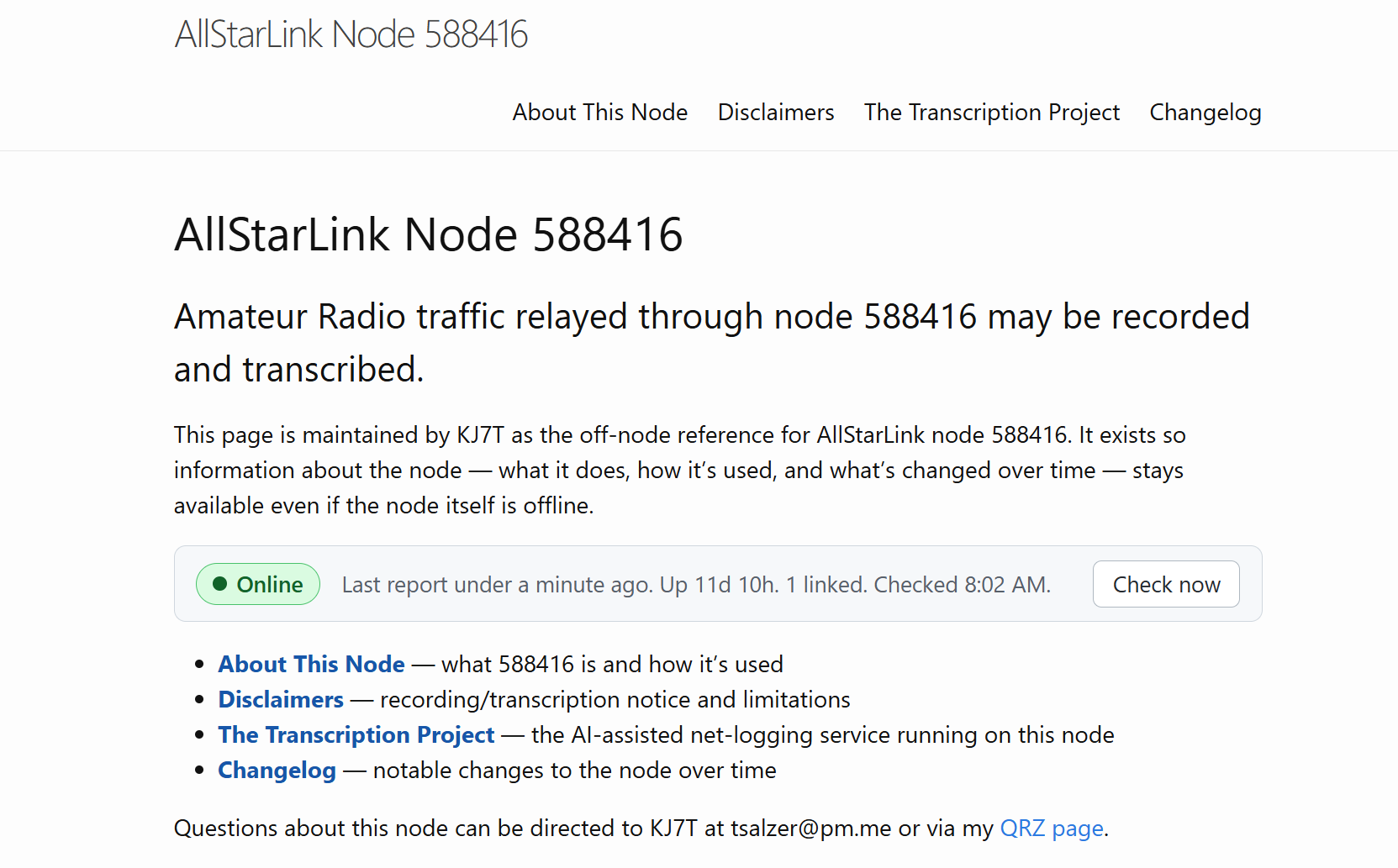
Next is the very first postscript. After publishing AllStar Node Info Pages: A Step-by-Step Guide, I wondered if there was a way to show a live status indicator for the node on the node’s GitHub page. Why yes, yes there was. Details are at the end of the Guide and the download has been updated to include this information.
It looks good — simple, but informative:
The second postscript
I used my “starter kit” template for a new page for node 578494…and found using it to be painful. Entering the same information, over and over, is a process that guarantees errors, and I made plenty. I decided right then: I need to find a better way.
So I rebuilt it. Now, you enter some key information in only two places: the .yaml file and in the index.md file. Those entries are carried into all the other pages. Much simpler. A new and improved starter kit (version 1.2) with updated instructions is now uploaded to the AllStar Node Info Pages: A Step-by-Step Guide article.
GitHub is free, and I find that free is often pretty attractive to radio amateurs. It’s not fancy, but it works. My new content hasn’t been “up” long enough to get indexed by search engines, but it’s on GitHub, so I know it will.
So that is the story of having an idea, improving it, improving it again, and finally giving all the individual node pages a single front door to this house of information.
6. AllScan Favorites Fix
I ran into something unexpected this week while copying an AllScan favorites file from one AllStar node to another. AllScan (from AllScan.info) makes it easy to build and manage a list of favorite nodes, and I’d built up a good list on my node 588418 that I wanted to put on node 578494. Simple enough: download the favorites file from 588418, upload it to 578494.
That worked fine, right up until I tried to add a new favorite on 578494. Nothing happened. The entry never showed up in the list.
AllScan really was saving my change. I could see it in the file on disk. What I hadn’t understood is how a favorites file is organized. It has a [general] stanza, whose entries appear on every node, and it can also have a stanza named for a specific node number, whose entries appear only on that node. My file had [general] plus a [588418] stanza, and [588418] held most of the favorites I actually cared about. On node 578494, AllScan looks for [general] and [578494]. It has no reason to show a stanza named for some other node, so while those favorites were present, they were effectively invisible. On top of that, AllScan adds a new favorite right after the last entry in the file, which dropped everything I added into the very stanza 578494 wouldn’t display. Saved, but hidden. From the browser it looks exactly like a file permissions or ownership problem, and that’s where I spent a good while looking.
The actual fix was one line: rename the [588418] stanza to [578494]. Everything appeared at once, and adding favorites has worked normally since.
So that I don’t have to think about it again, I wrote a small Python script that takes a downloaded favorites file and folds any node-specific stanza into [general], skipping entries that are already there. The result works on any node with no editing. It can also rename the stanza to a different node number, or strip it out entirely, depending on what you want. Eventually I’d like to extend it to merge favorites files from several nodes into one master list I can import everywhere.
This isn’t a flaw in AllScan. What I was doing is probably an edge case that the vast majority of AllScan users won’t do. Those per-node stanzas exist so one favorites file can serve several nodes, which is a sensible design. It’s the download-from-one-node, upload-to-another path that didn’t go quite right for me. I’ve passed the details along to David Gleason NR9V, AllScan’s author. AllScan is a great bit of helpful software and I install it — and will continue to install it — on my AllStar nodes.
7. 44Net Getting Some Press
-
John Burwell KI5QKX was on the Late Shift on September 18th talking about 44Net Connect. You can catch the show at https://www.youtube.com/live/qKnC682SJuw or view it below:
-
44Net was featured in Japan’s FB News! The first part of this three-part series describes 44Net’s history and how to get started using the network. You can read the article here: https://www.fbnews.jp/202608/special/.
-
ARDC showed off 44Net Connect at JARL Ham Fair 2026 in Tokyo. In its September 4 recap of JARL’s centennial Ham Fair, ARDC says visitors at its booth saw 44Net Connect running live. Tom Mabuchi JF3LGC, ARDC’s 44Net Regional Coordinator for Japan, translated and helped run the demos. The recap is at https://www.ardc.net/highlights-from-jarl-ham-fair-2026/.
-
Software updates this month. 44Net Connect also got a few maintenance updates this month (September 6, 8, and 18), mostly behind-the-scenes fixes. The last big release was 1.1.0 in July. The changelog has the details.
8. Radios and Gadgets
Icom IC-7110 radio
Need and want are interesting things: while I don’t need a full-duplex, all-band, all-mode radio, I want one. And Icom is set to deliver it:
IC-7110, an HF/VHF/UHF all mode transceiver featuring a 4.3-inch color touchscreen, real-time spectrum scope, and comprehensive D-STAR functionality.
That comes straight from the Icom website (hit the link to see a promotional photo of the radio), except the full-duplex behavior was surfaced by the Ham Radio Workbench crew in HRWB 271. No word on cost, but my observation has been that prices from all major suppliers have been rising, so we can expect some sticker shock when the IC-7110 price is announced.
No matter the price, it looks like a great radio. Having full duplex available makes this a natural for working satellites.
FX-4CR Transceiver
FX-4CR is currently SOLD OUT! proclaims the headline at https://bg2fx.com/fx-4cr-transceiver-so. I don’t see a provision for a waiting list. If you are thinking about this great little radio, you’ll need to monitor the website, or consider joining the FX-4CR HF SDR Transceiver User Group on Facebook to catch informational updates. This is another radio on my want (not need) list.
9. Net Transcription
As I continue to experiment with net logging, I captured the weekly M17 net on Saturday, September 19. I thought it would not be a successful test because the M17 audio I was hearing sounded choppy when I monitored the signal. I was surprised that the transcription actually turned out well.
I pasted the full transcript into ChatGPT and asked for a summary. I find that it accurately reflects what I heard during the net:
The weekly M17 Net covered recent developments in the M17 open-source digital voice and data project. Major news included experimental M17 transmission on an unmodified Retevis C62 using OpenRTX, progress on the LinuxHT board, and upcoming firmware releases 0.4.5 and 0.5. Discussion also covered hardware versus software vocoders, DVSwitch, CC1200 Raspberry Pi boards, and National Traffic System training. No formal NTS traffic was passed.
The paragraph was derived from this pathway:
-
M17 over the M17-KCW reflector, which also carries the net onto the Kansas City Wide system;
-
my USRP2M17 implementation, connected to my AllStar node 588416;
-
on 588416, the transcription system captured audio files in .wav format;
-
the .wav files were then transcribed on the node itself by OpenAI’s open-source Whisper speech-recognition model (via faster-whisper, running locally on the node’s CPU — no cloud service, no per-minute fees);
-
then call sign matching was done using regular expressions (no AI);
-
production of the transcript;
-
final summary produced by feeding the transcript to ChatGPT.
Here are the first few minutes of the net, as created by the transcription system:
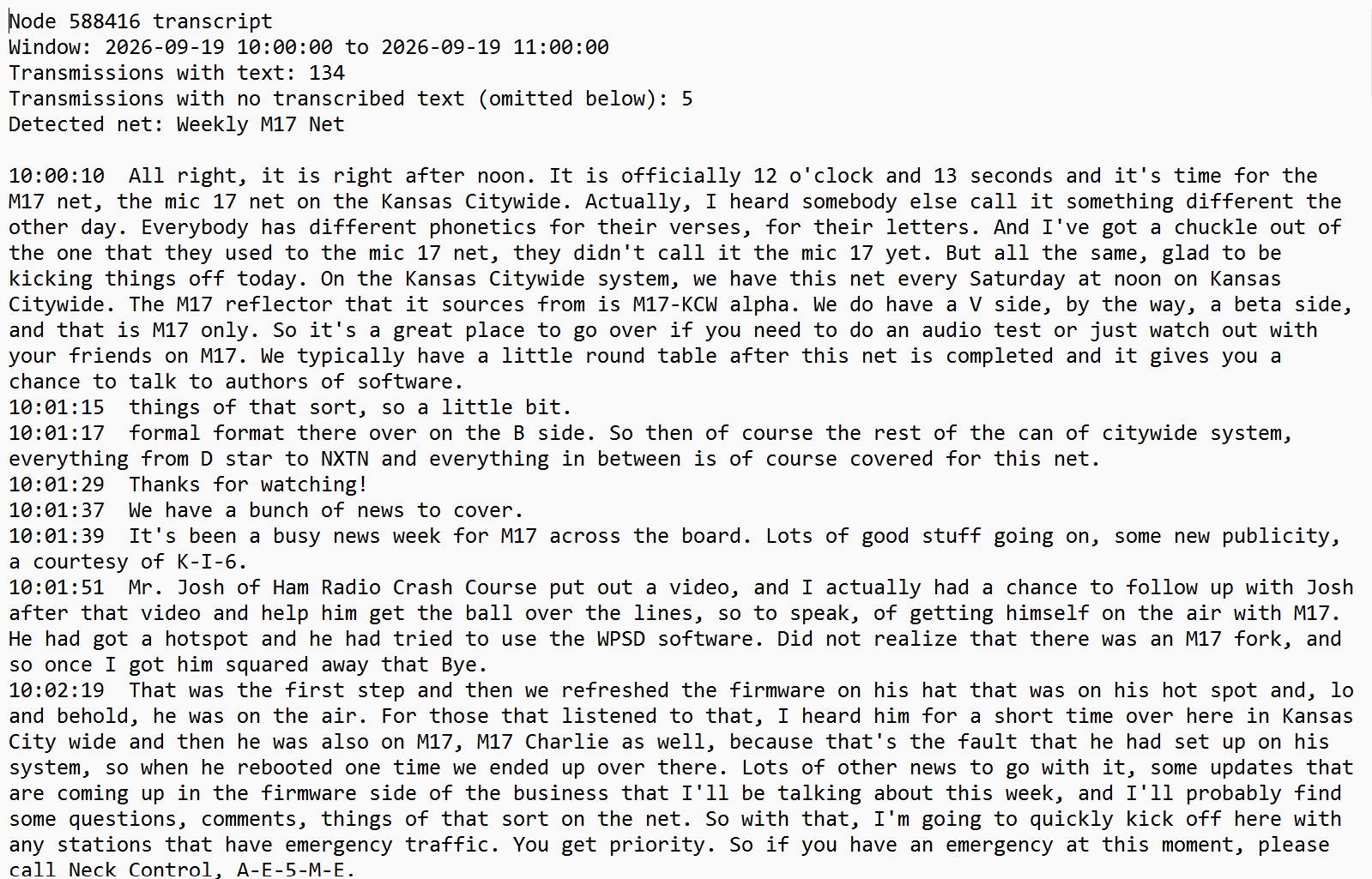
Notice there are some errors in the transcription (for example, “Kansas City Wide” was transcribed as “Kansas Citywide”, NXDN captured as NXTN, and “Neck Control” instead of “Net Control”), but all of these are decipherable without additional AI help.
Then I took one more step, which is optional and not automatic: I pasted the text transcript of the entire net into ChatGPT and asked for a summary. That summary is what’s quoted above.
What pleases me most is the balance between AI use and accuracy. The only AI in the automated pipeline is Whisper, running locally on the node. As you can see in the raw text above, the transcript is usable on its own, without the extra processing performed by ChatGPT.
I have to say that Jeff AE5ME runs a fabulous net: clear, clean, well structured, plenty of pauses for other stations, and something I rarely encounter: room allowed for emergency traffic. Kudos to Jeff!
10. Driving with Claude
Last Sunday, I made a day trip to Portland, about a three-hour drive on state and federal highways. On the way, I did something I thought I would never do: I talked with Claude (hands-free, voice mode) through the app on my phone while I drove.
I left the lake house at 5:00 am Pacific time — still dark, with little traffic and only a few deer wandering about. This is the time of day when I like to think. It’s a creative period of the day for me, and it’s often when I do my best thinking about writing.
10.1 Packet radio: AX.25 vs. FX.25
I started the conversation wanting to learn more about the differences between AX.25 and FX.25. Before the conversation, I knew a little bit about AX.25, but I knew next to nothing about FX.25.
AX.25 packets are validated by CRC (Cyclic Redundancy Check) and simply discarded on error, with no retransmission request on one-way links. FX.25, on the other hand, wraps AX.25 packets in a forward error correction layer. FX.25 works alongside existing AX.25 gear since a standard AX.25 receiver can still decode an FX.25 signal. Direwolf natively supports FX.25. It particularly helps satellite links at low elevations where signal quality suffers.
FX.25 is really an RF error rate solution. For an internet-based packet system running over TCP, TCP already handles error correction and retransmission, so you wouldn’t gain anything by trying to use FX.25 in that path. It would only earn its keep if the packets ever moved over-the-air.
10.2 M17 packet mode and the data channel angle
Then I pivoted the FX.25 discussion to M17. M17 has two modes: stream mode, which offers one continuous 3200 bits-per-second channel of encoded speech or data, or two 1600 bits-per-second channels carrying speech and data simultaneously; and packet mode, for discrete data transfer.
M17 packet mode is interesting to me. It already supports text messaging, APRS, AX.25, 6LoWPAN (IPv6 over Low-Power Wireless Personal Area Networks), Winlink, and raw data. The M17 spec defines all of these, and pyM17 looks like a possible starting point, so I parked this as a future Python exploration idea.
10.3 Winlink’s threading gap
Then I jumped from M17 to Winlink, where I think there is also some potential for two-way packet communications. Winlink has a store-and-forward bulletin system that functions as a one-way broadcast…a one-to-many system. If there was a way to intake replies to bulletins and show them in context — threaded — you would have a two-way Winlink-based BBS.
What I really like about this idea is Winlink is well established within the amateur radio community, both as a system and by reputation. That provides the potential for better adoption if a positive change could be implemented. Layering a many-to-many system on top of the existing one-to-many broadcast capability might add value. I’m thinking of this as a modernized BBS system built on the Winlink framework.
To be clear, this is just me thinking about possibilities. These aren’t proposals, just ideas.
10.4 APRS Chat, ANSRVR, and “next generation packet BBS”
As the Winlink thread was percolating in my mind, it triggered some thoughts about APRS Chat, APRS Connect, and the ANSRVR group-messaging server that powers #APRSThursday via CQ and join commands. As I talked with Claude, I recognized that the command style used by ANSRVR actually resembles classic BBS commands. That took me to the idea of an APRS-based (which is packet radio, after all) BBS. ANSRVR seems slightly more modern than old-school packet, and as #APRSThursday has shown, can be robust for wide-area communications.
10.5 Debian on phone for portable node?
And then I went to a new place, at least for me: the idea of installing Debian, AllStar, and DVSwitch on a phone to create a truly compact multi-mode node.
A phone-based build would need root access, an unlocked bootloader, and either a proper chroot or a full Linux install, none of which is guaranteed across phone models. It would also still need external USB audio hardware (the UCI90, the hub, the DV stick) riding alongside the phone, so the actual size and weight savings over using a small laptop becomes insignificant.
However, with the advent of all-in-one apps like QSO One that handle all of these modes in software, a compact hardware solution is probably a moot point.
10.6 Wrap-up
Well there you have it. That represents about an hour of talking with Claude while I was driving. That was an enjoyable way to burn up about 60 miles of highway, thinking about amateur radio and conceptually exploring some of the little sparks flitting around in my mind. I think this time was well spent, so I plan to do it again.
How about you? Do you ever go driving with Claude?
11. QRT: End Transmission
11.1 Net news
Heard on September 23rd on the morning Coffee Break Net on the W6EK repeater (AllStar node 51018): a schedule change. If I caught it correctly, the Coffee Break Net will move to 9:00 am Pacific time beginning October 1. This net is sponsored by the Sierra Foothills Amateur Radio Club.
11.2 Radio in the garage
I have a VHF APRS iGate/digipeater in the garage, along with a LoRa APRS iGate/digi. But what about FM broadcast radio? At the lake house, Dad used to have a small AM/FM receiver out in the garage, along with a few beat up speakers. I’m pretty sure he sourced those items a long time ago at a local Radio Shack store. His old twin-lead FM antenna is still tacked to the wall, but the rest of that setup is long gone.
In his memory, I purchased a low-cost FM receiver/amplifier and a pair of speakers to mount in the garage. The cheap radio only has a small telescoping aerial, so I attached about five feet of insulated wire to it to make a more-or-less half-wave FM antenna. It works fine. Dad would be happy about it, and it will remind my family members of him. It’s also a reminder to me that radio, in some form, touches all of us, in some way.
11.3 Notation Polish Reverse used you have?
I have a calculator nobody around me wants to touch, because it is a complete mystery to them. It’s a Hewlett Packard HP-15C, still going strong, built like a tank, and utterly indecipherable to the uninitiated. You see, it uses RPN logic: reverse polish notation. The best explanation might not be from XKCD but it’s my favorite, where RPN is presented in the guise of RPS: Reverse Polish Sausage. (I’m a big fan of the ultra-nerdy XKCD humor.)
I love that calculator. I love it so much, in fact, that I also have the financial version, the 12C. Both are still going strong after all these years. More importantly, each one brings a smile to my face when I pick it up. I can’t explain why. It’s like a favorite radio, I guess. I just like how it feels and functions.
11.4 Update on the book manuscript
My conservation book manuscript is at the publishing house. They tell me it will be about 330 pages in paperback. That’s a bit more than I expected. The manuscript still needs professional editing. We’ve finalized the title and settled on a conceptual cover design. I’m expecting publication by spring 2027, but my fingers and toes are also crossed for luck! I’ll share more as publication gets closer.
11.5 More Likely Than Lightning: What My Bitaxe’s Best Share Really Means
My Bitaxe’s best-ever share looked impressive until I did the math. It’s still 4,400 times short of a block, but a block win is more likely than getting struck by lightning. Read: More Likely Than Lightning on EtherHam.
With that, I’ll say 73. My best wishes to all. Remember to touch a radio every day!