1. QRV: Are You Ready?
I was certainly not ready for another vulnerability to surface this week, and this one reached almost every Linux-based radio node I own.
If PHP2Shell was a stranger rattling the front door of any node whose dashboard faced the internet, the apt flaw was quieter and stranger…more like someone swapping the groceries in the delivery truck after you’d already checked the receipt. That’s harder to pull off because the crook has to be riding along in your internet traffic. But when it happens, it strikes the delivery service every node depends on.
The good news is that the fix shipped the same day. The bad news is that “install the fix” turned into a routine on every node: check which Debian it runs, look up the right apt version, install it, confirm it took, and sometimes check again. Multiply that by every node I own, plus the time spent remembering how to log in to each one, and there went my Wednesday morning, just as I was sitting down to write this newsletter.
However, there was a lovely silver lining to this cloud: I learned more about using PowerShell shortcuts for SSH’ing to my nodes. Now, instead of using PuTTY, I can open a PowerShell window and just type:
ssh 588418That saves me a ton of time and aggravation.
I’m also finding that running my asl-node-check script is easier than typing sudo apt update && sudo apt upgrade, plus it gives me a more thorough report. For example, my AllStar node 588418 looks reassuringly healthy:
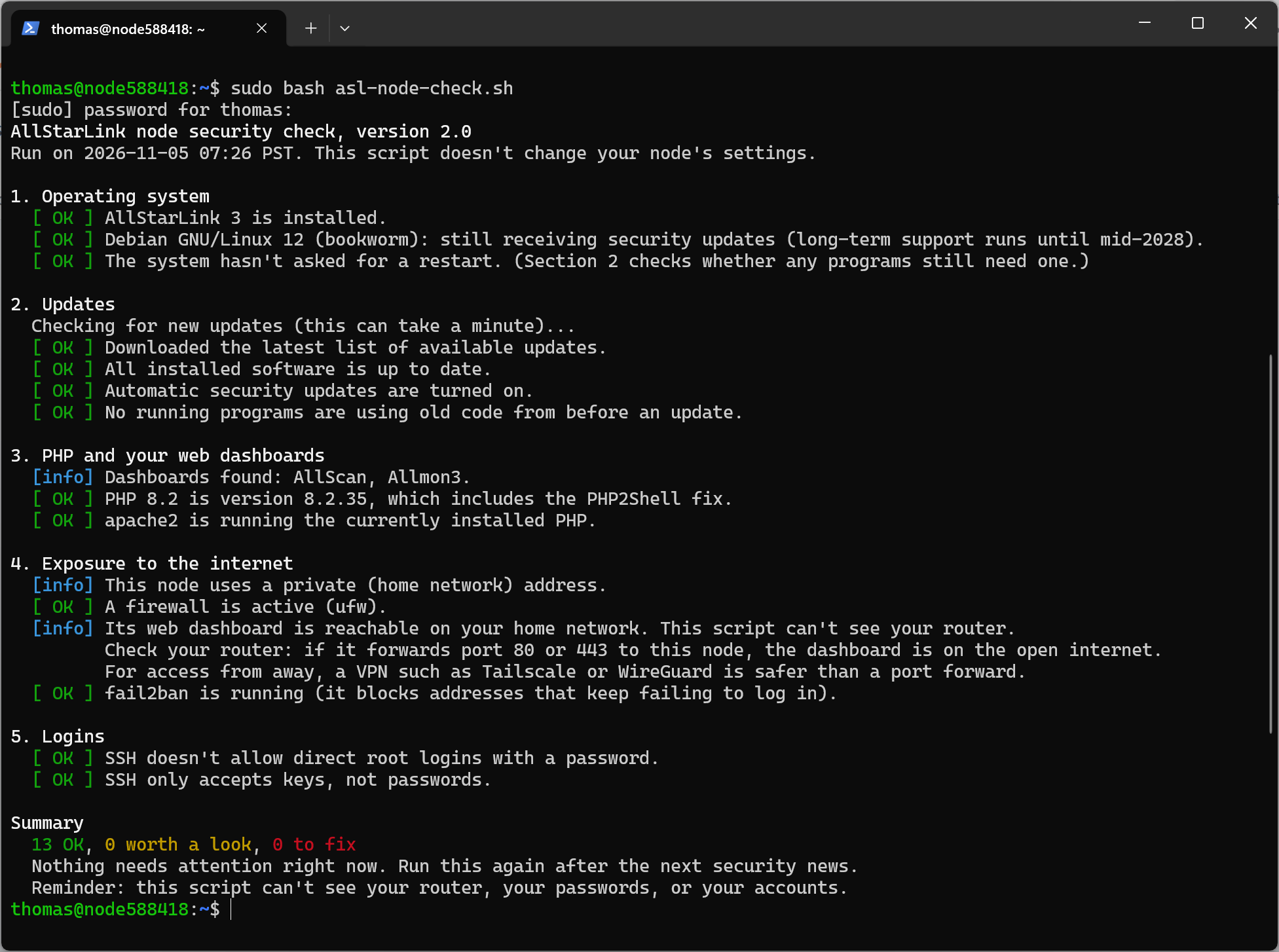
Partway through my morning spent updating apt, I had one of those forehead-slapping moments: I remembered that my Proxmox server is actually a Linux box…and every container on it also runs Linux. The host machine needed its own fix and a reboot. One command patched eight of the containers at once, but the ninth runs Ubuntu, which hadn’t shipped its fix yet, so that one is still waiting with a temporary workaround in place.
If I sound a wee bit frustrated, it’s because I really wanted to focus more time and energy on radio topics this week, but instead much of my writing time turned into multiple security-focused sessions instead. Necessary, but this isn’t always my happy place. Fortunately, there are some radio-related items in the Gear section below, so feel free to skip ahead if you wish.

2. Thank You!

My sincere thanks to Chuck and two other readers for the coffees. It has been a very enjoyable couple of weeks, helping folks solve some problems. Helping someone, and then getting a very nice thank you for it, makes it worth it. The coffees are, of course, icing on the cake and also much appreciated.
3. QST: News and Notices
3.1 Critical Node-RED Flaw Exploited in Attacks
Quite a few radio amateurs I know use Node-RED in their ham shack. And I know my harping on network security these past few weeks might have come across as computing instead of radio. But here we are — real attacks on Node-RED systems. SecurityWeek reports that “the attacks show that threat actors are actively scanning for Node-RED instances without adminAuth and exploiting them automatically with a single HTTP request.”
“If you run Node-RED anywhere…check whether it can be reached from outside your network today…,” VulnCheck notes.
Read it on the SecurityWeek website: Critical Node-RED Flaw Exploited in Attacks
3.2 Node Check Update (Versions 1.8 to 2.1)
I ran my AllStarLink node security check on a second node this week, an old x86 laptop running Debian 13, and caught a small stumble in my own advice. When automatic security updates were off, the script told you to run two commands. On that laptop, the first command (installing unattended-upgrades) turned automatic updates on by itself, so in version 1.6 I cut the advice down to one command. Then testing on fresh Debian 12 and 13 nodes showed that installing the package doesn’t always switch automatic updates on, so version 1.8 gives both commands again, in order, and tells you to run the check again to confirm. If you haven’t tried the script on your node yet, this is a good excuse. It takes about a minute and doesn’t change anything on its own.
And then…I upgraded the script. Until now it only reported problems and told you what to type, and typing long commands on a phone turns out to be where some people got stuck. Version 2.0 ends by offering to download a small companion script that installs the updates, restarts what needs restarting, and asks before every step. Every question defaults to no, and the check still changes nothing unless you say yes.
And later, I realized the prompts provided in the script no longer aligned with the optional “fix it for me” steps offered, so version 2.1 corrects that. Version 2.1 only changes wording. The report now mentions the update script wherever it can help, and tells you that nothing on your node changes unless you answer yes at the end.
The walkthrough and the one-line download are on EtherHam.
4. New on EtherHam
4.1 Holes in the Cheese

Every device on your home network is a slice of Swiss cheese. Each one has a few holes, and trouble gets through when the holes line up. My new EtherHam article talks you through how to find the old tech in your house and shack, check whether it still gets security updates, and decide whether to update it, replace it, fence it in, or put it on the museum shelf. Along the way I isolate an end-of-life SIP phone that I’m not ready to give up, dig into what the Pi-Star changelog reveals about hotspot security, and admit to a Sun Cobalt Qube that I don’t dare plug in.
Learn more with Holes in the Cheese: How Much Does Old Tech Expose You?
4.2 Fence Off Your Boxes
Google just took down a botnet of 1.3 million TV boxes that were infected at the factory and quietly rented out their owners’ internet connections. That news sent me back to my own network with a $70 Omada ES208GP PoE switch. In my hands-on review, I cover what port isolation can and can’t fence off, why a Wi-Fi TV box slips right past it, and the one thing I’d do differently next time.
Read the gear review in Omada ES208GP: A Small PoE Switch That Can Fence Off Your Boxes
4.3 Patch the APT Flaw on Your AllStarLink Node
Imagine my surprise — after working on the asl-node-check script for days — to have a new vulnerability appear involving apt, the package manager that is a foundation stone for Debian and Raspberry Pi OS AllStar nodes. The flaw could let someone tampering with a node’s internet traffic substitute a bad package after apt had already checked it. Debian released the fix the same day the problem went public, so the job was getting that fix onto every node I run. That turned out to be more work than I expected.
Along the way, I discovered that the default addresses for getting updates with apt were old-school http links, not the more modern and secure https links available today. Apt checks every download against Debian’s signatures, so http was never wide open, but https adds a second lock for exactly the day that checking has a bug.
The recipe covers how to check your node’s apt version, install the fix, confirm it worked, and optionally switch your update sources to https. It takes about 15 minutes per node.
Follow the recipe in Patch the APT Flaw on Your AllStarLink Node
4.4 Weekly Report: November 4, 2026
This week’s radio report has a theme running through it: the gear you forgot about is the gear that bites you. Malware-loaded TV boxes, a ransomed NAS, and an “encrypted” USB drive that wasn’t. Elsewhere, MeshCore keeps spreading, the 16GB Raspberry Pi 5 hit $385, and Luxembourg’s longwave masts are coming down.
Band conditions look decent now, but the K-index spiked to 6 at one point this week.
Digital Radio News has the new ASL WebUI and a PHP2Shell warning every AllStar sysop should see, and the Groups.io digest shows where the conversation was loudest, with a 64-message tinySA thread leading the pack.
Make the jump to read it all: Weekly Report: November 4, 2026
4.5 Two New “Linux: One Command” Articles
Each post in this series covers one Linux command: what it does, how to read its output, and what to do next, shown on a real machine. Many of the devices hams use, from AllStar nodes to hotspots to Raspberry Pis, run Linux built on Debian. That means the commands here work the same on ASL3, Ubuntu, Raspberry Pi OS, and any other Debian-based system.
Linux: One Command — df -h
Your AllStar node writes to its storage all the time: logs, update files, settings. If the SD card or drive fills up, strange things start to happen. Updates fail, services refuse to start, and sometimes the node won’t boot at all. This week’s command answers one simple question: how full is my node’s storage? It only looks. You can’t break anything by running it.
Find it here: Linux: One Command — df -h
Linux: One Command — ssh
SSH is one of those things that prevents some people from diving into AllStar, so I explain what it is and how to use it. It works the same for an AllStar node, a hotspot, a Raspberry Pi, or any other Linux machine on your network.
Make the jump: Linux: One Command — ssh
5. Gear
5.1 Omada ES208GP PoE Switch with Port Isolation
This is covered above in the New on EtherHam section, but I highlight it here in Gear because it really is a great bit of kit. If you use Power-over-Ethernet devices and want to tighten some potential holes on your network, this is a good choice. If you don’t use PoE, consider the Omada ES208G switch.
5.2 Raspberry Pi 5 Prices Increase
If you were planning to buy a 16GB Raspberry Pi 5, I hope you are sitting down, because the price just jumped by $80. Says RaspberryPi.com:
From today, we are raising the price of the 16GB variant of Raspberry Pi 5 by $80, to $385. The 16GB Raspberry Pi Compute Module 5 variants are increasing in price by $40, and updated prices for these can be found in the product brief on the Compute Module 5 product page.
Speaking for myself, this shifts my focus toward ESP32 devices and mini PCs. If you need access to GPIO pins for triggering actions, Raspberry Pi single-board computers are a great choice. If you don’t, you may wish to explore other platforms.
And just as I wrote this item, I saw this: 5 unexpected things you can do with a $100 mini PC — but what I want to know is: where do you find a $100 mini PC?
5.3 Retevis C62 radios…for M17
Yep, that is radios, plural. A box was delivered from Retevis, by way of China, last Friday. I am really looking forward to the LinHT boards once they are tested and available for M17. The LinHT board is designed for the C62 platform. You remove the C62 original board, swap in the LinHT board, and boom: you Frankenstein your way to a modern, fully open-source digital radio platform.
I also received a programming cable, and Retevis threw in a few freebies, including a small notebook and a lapel pin.
5.4 Ailunce HD2 V3 DMR Radio
Have you seen the ads for this good-looking radio? It’s a DMR radio by Retevis’s in-house brand, Ailunce. The marketing:
-
No Extra Hotspot Needed
-
Terminal Mode
-
BlueDV Windows
And I confess that I was pretty excited by the possibilities…until I realized the other modes you get with an AMBE stick and BlueDV aren’t present. It’s DMR over BlueDV. That’s it. No Yaesu System Fusion. No D-STAR. No NXDN.
One more catch: Terminal Mode only works on the V3 hardware, so if you’re tempted by a cheaper listing, make sure it’s a V3.
I suppose if I played more in the DMR-verse, this would be more interesting to me. And it is certainly an interesting approach: marry a digital RF radio to a digital radio app with a cable. That’s a nice two-fer, and you get part of BlueDV without buying the AMBE stick.
If you’d rather use a phone with this radio, David Grootendorst PA7LIM, the developer of BlueDV, has an Android app called BlueDMR, now in Early Access on the Google Play Store: “Connect your Ailunce HD2 to BrandMeister using your Android phone or tablet.”
5.5 Kantronics Ships the KPC-3XE USB, Successor to the KPC-3+
If you’ve been around packet long enough, you’ve probably seen a KPC-3+ terminal node controller (TNC) running a hilltop digipeater or tucked into an EOC go-kit. Kantronics has now announced its replacement, the KPC-3XE USB, and the changes address most of the complaints people have had about the old box.
The big changes, pulled from their announcement:
-
Flash firmware. No more ordering and swapping EPROMs. You set an internal jumper and send the new firmware from any terminal program that can send an ASCII file.
-
1 MB of RAM, twice the KPC-3+, so there’s more room for PBBS mail.
-
A real-time clock is now standard. It used to cost extra.
-
FX.25 forward error correction added on top of AX.25. It only helps when the station on the other end also speaks FX.25 (Direwolf does), but on weak or noisy paths more packets should get through on the first try.
-
Native USB with an FTDI chip, so no USB-to-serial adapter. A USB A-to-B cable is included.
-
Reverse-polarity protection on the power input.
Before you order, read the spec sheet for a few trade-offs that come with the USB version. On the USB model, GPS or weather station data can only come in through pin 2 of the radio port, and you can’t stack it in a node with other TNCs. Whether KISS mode works depends on your software being able to talk to the virtual COM port your operating system assigns when it detects the USB connection. If you run a multi-TNC node stack, keep your KPC-3+.
Kantronics lists it at $249 in their online shop, with a limit of five units per order.
Sources
5.6 GL.iNet Umino D1 Mini & Pro Dashcams
These are “Travel Dashcams for Rental Cars” says the invitation to sign up early, but I think of them as just portable, suction-mounted dashcams. I touched on these devices in Random Wire 204.
I rarely sign up for a new device reservation, but this time, I did, purchasing a “VIP Pass” to get a head start on the crowd when the devices are released in (projected) January. I’m leaning toward the one that records 4K video.
If you’re curious, jump over to the VIP Pass page for more information (and this is not an affiliate link). GL.iNet is one of my favorite device makers.
5.7 A Trip Down Memory Lane With Vintage Devices
Remember the Walkman or the Sony BetaMax tape format? If so, you’ll enjoy reading this: 12 CLASSIC TECH INVENTIONS FROM THE 1970S THAT SHAPED THE MODERN WORLD
The only thing in the list I don’t remember is the Odyssey video game. That’s understandable, since I’ve never gotten into gaming. But that cell phone! I had one of those!
If you liked the old Walkman headphones with the wire band over your head and open foam earpads, they are back, but in USB-C format: Sony revives the Walkman’s iconic MDR-3 headphones with USB-C for $60
Not vintage, but nice noise-canceling headphones, now at a steep discount: Bose QuietComfort headphones (this is an affiliate link). I find my pair of Bose headphones to be quite comfortable to wear and good at noise cancellation.
6. Comment Spam: How to Tell
Hams who run a mailing list or operate a website know all about spam. I find it is sometimes harder to detect spam than it used to be. No single sign is conclusive, but two or three factors added together usually add up to this conclusion: this is spam.
With apologies to Jeff Foxworthy (see the italicized bits), here’s how to tell.
Strong signs it is spam
-
It could be pasted under any article. “Great practical points! Valuable breakdown, thanks for sharing!” names nothing specific: no device, no step, no number from your post. Real readers almost always mention a particular detail, often a detail that bugged them.
If the comment would fit just as well under your post, a recipe blog, and a funeral home’s obituary page… it might be spam. -
It’s about the commenter’s topic, not yours. When a comment steers toward what a business sells, that’s the tell.
If someone loved your article on hams and wants to tell you about their spiral-cut honey glaze… it might be spam. -
The name is a business or keyword. “Alex – StickerBanner,” “Best VPN Deals,” “Mike from SEO Pros.” Real people use their name, and on amateur radio mailing lists and sites, they include their call sign.
If the commenter’s mama named him “Best VPN Deals”… it might be spam. -
The website field points to a commercial site unrelated to radio, especially newer domain endings like .online, .site, .shop, or .xyz. That link is the real payload; the comment exists to carry it.
If a nice note about your J-pole links to cheap-roof-repair.xyz… it might be spam. -
Polished, slightly corporate prose with no rough edges. AI-written spam is grammatically perfect, upbeat, and hedged (“makes a noticeable difference,” “is often tricky”). Hams write like hams, with abbreviations, “73,” typos, and a multitude of opinions.
If the comment has better grammar than your post and fewer opinions than a ham at a swap meet… it might be spam. -
It lands on an older post that’s getting search traffic, or several arrive in a burst on the same post.
If your 2019 Baofeng review suddenly gets eleven compliments in four minutes… it might be spam.
Strong signs it’s not spam
-
It asks a specific question or pushes back on something you wrote. Spam usually doesn’t ask a question that requires a real answer.
If the commenter says your SWR numbers are wrong and wants to see your feedline… it’s probably a ham. -
It includes a call sign, a “73,” or a personal experience (“Breaks my rule: if it doesn’t move it requires wired network”).
If the comment tells you about the time his tower fell on his truck… it’s probably a ham. -
The name and email look like a person (a personal domain, a Gmail address, a ham club address), and the website field is empty or points to a personal QRZ page.
If the only link is a QRZ page with a blurry photo of a shack full of radios… it’s probably a ham. -
It’s a repeat commenter whose earlier comments you’ve approved.
If you already know which antenna he’s going to argue about… it’s probably a ham.
A quick test for borderline cases: paste a distinctive sentence from the comment into a search engine in quotes. If the same sentence shows up on other blogs, it’s probably spam.
If that sentence also praised a pool-supply blog and a dentist in Ohio… it’s definitely spam.
You can also check the IP address with a quick lookup; hosting-company and data-center addresses are a bad sign, while home ISPs are a good one.
If “just a fellow ham in his shack” is posting from a server farm… it might be spam.
When in doubt, I leave it in Pending. A real reader will usually follow up or comment again, and a spammer almost never will.
7. Apology: I Missed a Few Emails
A couple of emails to kj7tom@gmail.com got classified as spam. I have that address set to forward everything to another account, but Gmail doesn’t forward anything it flags as spam, so those messages sat in the spam folder where I never saw them. I’ve fixed that and reached out to the two people who got caught in my spam filter on October 8th and October 15th.
8. QRT: End Transmission
I need to find more radio time. I missed most nets this week and only got on the local System Fusion repeater a few times.
During last weekend’s trip to Portland, I found a box of old CDs. While working on other projects this week, I ripped about 40 of them into MusicBee. The files land on my file server, where they’re available anywhere on my home network. A lot of memories are tied up in those tunes, and it was hard not to stop and listen to every one.
Finally, I can’t close without mentioning this week’s elections. I generally steer clear of political messages, and this isn’t one. It’s more of a request.
Elections like these stir strong feelings. That’s part of living in a representative democracy: there are winners and losers, and many of us care deeply about the outcomes. This week, I’m reminding myself as much as anyone to show some grace, and to give each other a little space. Some of the people around us will be overjoyed, and some will be dismayed. Both are human responses, and both deserve our patience and respect.
It’s a good moment to remember what amateur radio is about and how it brings us together, even when we hold a wide range of beliefs. That common ground is our strength. It’s part of the secret sauce that has helped our hobby grow and thrive across generations of operators.
Thanks for the care you bring to amateur radio every day.

73, and remember to touch a radio every day!

Notice: As an Amazon Associate, I earn from qualifying purchases.