Rikk, WE9G is on his travels again – this time to Paraiso, Panama signing HP/WE9G during September 2-9, 2026. QRV mostly on FT8 with some CW and SSB. QSO uploads to Club Log, QRZ, and LoTW will be real-time (and free) as usual. QSL via WE9G for direct/bureau or via Club Log OQRS, QRZ, LoTW. […] This post appeared first on: DX-World Want to know more about it? Read More
Author: Source Author
-
Ham Radio Portable Operating Insights—Ham2K Portable Logger (PoLo) Part 2
In an earlier article, I introduced Ham2K PoLo, the portable logging program developed by Sebastian, KI2D, and his team. Since then I’ve spent considerably more time using it. After conferring with friends (thanks to Kevin, W8NI), I have lots more features to share with you this time. These features make PoLo much more than simply another way to log a POTA activation.

Ham2K PoLo can be found at polo.ham2k.com. (Image/Ham2K) If you participate in Parks On The Air® (POTA), World Wide Flora & Fauna (WWFF), or one of the various state park contests, PoLo definitely deserves a closer look. By the way, the operating activities I just mentioned are only the tip of the iceberg. PoLo does so much more! One of the things that initially caught my attention was PoLo’s support for POTA.
Here are a few features I didn’t know that I needed.Some of them that I’ve discovered probably won’t matter to everyone. Others, however, can be surprisingly useful.
Record Weather & Solar Conditions
I’ve gotten into the habit of recording the weather when I arrive at a park. PoLo makes this easy. Enter WEATHER in the call sign field and PoLo will display the current weather conditions and record them in the log.

The current weather at your location can be found easily by typing WEATHER into the “Their Call” box. (Image/WG8X) Similarly, entering SOLAR displays the current solar conditions and adds that information to the log.

The current atmospheric conditions can be found easily by typing SOLAR into the “Their Call” box. (Image/WG8X) These aren’t features that are going to make or break an activation, but I like having that information in my log. Months later, it can be interesting to look back and see what the conditions were like during an activation.
SEED Command
If you’re experimenting with PoLo, you probably don’t want to mess around with one of your existing logs. No problem. Simply enter SEED followed by the number of contacts you want in the “Their Call” field.
For example, entering SEED 20 will create 20 randomly generated contacts in your log. This is particularly useful if you’re learning the program, demonstrating it to someone else, or simply want to experiment with the various features without risking one of your real logs.
Change Mode or Frequency
If you’ve used N1MM, you’ll recognize this next one. To change the mode or frequency in PoLo, just type it into the “Their Call” field. I find this easier than using the dedicated field.
That’s what I like about PoLo: It gives you a couple of ways to change the more frequently used settings.
Spotting
Though PoLo will definitely work offline, you’ll want to connect to the internet for this next one. PoLo allows you to spot yourself from the keyboard by typing SPOT followed by whatever you’d like to show up in the comment field with your spot (e.g., “poor condx here” or “QRT”). It will send the spot to all the programs you have configured.
I use it to spot to both POTA and WWFF.
Call Stacking
Call stacking is something I’ve not used a lot, but from talking to friends and reading online, it sounds like a great feature for both the SSB and CW operator. It lets you enter multiple call signs from a pileup and work them one by one. You enter them all, placing a double slash between each call. Each time you press Enter, the last call sign entered is logged and removed from the call-stacking list.
CW operators tend to work stations one at a time, so they may not get quite as much benefit from this feature. But if you’re an SSB operator who occasionally finds yourself with a dozen stations calling at once, you’ll appreciate it.

Call stacking allows you to enter multiple call signs heard in a pileup and work them one by one. (Image/WG8X) Multi-Operator & Multi-Park Operations
PoLo also has some clever features for more complicated activations. For example, you can use a comma to identify multiple operators or parks, allowing PoLo to create the appropriate entries in the log.
You’ll love this feature the next time you manually enter an X-fer (an X-fer is an activation that takes in multiple POTA locations). It’s also handy for those multiple-operator “Pass-the-Mic” activations.

When logging an activation with multiple operators, just enter them all separated by a comma. PoLo will take care of the rest! (Image/WG8X) If you’re doing a multi-park rove, there’s a BREAK command that helps separate the individual activations. I’ve never used this, so I did some reading about the BREAK command, and frankly, I’m impressed. I plan to use PoLo for the 2026 Ohio State Parks On The Air (OSPOTA) Contest on September 12. I’ll be operating as a rover this year, and I’m looking forward to trying out the BREAK command.
VE9CF did a good explanation of how to use this command. You can watch the video on YouTube.
It appears to be especially useful when moving from one park to another while keeping all your contacts in a single log file, all while still maintaining the proper information for each activation.
Start/Stop
In PoLo, you can type START into the “Their Call” field and PoLo will start a timer for your activation. When done, type STOP to end the timer. I’m going to try this on my next multi-park rove.
And I can’t overlook the most humorous command in PoLo: the EXCUSE command. Just type EXCUSE into the call sign field to have a random excuse entered into your log.
When Kevin, W8NI, told me about it, I literally thought he was pulling my leg!

Sometimes things just don’t go as planned. Entering EXCUSE on the call field enters a random excuse in your log. (Image/WG8X) The Map
When I finish an activation, I take a screenshot using PoLo’s map function. The exact procedure for taking a screenshot will vary depending on the device you’re using. It’s a handy way to preserve a visual record of where the activation took place. When done, I save my files and the map to my Dropbox account.

I love seeing the locations for the stations I contact during an activation. This is where the map tab comes in handy. (Image/WG8X) Ham2K’s File Stash
Using File Stash, you can upload your files to the Ham2K servers. You can then download them to any device. There is a free version that allows you to upload one file at a time, or a paid version that costs as little as $24.99 per year (at the time of this article’s publish date).
PoLo Works Offline
Some of the parks I visit have little or no cellular service. That can be a problem for applications that depend on a constant internet connection. PoLo doesn’t care; it just works.
Of course, spotting doesn’t work without an internet connection, but if I have no cell service, I can ask a contact to spot me or set up my activation ahead of time on the POTA website.
Versatility
PoLo can run multiple park programs while also running a contest. While setting up PoLo for an upcoming contest, I tried inputting POTA and WWFF park locations on top of the OSPOTA logger. You know what? It handled it flawlessly!
Not only did it keep track of everything, but it created files appropriate for each of the park programs, as well as a master log for importing into my main logging program and a Cabrillo file for the folks at OSPOTA!
More Than Just a POTA Logger
It’s easy to think of PoLo as simply another POTA logging application. It certainly does that job well, but that’s selling it short.
Several states hold their own parks-on-the-air-style contests. Some of these contests actually predate POTA, which can make things a little confusing when first looking at the rules for these contests. Ohio, Florida, Georgia, and Texas are among the states with established state park contests. PoLo incorporates all of them. There are other state park contests as well.
For operators here in Ohio, the big one is OSPOTA which I mentioned above. It’s held each year on the Saturday following Labor Day. PoLo makes participating in OSPOTA remarkably easy. There are no complicated setup instructions required to make OSPOTA work. The data-entry form accepts OSPOTA’s park abbreviations, and when the contest is over, PoLo can generate the Cabrillo file required for submitting your log to the contest.
PoLo handles POTA, WWFF, state park contests, and other portable operating situations. It can operate without an internet connection, handle multiple parks and operators, record weather and solar information, generate the files required by different programs, and provide tools such as call stacking and activation timers.
And it continues to be developed.
At the time of this writing, PoLo is available for both Android and iOS devices. According to the Ham2K forum, a Windows- and Linux-compatible version called HaLo is also in development.
You can find more information about PoLo here, including the manual and links to the Ham2K forum. There’s also a “Buy Me a Coffee” link for those who would like to support the developers.
PoLo is free, but if you find it useful, consider making a donation. Supporting developers who create and maintain tools like this is a good way to help ensure that development continues.
In conclusion, I think PoLo is worth a look. I encourage you to download PoLo, take it out to the field, and decide for yourself if PoLo fits the way you operate.
73,
John, WG8X
The post Ham Radio Portable Operating Insights—Ham2K Portable Logger (PoLo) Part 2 appeared first on OnAllBands.
OnAllBands
-
J3 Grenada DXpedition
[INFO] by Jamie, M0SDV. From 22 November to 2 December 2026, a team of six operators will be QRV from Grenada (J3). They will have several J3 callsigns available throughout the visit, with activity planned across the HF bands on CW, SSB and digital modes. A particular callsign to look out for is J38W, which […] This post appeared first on: DX-World Want to know more about it? Read More
-

Zero Retries Digital Conference (ZRDC) 2026 to Bring Amateur Radio Technology and Innovation to San Ramon
The following is a press release from Zero Retries Digital Conference:
SAN RAMON, Calif. — The Zero Retries Digital Conference (ZRDC) 2026 will bring together amateur radio operators, technology enthusiasts, engineers, experimenters, and innovators on Friday, October 16, 2026, at the Roundhouse Conference Center in San Ramon, California.
Now in its second year, ZRDC is dedicated to the technological side of amateur radio, with an emphasis on digital communications, experimentation, emerging technologies, and the innovative projects shaping the future of amateur radio. Topics are expected to include digital voice and data, software-defined radio, amateur radio networking, new modulation technologies, satellite communications, and other innovative applications.
The conference will feature presentations from individuals actively developing and experimenting with new technologies for amateur radio. Attendees will have the opportunity to learn about current projects, exchange ideas, and connect with others interested in applying modern computing, networking, software, and communications technology to amateur radio. The conference will also provide an opportunity to look back at projects presented at the inaugural ZRDC in 2025 and report on their progress.
“Amateur radio has always been a place where people experiment with technology,” said Steve Stroh, N8GNJ, Editor of Zero Retries. “Today, radios are increasingly computers – with antennas – and the opportunities for innovation in amateur radio are greater than ever.”
Tina Stroh, KD7WSF, ZRDC Conference Manager, said, “Our goal is to bring together people who are excited about where amateur radio technology is going and provide a place where they can share what they are building, experimenting with, and learning.”
ZRDC 2026 will take place in San Ramon during the same weekend as Pacificon 2026, which will be held at the nearby San Ramon Marriott. ZRDC and Pacificon are independent events with separate registration. The proximity of the two conferences provides attendees with a unique opportunity to participate in both events during the same trip.
About Zero Retries Digital Conference
Registration:
https://lp.constantcontactpages.com/ev/reg/8zyqbadConference website:
https://www.zeroretries.org/p/conferenceZero Retries Newsletter:
https://www.zeroretries.orgSource: Zero Retries Digital Conference
Amateur Radio Daily
-
C6AAG – Bahamas
Team consisting of VA3DF, VE3RZ and VE3TW will be active from The Bahamas as C6AAG during the CQWW CW contest (M/2 entry). Activity likely prior to the contest too. QSL via M0URX. This post appeared first on: DX-World Want to know more about it? Read More
-
ZA/AE5X – Albania
John, AE5X lets us know that he will be active from Albania as ZA/AE5X during October 8-30, 2026 (possibly longer). Holiday-style activity with POTA sites taking a priority. John also mentions he plans to operate from the old Radio Tirana transmitter site, which is now abandoned, and located near Shijak. Operation will be CW only […] This post appeared first on: DX-World Want to know more about it? Read More
-
DX-World Weekly Bulletin
[#677] The latest FREE NON-SUBSCRIPTION DX-World Weekly Bulletin written by Bjorn ON9CFG is available to download. Click below to get the newest edition which this week runs to 17 pages. Previous bulletins can all be found here. Please contact Bjorn with any updates or errors. DOWNLOAD THE LATEST BULLETIN ===== This post appeared first on: DX-World Want to know more about it? Read More
-
Guide to Amateur Radio Amplifiers 2026 Part 5: RM Italy
In Part 5 in our series on amplifiers available at DX Engineering, OnAllBands is featuring products from RM Italy—a company that has been manufacturing world-class amateur radio equipment since 1974. Based in Porretta Terme, Italy, the company produces a range of finely engineered, proven amplifiers for amateur radio enthusiasts around the globe.
Before we can get to RM Italy, check out these posts covering other amplifiers we’ve showcased:
Also, read “I’ve Got the Power. What Else Do I Need?” for insights into other upgrades you’ll need to consider when adding a high-power amplifier to your station.
***
Here are some of the RM Italy amplifiers you’ll find at DX Engineering.com:
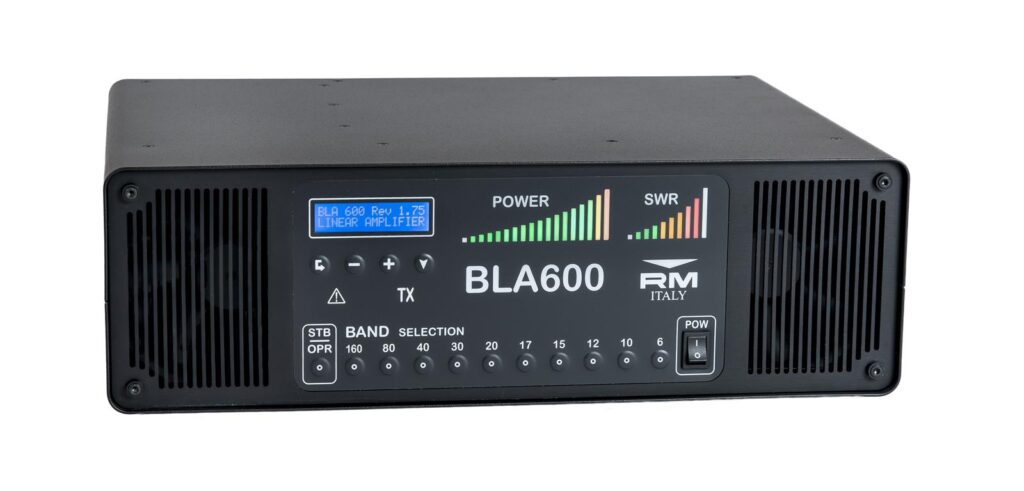
BLA600 Solid State Amplifier
This wideband, compact, automatic linear amplifier for 160 through 6 meters offers low input drive requirements (20 to 25W on 80-10 meters, 30 to 40W for 500W on 160M and 6M) and a host of other benefits. We’ll let James, a DX Engineering customer, explain further in his five-star review:
“First, the BLA600 is perhaps the simplest amp to put in service of any I’ve ever used, and there have been several in my ham radio lifetime. Literally all that is involved is to connect the keying line and output from your transceiver, connect the output to a resonant antenna, and you are ready to go live. Band switching in the amp is fully automatic.
“I’m getting a full 500-watt output on 75, 20, 17, and 10 meters with just 20 watts of drive. I’ve yet to try it on any other bands, but plan to test with 6-meter FT8 in the next few days. That said, the instructions for setup are clear and concise. If you read them before connecting things up (and you should do that), make certain your antenna has a low SWR, and keep the exciter drive at recommended levels. Your experience with this amplifier should be very good.”
Key features include:
- Weighing in at 47.4 lbs., this fully automatic 500W solid-state linear amplifier is suitable for seamless integration with all modern transceivers. It utilizes the rugged NXP/Freescale MRF6VP5600H 50V power MOSFET for high power and reliability.
- The BLA600 is capable of all modern modulation modes. It’s fully automatic, featuring instant RF frequency-reading for band changes and fast, reliable, and silent PIN diode TX-RX switching. This makes it ideal for CW QSK operation. A separately purchased transceiver to amplifier PTT keying cable is required.
- The amplifier has three antenna outputs that are easily configurable on a per-band basis.
- The amplifier’s RF deck has a large heat spreader and copper heat sink which provides an efficient cooling system. There are separate fans for the RF deck and LPF board/power supply for high-duty-cycle operation. Internally, all modules are mounted in a robust enclosure.
The BLA600 features a dual MCU control and an extensive array of protection circuits that look after the amplifier with rapid reaction time.

(Image/RM Italy) MLA-400V HF Amplifier
This amplifier covers 160 through 10 meters, providing up to 400 watts output on HF with only 35 watts maximum input. It’s a good choice for operators who want to bump their 100-watt radio to a higher power level. Featuring four Toshiba 2SC2879 arranged in a parallel push-pull configuration, the MLA-400 provides clean Class AB power output.
Low-pass filters with frequencies of 3, 4, 5, 8, 15, 22, and 31 MHz reduce unwanted harmonic output and may be selected automatically or manually. An onboard microprocessor controls all aspects of the amplifier including its various protection circuits. Protection is provided for excessive input power, excessive output power, excessive load SWR, out-of-band operation, and high temperatures.

(Image/RM Italy) BLA350 Plus HF Linear Amplifier
This amplifier is intended to be used with a low power transceiver that is capable of an RF output of approximately 10 watts maximum. The compact and fully automatic amplifier delivers up to 300 watts output when driven with less than 10 watts RF input. Internally, a dual microprocessor controls a variable speed cooling system.
On the front panel is a large, illuminated analog output power meter. Plus, the two-line 16-character LCD display shows amplifier operating parameters including frequency, filter selection, and PA temperature. This display also enhances quick navigation of the amplifier’s menu system. Appropriate operations for this amplifier are on HF antenna systems with SWR below 1.5:1.

(Image/RM Italy) Choose from these other RM Italy amplifiers at DX Engineering:
- MLA100 HF Amplifier: This unit covers 160 through 6 meters, providing up to 100 watts output on HF and 80 watts on 6 meters with only 5 watts maximum RF input. It’s a good choice for medium power operations with today’s low power (QRP) radios, including many brands of portable and SDR transceivers. This amplifier is intended to be used with a QRP transceiver that is capable of an RF output of approximately 5 watts maximum.

(Image/RM Italy) - MLA300 HF Linear Amplifier: This broadband linear amplifier is designed for operation from 160-10 meters, delivering up to 300 watts of average output power.

(Image/RM Italy) Also choose from RM Italy VHF and UHF amplifiers, as well as the SPS1050S Switching Power Supply.

The 50A SPS1050S switch mode AC to DC power supply features variable output voltage and is suitable for use with all electronic and telecommunication devices. It is equipped with illuminated voltmeter and ammeter, and a knob for adjusting the output voltage. (Image/RM Italy) The post Guide to Amateur Radio Amplifiers 2026 Part 5: RM Italy appeared first on OnAllBands.
OnAllBands
-
HK0/PY8WW – San Andres Island
[INFO] by Renato, PY8WW. I will be visiting San Andres Island, Colombia, from 3 to 7 September 2026, and during my free time I plan to operate as HK0/PY8WW. This will be a holiday operation, rather than a full-time DXpedition. I will be visiting the island primarily for vacation, and radio activity will take place only during available […] This post appeared first on: DX-World Want to know more about it? Read More
-

Ham Radio Youth Insights—My Visit to WRTC 2026 UK
What is the WRTC?
The WRTC (World Radiosport Team Championship) is best referred to as “The Olympics of Ham Radio.” The event takes place every four years in varying locations, and the objective is to create a level playing field for the top contesters to compete against each other to determine who is the best in the world.
The qualification period for the WRTC begins a few years before the event takes place. To qualify, hopeful competitors must take part in numerous predefined contests. By participating in these contests, they accrue points which are used to determine who attends the WRTC event as a competitor.
Once the selections of team leaders are made based on points, they select a team member to compete with them—every team competing at the WRTC is a pair. During the actual contest, the two-person teams are assigned referees who come with them to their sites and listen to their operating for the entire contest, much like a referee would watch and monitor the contestants at a sporting event. Since the objective of the WRTC is to put the top contesters on a level playing field, the contestants are provided with the exact same basic antenna setup. They must bring their own radios and other equipment, like laptops and keys.
My Road to WRTC 2026 UK
While the WRTC is a bucket list item for many contesters, it’s not very well known outside of the contesting sphere. I first learned about the WRTC in the summer of 2023 from a presentation at the YOTA camp in Ottawa. I was immediately fascinated. Before learning about the WRTC, I wasn’t involved in contesting at all. I participated in the ARRL School Club Roundups with my school’s club members and had done a few QSO parties but had never done a serious contest. It inspired me to give contesting a try. I participated in my first contest just a few weeks after learning about the WRTC– the IOTA contest that I did on the YDXA (Dave Kalter Youth DX Adventure) at K3LR. I had so much fun with this contest that I considered trying to qualify for WRTC 2026 as a competitor, but I decided that between balancing school and not having very much contesting experience under my belt, it would be best to wait.
I was still interested in the WRTC and contesting, so I started to participate in more contests and tried to learn as much about contesting as I could. I started to get to know the other hams who make up the contesting sphere in amateur radio and realized that even if I wouldn’t attend as a competitor, I would go to WRTC 2026 in England (July 8-13) to meet many of my contesting friends and see how the event was run.

(Image/WRTC 2026) As WRTC 2026 approached, I started to make plans about how I could attend. I eventually decided I wanted to volunteer to help with the event, so I joined the pre-event public relations team. I had a lot of fun bouncing ideas about how we could publicize it and improve the 2026 edition. I also decided that I wanted to help out at the event’s headquarters to get an even better idea of how the event was run and what went on behind the scenes.
I got in touch with organizing committee members to see if volunteering would be possible, and luckily it was. I excitedly agreed to help out with the event and made plans to travel there. I booked the Eurostar from Paris to London, but it ended up getting canceled a few days before I was planning to travel, so I quickly booked a flight so that I could still make it on time.
I arrived at the venue, checked into my room, and had dinner with a few acquaintances that I hadn’t seen in a while because I had been in Germany for my exchange year. After we had caught up a bit, the volunteer team got to work sorting the welcome bags for each attendee. A few hours—and a few hundred bags later—we finished up and headed to bed to get some sleep for the next day. After this first day there, it felt almost surreal for me to finally be at a WRTC. I went to bed eagerly awaiting the rest of the week.
Stay tuned to OnAllBands for details of KE8LQR’s weeklong experience at WRTC 2026 UK in Part 2 of her series. Also read her WRTC article on “How It Feels to Be a Young Ham in a Roomful of Experts.”
***
Editor’s Note: It takes an incredible volunteer effort to make the “Olympics of Ham Radio” happen. Watch volunteers build contest sites in this video from WRTC 2026 UK.
The post Ham Radio Youth Insights—My Visit to WRTC 2026 UK appeared first on OnAllBands.
OnAllBands