Author: Source Author

  • Legendary DXer Bob Locher, W9KNI, Presents Tales from a Serial Sniper Part 4: My Bouvet Island QRP QSO with 3Y0C

    Legendary DXer Bob Locher, W9KNI, Presents Tales from a Serial Sniper Part 4: My Bouvet Island QRP QSO with 3Y0C

    Read More

    OnAllBands is thrilled to feature articles from noted author and amateur radio DXing legend Bob Locher, W9KNI. 

    Today, Bob remembers building the Elecraft K2 kit when it was released and using it to make an eleventh-hour QSO with Chuck Brady, N4BQW (SK)—the sole operator on the historic 3Y0C activation of Bouvet Island 26 years ago. Bob also talks about the past use of DXpedition “lists” and their role in DXing.

    Be sure to check out these other fine articles in Bob’s Serial Sniper series from OnAllBands:

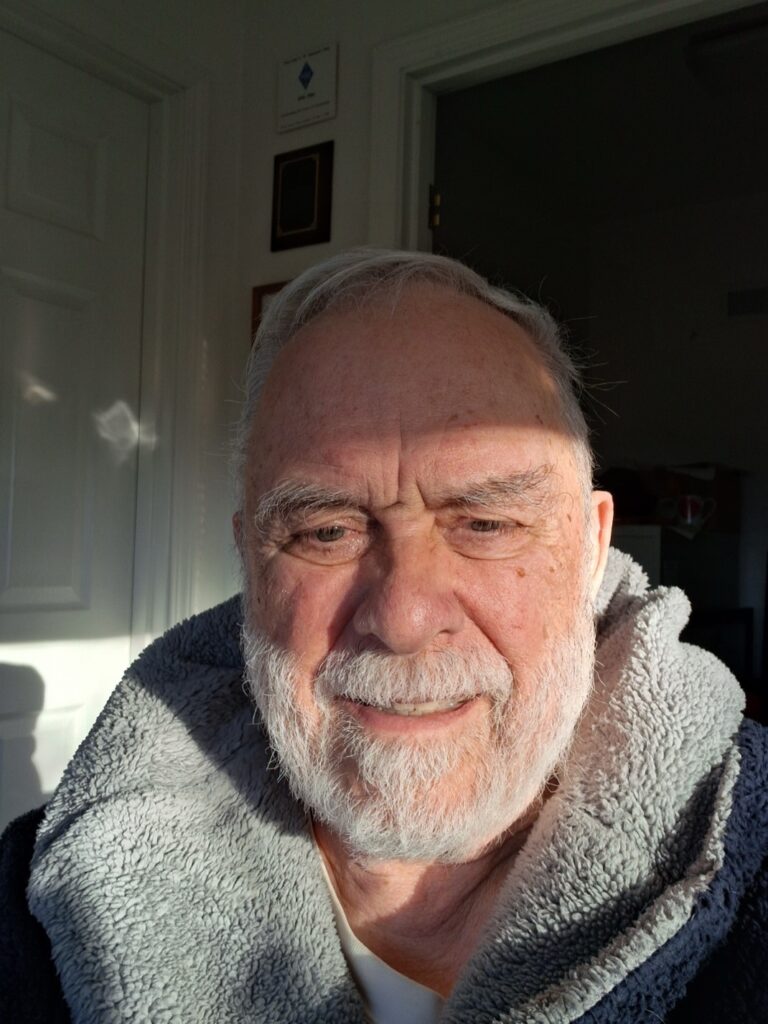
    Bob Locher smiling for a camera shot
    Bob Locher, W9KNI, in his Dawn Patrol uniform. (Image/W9KNI)

    ***

    Bouvet Island has been much in the DX world news this year, thanks to the terrific operation by the 3Y0K team.

    In 1999, I was residing in rural Sonoma County, California. I had a good setup and lived on a ridge. My station at the time was a KWM-380 transceiver, driving a Henry 3KA amplifier to 1,500 watts out, and a Skyhawk tri-bander 60 feet high.

    Editor’s Note: The 20/15/10M Skyhawk Yagi has been sold exclusively through DX Engineering since 2014.

    It was a fine DXing station, and I was becoming bored with it all. I loved working new countries, but at that point I had worked pretty much everything that was available, and the occasions to work new ones were very rare events.

    So what to do?

    I knew I had a problem and was kicking around several possibilities in my head. At a DX Club meeting in September, Eric Swartz, WA6HHQ, (co-founder of Elecraft) made a presentation of the new Elecraft K2 to the group. The radio was only offered as a kit. At $599 plus tax I could get a radio good for about 12 watts out on all the HF bands. For an additional $89 I could get the SSB module for the radio. I was fully prepared to be unimpressed, right up until I sat down and listened to it for perhaps five minutes. That was enough to make me realize this could be a serious piece of gear. I went home from the meeting in a thoughtful mood and placed my order a few days later.

    Building & Operating the K2

    I know what I’m doing with a soldering iron. In my younger days, having more time than money, I assembled Heathkits for myself and others. Summers in high school and college I worked in an electronics factory as an assembler and later as a technician. I built a KW amplifier from scratch. It had been years since I had undertaken any serious soldering project more than putting PL-259s onto coax. But I was game.

    The kit arrived. It was very well organized and had a good assembly manual. It took me roughly 35 hours to build. Did it work the first time I applied power? Well… sort of. But there was no BFO, so I could not copy CW or SSB. A look at the circuit diagram gave me a suspicion. Sure enough, I had wired in a diode backward. Twenty minutes later, joy! It was working beautifully. It was putting out a maximum power of 12 watts. Now, the QRP police will pull you over for exceeding five watts output, but I didn’t care. For me, 12 watts was close enough.

    I set it up on a table next to my main rig and started working with it. Hey, this was fun! I put the radio on 20 meters and almost immediately started working DX with my mighty 12 watts. I do have to say that having a Skyhawk at 60 feet was, in modern terms, a significant force multiplier. Anyhow, the little box I had built had all the tools I needed to be a CW DXer. Split operation was well integrated. CW output was exceptionally clean—no clicks. The receiver was very sensitive. It had wonderful AGC characteristics and good receive selectivity.

    Almost immediately, I began running a country count for QSOs with the little box. I was having a ball—the DXing juices flowing again. After several weeks, I assembled and installed the SSB module. Let me be honest: SSB has never been my favorite mode. I love CW DXing and like to think I’m fairly competent at it. That said, within limitations, SSB operation with the K2 was very acceptable. But for sure, 12 watts on SSB is a lot less effective than 12 watts of CW.

    OK, now that I have explained my QRP credentials, let’s fast forward to working Bouvet Island with my little box.

    Bouvet Island, a small island in the far southeast Atlantic Ocean, is considered the world’s most remote island and has always been a rare country for DXers. The first significant DXpedition of modern times was the 3Y5X operation in late December 1989/early January 1990. It racked up 50,000 contacts on CW, SSB, and RTTY. But even with that many successful contacts, Bouvet remained in the top ten list of needed entities.

    3Y5X Ham Radio QSL Card from Bouvet Island
    3Y5X QSL card (Image/DX Engineering)

    Norway had assigned the prefix 3Y to stations there, but of course, normally there were none. Ten years later, the DX Community was electrified when 3Y0C came on the air. By design, the activation was totally unannounced ahead of time. The sole operator was Chuck Brady, N4BQW. Chuck’s resume, both in life and in ham radio, was exceptional. Professionally, he was an MD. He was a naval captain, NASA astronaut, and well-regarded scientist. In his ham radio career, he had contacted students while on the space shuttle Columbia as part of the Shuttle Amateur Radio EXperiment program (SAREX).

    After he completed his astronaut tour, he helped activate Kure Island, Palmyra, Kingman Reef, Midway Island, Wake Island, and Baker and Howland islands—all rare countries. Then, in December 2000, came the stunning announcement that he had begun operation as the solo ham operator from Bouvet Island, serving as a member of a Norwegian scientific expedition. (Sadly, I use the past tense in all of this because Chuck passed away in 2006.)

    Dr. Charles “Chuck” Brady, N4BQW
    Dr. Charles “Chuck” Brady, N4BQW (SK) (Image/NASA)

    In spite of extremely difficult weather conditions—with winds topping 120 mph—and heroic efforts to keep antennas up, he was able to make 17,000 contacts, the bulk of them on SSB. Near the end of his operation, I was not in the log. Twelve watts of SSB was not going to make the grade in a time of howling pileups. Me and my mighty 12 watts were getting desperate. During his last few days on Bouvet Island, along with his regular operation, Chuck was working list operations with a fellow in North Carolina, where Chuck had long-term roots. These lists were occurring in mid-afternoon California time. They were high up in the General Class portion of the 20 meter band.

    What Are List Operations?

    List operations in those days were, in some respects, similar to the DX net operations of today. The idea was that stations in good communication with the rare DX station would call for a list of people to work. Everyone would call the list-taker, and he or she would select typically ten stations to be on the list. Then the list-taker would pass the list to the DX station, who would, in turn, start calling and working the stations from the list one by one.

    Though I don’t know this for a fact, I strongly suspect the list-taker, a WA4 (a southeastern U.S. prefix) who lived in North Carolina, was a friend of Chuck who was helping a lot of the locals get through. Like most serious DXers, I disliked lists—too much like shooting fish in a barrel—but again, like most DXers, pragmatism ruled. So, every day I tried to get on the list. I was a quick study and learned a few things about lists. For one, once I knew I could actually hear the DX station with my Yagi pointed at him or her, the thing to do was to move the Yagi and aim it at the list-taker. It was he or she you had to contact to get on the list—the rare DX station was an after-the-fact dessert.

    Sadly, I was unable to get on the list after trying for multiple days. It seemed W4s were favored—and, of course, they were much closer to the list-taker AND not running 12 watts.

    Then came March 1 in UTC time. The DXpedition was to end the following day. I was becoming increasingly despondent. Spring was coming; maybe I could take up golf? It was do or die time. At about 2300 UTC, the last day of February, I listened to the list-taker starting a QSO with the 3Y, obviously on schedule. With my Yagi on the 3Y, he was about 4 by 4—not great but probably good enough for a QSO in a one-on-one situation.

    The WA4 list-taker gave him a 5 by 7. After a few exchanges of remarks, including Chuck stating that he was about to pack up, the list-taker passed Chuck a short list of stations already somehow on the list. The list went through, not without some difficulty, as some of the stations had very poor copy on the 3Y. Then the WA4 took another list—this time over the air, and once again I failed to make the grade. Rinse and repeat for several more lists.

    But conditions began to change. It was becoming obvious that the North American East Coast was losing propagation, as evidenced by list station reports: “When last heard, you were 3 by 3, 3 by 3, over over.” (“Last heard” probably meant 40 minutes earlier!) And there was no response from Chuck; he could not hear them. The sun was well down on the East Coast by this time, and the band, at least to the southeast, was closing. In the meantime, his signal to me on the West Coast was slowly building. Chuck was now a comfortable 5 by 7 copy for me.

    Finally, I heard the WA4 tell Chuck that he no longer had any copy. Chuck did copy him and attempted to respond, trying to set up a schedule for the following day, but the WA4 heard nothing.

    “3Y0C, here is Whiskey Niner Kilowatt, Norway, Italy, that’s Whiskey Niner Kilowatt, Norway, Italy, Over.” My heart stopped beating… “Roger. W9KNI from 3Y0C, you are 5 by 6. Can you copy WA4xxx and pass him a message?”

    “Roger, thanks for the report. You are 5 by 7 to 8, and running QRP here, 12 watts. Handle is Bob. I can copy WA4xxx and would be glad to help. Over.”

    “OK, thanks Bob, good copy. Your QRP is doing great. Please tell him there is a good chance I will be able to meet him tomorrow, same as today, OK? Over.”

    “OK, will do. Stand by while I turn my antenna to him.” Which I did. And now, marvel of marvels, the WA4 came back to me. NOW he could hear me. I passed the message, got a thanks, cleared, and turned my antenna back to the 3Y station.

    “OK, Chuck. He did copy me, and I passed the message. He will be there tomorrow if you are.”

    “OK, much obliged. Going to QRT now; work to do. 73 and again thanks. W9KNI from 3Y0C clear.”

    I sat there stunned, a golden glow over my spirits. I had just worked a very rare country using very low power, from a radio I had built myself, and with an antenna I had assembled myself, mounted on a tower I had put up myself. AND I did not have to work him from being on a list!

    Aftermath: Chuck’s departure from the island was delayed several days by horrendous weather, so he made a few more contacts before leaving. He kept all logs by hand on paper, which were later transcribed into digital mode and posted on Clublog… and my call is not in there. I have no idea why. Yet, after his return stateside, Chuck and I exchanged several messages, in which he commented that he had read my book and loved it, and thanked me for helping out with the WA4. He remembered the QSO. And, since I did not need it for DXCC, having worked Bouvet ten years earlier, I never sent for a QSL. The contact is in my log and in my heart—a special moment.

    And a reminder: Never give up until the ship has sailed! The contact with Bouvet was DXCC country #260 with my little QRP rig at 12 watts. QRP DXing is fun!

    The post Legendary DXer Bob Locher, W9KNI, Presents Tales from a Serial Sniper Part 4: My Bouvet Island QRP QSO with 3Y0C appeared first on OnAllBands.

    OnAllBands
  • A QRX…but not for long!

    [NEWS] –  First of all, thanks so much to everyone who emailed, left messages or commented on social media regarding my health scare. It meant a lot and goes to show how much DX-World is really valued. I remained in hospital overnight with further tests taking place. While still high, the blood pressure has fallen […] This post appeared first on:​ DX-World Want to know more about it? Read More

  • V47FWX – St Kitts

    Gary, G0FWX will again be active from St Kitts as V47FWX during October 13-20, 2026. See below:  Please note this is a holiday type operation. I will be operating at the QTH of John V47JA. We visit St Kitts a couple of times a year, beautiful island with lots to do and I get to […] This post appeared first on:​ DX-World Want to know more about it? Read More

  • DX-WORLD Weekly Bulletin

    [#682] The latest FREE NON-SUBSCRIPTION DX-World Weekly Bulletin written by Bjorn ON9CFG is available to download. Click below to get the newest edition which this week runs to 19 pages. Previous bulletins can all be found here. Please contact Bjorn with any updates or errors. DOWNLOAD THE LATEST BULLETIN ===== This post appeared first on:​ DX-World Want to know more about it? Read More

  • Guide to October 2026 Ham Radio Contests: New Reference Books Edition

    Guide to October 2026 Ham Radio Contests: New Reference Books Edition

    Read More

    OnAllBands is committed this October to keeping you as updated as possible on all the new products available at DX Engineering. Look out for posts this month spotlighting the hottest station upgrades you’ll find on our website.

    Since October kicks off “sweater weather” season in northeast Ohio (home of DX Engineering headquarters), it’s a great time to get cozy in a comfortable chair with your favorite pumpkin spice beverage (straight black coffee for this ham) and read about amateur radio.

    Before we get into what’s up this contesting season, we’ve highlighted some new reference books you’ll want to add to your amateur radio bookshelf. For the full list of reference books, license study guides, and instruction manuals at DX Engineering, click here.

    You’ll find all the latest reference books and equipment by clicking on “What’s New” at DXEngineering.com. You’ll also discover savings on “scratch and dent” and “open box” gear to enhance your operating capabilities.

    Cue the “Reading Rainbow” theme—Here we go:

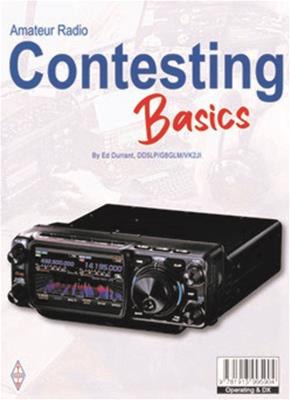
    Amateur Radio Contesting Basics

    amateur radio contesting basics
    (Image/RSGB)

    Written by experienced contester and amateur radio author Ed Durrant, DD5LP/G8GLM/VK2JI, this beginner-friendly guide published by the Radio Society of Great Britain (RSGB) removes the mystery surrounding contesting and explains the fundamental concepts in a clear and practical way. From understanding what contesting is and why so many operators enjoy it to learning how to participate in your first event, the book serves as an accessible introduction to this rewarding aspect of the hobby. (88 pages, paperback.)

    ***

    Nifty Accessories now offers mini-manual reference guides for the Icom IC-7300MK2 and Yaesu FTX-1 Series transceivers.

    These manuals have the same information contained in your owner’s manual but in concise, easy-to-follow, plain language. They feature clear illustrations and a logical approach to operations, providing users with a better understanding of their equipment’s functionality.

    Nifty Manual for Yaesu FTX-1
    (Image/Nifty Accessories)

    DX Engineering carries Nifty Accessories reference guides for many current and older transceivers; popular antenna analyzers; and instruction manuals for PSK31, D-STAR, EchoLink, and more.

    ***

    Also check out the RSGB “Radio Today Guide” for the IC-7300MK2 by Andrew Barron, ZL3DW.

    radio today guide to the icom 7300mkII
    (Image/RSGB)

    Looking to purchase the IC-7300MK2 or its beloved predecessor, the IC-7300? You’ll find them at DX Engineering. Get them now to upgrade your station or to give as a holiday gift.

                                                      ***

    Chameleon Antenna HOA Guide Book, First Edition

    This 74-page guide explains everything you need for planning, selecting, and installing an antenna in an HOA. Topics covered include:

    • How to understand and navigate HOA rules and limitations
    • Proven real-world antenna installation strategies
    • Effective stealth and camouflage techniques
    • The advantages of temporary versus permanent antenna installations
    • Solutions for apartments, condominiums, townhomes, suburban properties, urban lots, and mobile home communities
    • Specialized installation methods for attics, soffits, fence tops, and remote tuner configurations
    • Step-by-step DIY projects, including a flowerpot antenna mount, purple martin house mast, and flagpole mast solutions
    chameleon antenna HOA guide
    (Image/Chameleon)

    ***

    We’ll finish up our October reading rundown with one of our latest favorites,  “Salty Walt’s Next Level Portable Antenna Sketchbook.” The 144-page paperback features 17 portable antenna designs and new ways to maximize your station’s potential from Walt Hudson, K4OGO, who shares his operating adventures and the magic of amateur radio on his YouTube channel, Coastal Waves & Wires, and now as an OnAllBands blogger.

    salty walts next level portable antenna sketchbook
    (Image/ARRL)

    ***

    Now that you’ve had some valuable reading time, put into action what you’ve learned with these October contests, including the CQ World Wide DX Contest, SSB.

    • Collegiate QSO Party: Oct. 3, 0000Z to Oct. 4, 2359Z. Per the contest website, “The Collegiate QSO Party is an operating event focused on amateur radio clubs at colleges and universities around the world. Each fall, the Collegiate QSO Party provides an opportunity for clubs to demonstrate amateur radio to new members, engage with alumni, and promote activity throughout college and university communities.” Participating schools in 2026 include Carnegie Mellon University, The Ohio State University, and Indiana University. Find the up-to-date list here.
    • Oceania DX Contest, Phone: Oct. 3, 0600Z to Oct. 4, 0600Z. The 83rd running of this contest promotes HF contacts to and from stations in the Oceania region as well as contacts between stations in Oceania. Find complete rules here. The CW portion of the contest runs Oct. 10-11.
    • QRP ARCI Fall QSO Party: Oct. 10, 0000Z to 2359Z. The QRP Amateur Radio Club International kicks off autumn in their usual manner—by doing more with less! This club for low-power enthusiasts worldwide sponsors various contests and events that promote QRP operating and related activities, such as building minimalist radios, portable ops, and antenna experimentation. Like much of the club’s activities, its Fall QSO Party (HF CW only) is a test of ingenuity and skill, as operators make QSOs using anywhere from 55 mW or less to 5W.
    • Stew Perry Topband Challenge: Oct. 17, 1500Z to Oct. 18, 1500Z. Here’s a popular event 160M fans won’t want to miss. Point value of QSOs depends on the distance between the two stations. Participants are given one point plus another point for each 500km of distance. Points are also multiplied for lower power categories—for both the sending and receiving station. Looking to boost your topband capabilities? Read this article on the effectiveness of the DX Engineering 160M THUNDERBOLT® Vertical Antenna.
    • ARRL School Club Roundup: Oct. 19, 1300Z to Oct. 23, 2359Z. This bi-annual event is designed to foster contacts with and among school radio clubs. Participants can exchange QSO information with any amateur radio station, so non-school clubs and individuals are encouraged to participate as well. All amateur bands except 60, 30, 17, and 12 meters are permitted.
    • CQ World Wide DX Contest, SSB: Oct. 24, 0000Z to Oct. 25, 2359Z. This is why they call this time of year Contesting Season! The CQ Worldwide DX Contest is the largest amateur radio contest in the world. Featuring over 35,000 participants, the challenge is to make as many contacts with as many DXCC entities and CQ Zones as possible, while competing against the world’s elite contesters. Not into SSB? The CW portion of the contest is Nov. 28-29.
    • ARRL’s EME—50 to 1296 MHz: Oct. 31, 0000Z to Nov. 1, 2359Z. Work as many amateur stations as possible via the earth-moon-earth path on designated frequencies. This portion of the ARRL EME event continues on November 28-29.

    Also check out these State QSO Parties:

    • California: Oct. 3, 1600Z to Oct. 4, 2200Z
    • Arizona: Oct. 10, 1500Z to Oct. 11, 0500Z
    • Pennsylvania: Oct. 10, 1600Z to Oct. 11, 0400Z, and Oct. 11, 1300Z to 2200Z
    • South Dakota: Oct. 10, 1800Z to Oct. 11, 1800Z
    • New York: Oct. 17, 1400Z to Oct. 18, 0200Z
    • Illinois: Oct. 18, 1700Z to Oct. 19, 0100Z

    ***

    Ready to upgrade your station for better contesting results? Visit DXEngineering.com for everything you could possibly need to boost your scores:

    The post Guide to October 2026 Ham Radio Contests: New Reference Books Edition appeared first on OnAllBands.

    OnAllBands

  • K6VHF/HR9 – Honduras

    Alex, K6VHF/HR9 will again be active from Roatan island, NA-057 during November 25 to December 5, 2026. Activity on 160-6m using combination of verticals, Hexbeam, Slopers, Delta loop, beam; FT8, FT4, SSB, RTTY & CW. QSL via K6VHF direct or OQRS Club Log, LoTW. This post appeared first on:​ DX-World Want to know more about it? Read More

  • D44JB – Cape Verde

    Charlie, EI8JB will be active from Santo Antão island, Cape Verde as D44JB during November 13-20, 2026. QRV on 80-10m; SSB & FT8 using vertical antenna and fan dipole. QSL via LoTW, Club Log OQRS. This post appeared first on:​ DX-World Want to know more about it? Read More

  • Call sign grace period: A hard lesson learned

    Call sign grace period: A hard lesson learned

    Read More

    By Rob Rosenberger (K4HST)

    The FCC’s two-year grace period is a safety net if we forget to put a reminder in our calendar app. One operator relied on it when he applied for a renewal in April, five months before the end of his grace period. But it requires more than just signing in. He needed to confirm the payment actually occurred.

    This brings us to the sad tale of KE6MIT.

    He attempted to renew it twice. His first application on April 9 placed his call sign in a temporary status that shielded him from losing it. His application was dismissed 19 days later, probably over a failure to pay. He did not petition the dismissal; the period for reconsideration closed; and his call sign returned to its normal grace period on June 9.

    Did he not get the FCC emails? Did they go into his junk folder?

    A second application on July 23 again placed his call sign in a temporary status, and the FCC again waited 19 days. Detailed records suggest the ULS checked the CORES database each workday to see if he paid $35. August 11 arrived and the FCC again dismissed his application.

    KE6MIT reached the end of its grace period on September 14 — yet the window stayed open to petition the second dismissal for reconsideration… had he done so… which he didn’t.

    That window shut on September 22 when the FCC closed the period for reconsideration and the ULS set KE6MIT to “expired.”

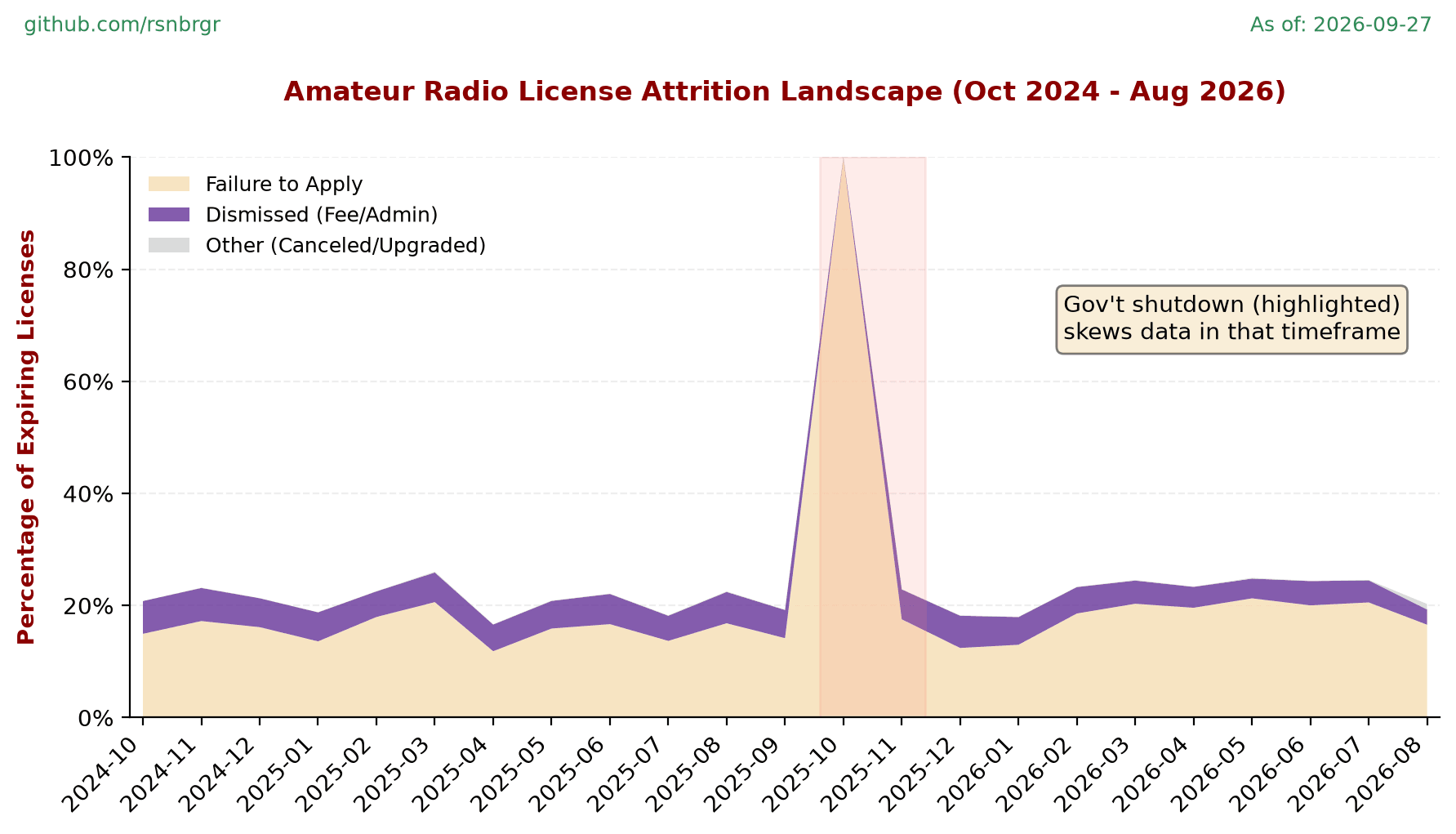
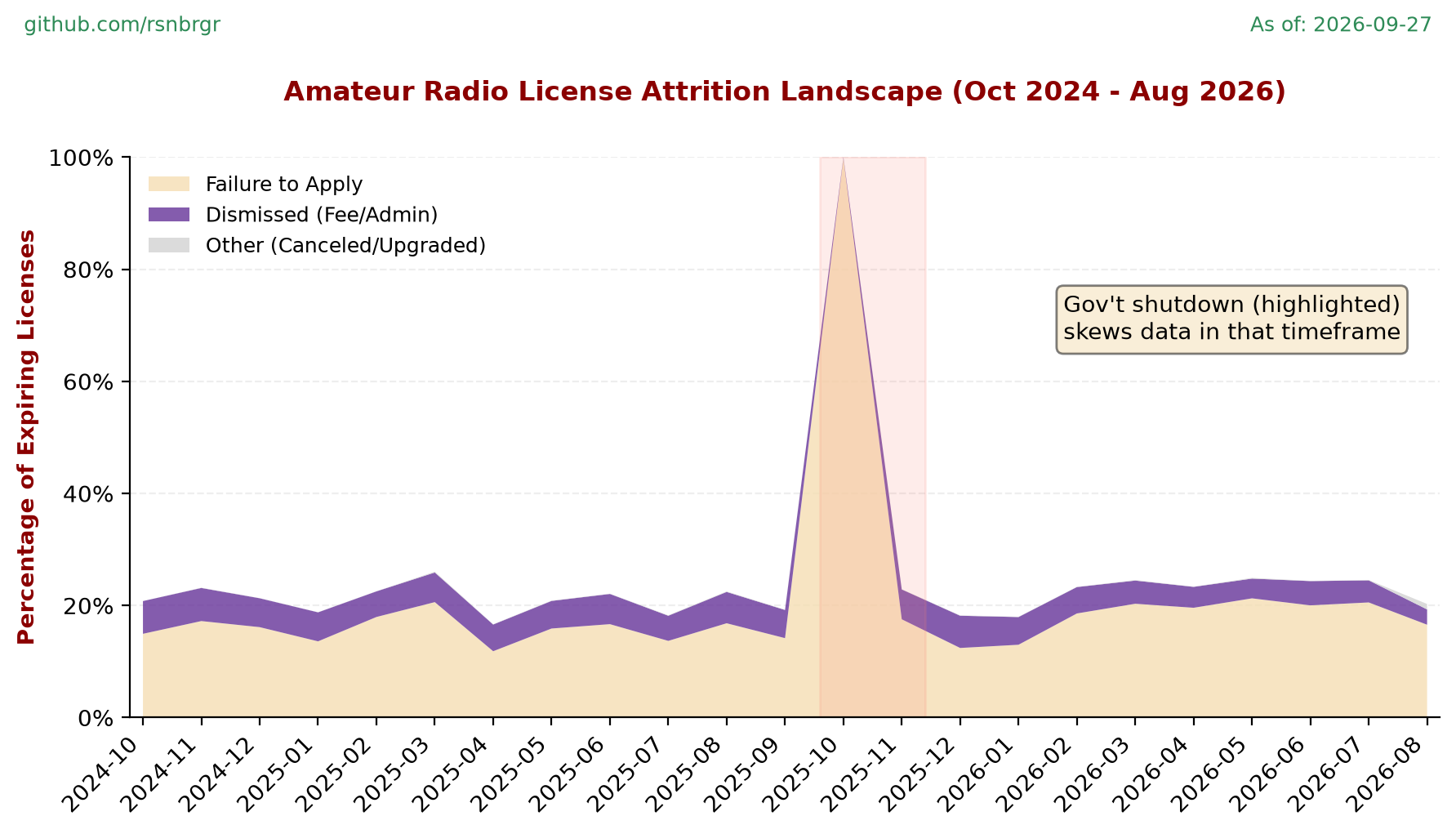
    KE6MIT’s circumstances led me to analyze the ULS data to learn how many call signs expire for lack of payment. Over the last two years, roughly 20% failed to apply for renewal, while another 5% failed to pay their fee after applying:

    Amateur Radio License Attrition

    Roughly 1 out of 16 operators who apply for renewal fail to pay for it. Did they not get the FCC emails? Did they go into a junk folder?

    (The chart can only go back 24 months because the FCC apparently flushes payment data to control database bloat.)

    All operators should consider doing four things: (1) put a note in your calendar app to update your email address before you pay a renewal fee; (2) update your FRN with a valid email address if needed; (3) submit a payment application; and (4) make sure the payment goes through.

    Don’t learn this lesson the hard way. Your grace period offers zero protection if you fail to pay.

    Source: Rob Rosenberger (K4HST)

    ​ Amateur Radio Daily

  • 7P8JL, 7P8LZ & 7P8TR – Lesotho

    South African operator ZS4AA, ZS4TDR and ZS6LZ will be active from Lesotho as 7P8JL, 7P8TR and 7P8LZ respectively during October 1-11, 2026. QRV on HF bands including SOTA and POTA activities. QSL via ops instructions / LoTW. This post appeared first on:​ DX-World Want to know more about it? Read More

  • Monitor Screens in Ham Radio: Getting the Big Picture

    Monitor Screens in Ham Radio: Getting the Big Picture

    Read More

    There was a time when operating a ham radio meant sitting in front of a radio and watching a few knobs, meters, and perhaps a frequency display or meter. If you were feeling especially modern, you might have had a digital clock nearby. Today, the computer monitor has become nearly as important as the radio itself.

    Modern amateur radio involves more than tuning a frequency and listening. Operators may be logging contacts, decoding digital signals, monitoring propagation, watching spectrum activity, and even operating several receivers at once. A large monitor—or several smaller ones—can turn an ordinary ham shack into something that looks suspiciously like mission control.

    The Visual Ham Shack

    Computer-controlled and software-defined radios have changed how operators view the bands. A modern SDR radio can display activity across a large section of spectrum. Instead of tuning slowly from one frequency to another, you can see signals immediately. Strong stations appear as obvious peaks, while weaker ones may barely rise above the noise.

    The waterfall display adds another dimension by showing activity over time. Signals appear, disappear, move, and sometimes leave traces after they are gone. This makes it much easier to spot weak or intermittent stations.

    There is one danger, however: the waterfall can be hypnotic. Some operators spend so much time watching it that they forget to listen. It has about the same mesmerizing effect as a fish tank, but with vertical lines and squiggles.

    How Many Monitors?

    For most stations, one large monitor is usually enough. A 27- or 32-inch display provides plenty of room for radio-control software, logging programs, digital-mode applications, and other information.

    A second monitor can make multitasking considerably easier. One screen can show the radio and spectrum while the other displays logging software, spotting networks, propagation information, or digital decoding.

    Serious contest stations may use three or four monitors, with each screen assigned a specific job. One might display the main radio, another a second transceiver, another the logging program, and another propagation or spotting information. You don’t need a wall of screens, however. The goal is to make operating easier, not to recreate the bridge of the Starship Enterprise.

    Spectrum & Waterfall Displays

    Perhaps the greatest advantage of a monitor is being able to see the spectrum rather than just hear it. Suppose you’re listening around 14.250 MHz and hear nothing. A glance at the spectrum display might reveal several strong signals a few kilohertz away. Instead of thinking the band is dead, you know exactly where activity is occurring.

    A station that briefly appears may leave a visible trace, giving you a clue about where to tune. This is particularly valuable during contests, special events, and band openings. Instead of searching the band one frequency at a time, the operator can survey a large portion of it or several band slices at once.

    Digital Modes

    Screens become even more useful with digital modes such as FT8 and RTTY. Digital-mode software can display decoded callsigns, signal strength, frequency, timing, and other information. With a large monitor, dozens of signals can appear simultaneously. The operator can quickly see who is active, select a station, and allow the software to handle much of the technical work.

    However, that doesn’t make the operator totally unnecessary. Someone still has to decide which station to work, monitor the equipment, manage the log, and make sure everything is functioning properly. The computer and monitor add another tool to the shack.

    Logging & Station Management

    Modern logging software has largely replaced the paper logbook for many operators. A monitor can display numerous items: callsigns, names, locations, previous contacts, frequencies, modes, and other details. It can also automatically record the date and time of the QSO.

    During a contest, the computer can keep track of contact totals, multipliers, and duplicates. Searching hundreds of previous contacts takes seconds rather than several minutes of flipping through pages while hoping you don’t spill your coffee.

    When connected to online callsign databases such as QRZ, you can learn more about the station operator or even view a picture of their shack, which may also include a monitor or two.

    Propagation at a Glance

    A monitor can also serve as a window into propagation conditions. Solar activity, geomagnetic conditions, spotting networks, band reports, and propagation predictions can help operators decide where to look for contacts.

    A quiet band isn’t necessarily a dead band. The best action may be on another frequency, another band, or another mode. A quick look at propagation information can help point the operator in the right direction. In this respect, the monitor provides information the radio itself cannot. The radio tells you what is happening where you’re listening; the computer can help explain why.

    Remote Operation

    Large displays are particularly helpful for remote operation. Depending on the equipment and software, operators can control frequency, mode, power, filtering, antennas, and other functions of a computer miles away or even across continents.

    A large screen makes virtual controls easier to see and provides room for multiple windows. Remote operation also demonstrates just how far amateur radio has come. The only thing missing is a large red button labeled ENGAGE WARP DRIVE.

    Choosing the Right Display

    For most amateur radio stations, there’s no need to buy an expensive professional display. A reasonably sized computer monitor with good resolution is usually sufficient. A larger screen can make multitasking easier, while a second inexpensive monitor may offer more flexibility than a single display.

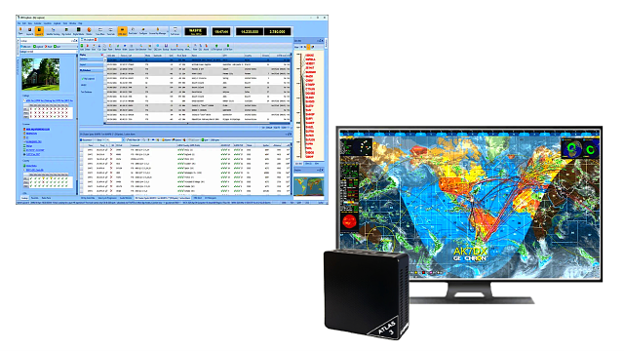
    The differences between monitors and TVs tend to blur, with features, resolutions, and physical sizes improving while costs go down every year. My shack has a 27-inch HD monitor for logging and spotting, and it serves as an auxiliary waterfall display for my Flex radio. A 43-inch 4K TV monitor across the room serves as a display for the Geochron Digital Altas 3 4K World Clock and a fully populated ham dashboard.

    ham radio software displayed on a computer
    Ready for the big screen? Ham Radio Deluxe Software (left) and the Geochron Digital Atlas 3 4K World Clock (right). (Image/K8MSH)

    So where do I plug in? Some transceivers have a video output or can support video with an adapter. Examples of current and discontinued rigs include:

    • Icom IC-7300MK2: Features an integrated HDMI port. The original IC-7300 can display video using wfview and a computer
    • Elecraft K4: Includes a built-in HDMI video output
    • FlexRadio “M” models have an HDMI output port for external monitors
    FlexRadio 8400M HF6M Signature Series SDR Transceiver
    (Image/FlexRadio)
    • Yaesu FT-710 and FTDX10: Equipped with a DVI-D display port connection
    • Icom IC-7000: A mobile rig that included a video output jack (via a 1/8″ TRRS port)
    • IC-7610, IC-7700, IC-7850: These rigs feature external VGA or DVI/HDMI monitor ports

    Adjusting the text size and software windows is also important. The best monitor is not necessarily the largest one; it is the one that lets you see the information clearly and comfortably. 

    The Future of the Ham Shack

    Monitor screens will likely become even more important as amateur radio equipment continues moving toward software-defined and computer-controlled operation. Spectrum displays, logging, propagation information, digital decoding, station control, and other functions are increasingly being integrated into a single screen.

    For today’s operator, the monitor is much more than a place to read email. It can be a control panel, a spectrum analyzer, a logbook, a propagation guide, a digital decoder, and sometimes an electronic crystal ball.

    The beauty is that you don’t have to use all those features. You can operate with one modest monitor or build a shack with enough screens to make NASA jealous. Either way, the basic idea remains the same: The radio lets you hear the bands, but the monitor helps you see them.

    The post Monitor Screens in Ham Radio: Getting the Big Picture appeared first on OnAllBands.

    OnAllBands