

1. QRV: Are You Ready?
I started a series on DMR radio this week, because my coverage of DMR has been a bit light. Why? Because I don’t really understand it. The best way to learn DMR is to use it, and I find that organizing what I’m learning and writing about it really helps to cement that knowledge in my mind.
I fixed a bug in my AllStar node running on an Arduino UNO Q board. It is reliable again. Speaking of reliability, I also implemented a backup routine for one of my primary AllStar nodes that is driven by a Dell Wyse 3040 thin client PC.
There are a few write-ups about artificial intelligence in Random Wire 191. I had an interesting experience with two different models in Claude. I also gave Hermes Agent a try and found it is too powerful and complex for what I need, but that doesn’t mean it isn’t right for you.
Following up on my deep dive into the push-to-talk over cellular space, I ordered a PoC radio. This is a leap of faith. I want to experience what a typical buyer experiences, and I’m hopeful the new radio will be fun to use. This week I touch on some purchasing friction points. Next week I should have the radio in hand.
I learned about CascadiaMesh this week…and it is interesting enough that I ordered a solar-powered mesh device to go on the roof. Fingers crossed it works well.
I signed up for QSO One and tested it for a few days. It has great promise, but right now, the UI is still a little rough around the edges, at least in my experience.
And I saw a strange glitch in my APRSdroid display. It was odd enough that I did some research on it and documented it in a bug report filed on GitHub.
I also tried a speaker-mic on the Uniwa F400 smartphone with DVSwitch and DroidStar installed. Did it work? Yes as a remote speaker, no as a microphone. I’ll be exploring button mapping as a way to try to get it working with that platform.
That’s Random Wire 191 in a nutshell. I hope you enjoy reading about these amateur radio and technology topics this week. I’m always open to learning and trying new things, so please do send your ideas and suggestions to me!

2. Thank You
I want to thank all the innovators and all the folks who form the solid backbone of our hobby. Last week, I wrote a brief piece about crossing the chasm, in the context of adopting amateur radio technology.
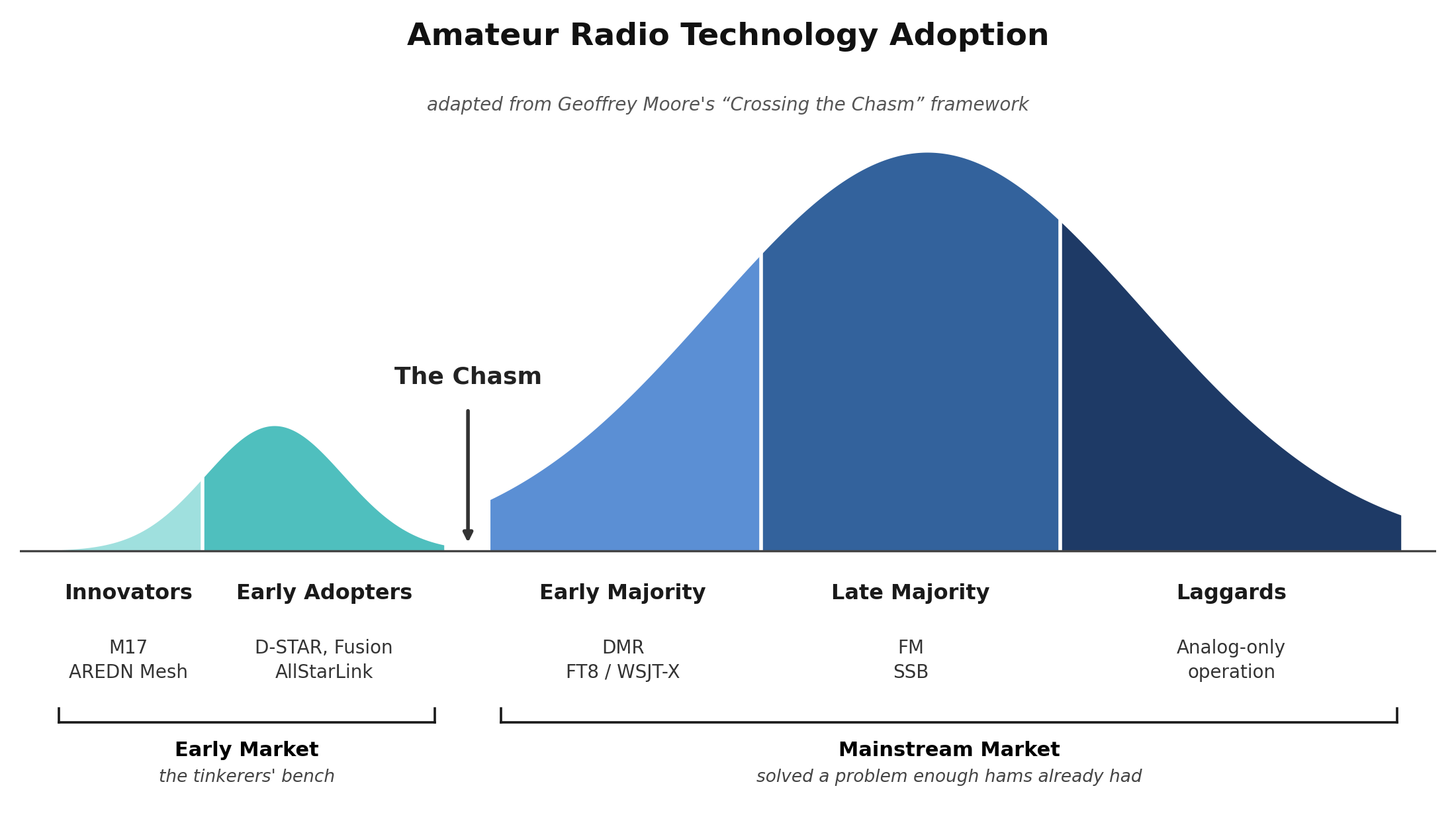
This week, I’m leaning in on this concept. I usually occupy the “early market” part of the curve — innovators and early adopters. Trying new things, or things new to me, is what I enjoy most. The makers, designers, builders, and coders keep the magic alive in our hobby. I doubt we’ve ever seen as much innovation and creativity in amateur radio as we’re experiencing now.
But people like me are actually a small percentage of the hobby, compared to the much larger group: the “mainstream market” folks. The early majority, late majority, and laggards (not my choice of term!) form the spine that holds up amateur radio, year in and year out. They buy the gear that keeps major players in the game, and that benefits all of us.
The “early market” folks are one side of the amateur radio coin; the “mainstream market” folks are the other. We can’t have one without the other — both are needed to keep the hobby healthy and vibrant.
Thank you to the innovators and early adopters. Thank you to the larger group that keeps the hobby together. No matter which side of the coin you prefer, you’re important to all of us.
3. New on EtherHam
Some fun radio-related topics this week.
-
Introduction to DMR: The Four Wheels on the Car — This is Part 1 in a short series on DMR, written for those of us who find DMR, well, daunting. DMR asks new users to understand codeplugs, timeslots, talkgroups, and networks before they’ve even keyed the mic — and most guides bury that in jargon before you get near your first contact. This piece cuts through it with one idea: DMR is like a car, and those four concepts are its four wheels. Get all four turning and you’re on the air; skip one, and you’re not going anywhere. Part 1 of Tommy’s Guide to DMR builds that mental model — no gear list yet, no codeplug, just the four ideas you need before any of the rest makes sense.
-
AllStar on Arduino UNO Q: Part 2 (The Bug That Killed My Node…Until I Fixed It) — If your UNO Q AllStar node runs for hours and then drops dead — heartbeat LED red,
lsusbempty, nothing but a full power cycle bringing it back — the culprit is a documented bug that silently flips the board’s USB-C port out of host mode. The fix is a one-line command, made permanent with a small systemd service, and it’s all laid out below. The QNode is now rock solid, and yours can be too. Part 1 is at How to Run AllStar on the Arduino UNO Q. -
Backing Up Your AllStar Node: Why I Do It Even Though “eMMC Never Fails” — Every AllStarLink node builder has an opinion on whether the storage in their node will ever fail — and one popular take is that the eMMC in a Dell Wyse 3040 thin client basically never does. That might even be true. But I learned decades ago, the hard way, what it feels like to lose weeks of irreplaceable work to a single bad disk, and I’ve never wanted to relearn that lesson on a node that also connects to my ham phone. Here’s why I back up my node anyway, what eMMC actually gets right (and wrong) compared to microSD, the one AllScan file I almost forgot to include, and a free, MIT-licensed script you can use so a dead drive is a shrug instead of a crisis.
-
Hardening SSH Access to Your AllStarLink Node: Moving Beyond Port 22 — Your AllStarLink node isn’t just a simple appliance — you’re running an unattended Debian server with a direct line to your radio and your home network, and automated bots are scanning for it right now. A compromised node isn’t just an inconvenience: it can mean unauthorized transmissions attributed to your callsign, or a foothold into every other device on your LAN. This walkthrough shows how to close a common gap in an afternoon — moving off the default SSH port, adding real rate-limiting, and locking down Fail2Ban correctly on Debian, including the exact reason it silently fails for a lot of people.
-
Push-to-Talk Over Cellular: The Actual Buying Experience — I ordered a PoC radio from Talk2Me USA on July 11, expecting to click “buy” and wait for a box. Instead, the next four days were an inbox: a $15 billing mix-up that was later reversed, a new Terms of Service that arrived the day after I paid, and login credentials for three separate radio networks — before the hardware itself had even shipped. The ad copy sells “buy now.” The actual experience is “buy now, then wait” — and it turns out most of what a buyer needs to know happens in that gap, not at checkout.
4. Claude AI: An Hour with Sonnet, Ten Minutes with Fable
I reported last week that the default engine on Claude had changed from Opus to Sonnet. I also reported that Fable had been released, then blocked, and then made available again. I got a chance to use the high-powered Fable engine this week, and therein lies a story.
This relates to the UNO Q item directly above in this newsletter. As I tried to figure out what was going on with my Arduino UNO Q-powered AllStar node, I eventually turned to Claude for some help. Using the default Sonnet engine, we went round and round for an hour. It got to the point where I would tell Claude: no, we’ve tried that twice already, I do not want to repeat that process…and Claude would push it forward anyway.
Eventually, I asked for a written summary of that conversation, closed the thread, and opened a new one with Fable as the engine. Ten minutes. That’s what it took to do the proper research and lead me to a solution that worked.
To be fair, this comparison isn’t perfectly clean. It’s tempting to blame Sonnet for an hour of churning — but that churning is what produced the diagnostic evidence, including the exact kernel log signature of the failure, that let Fable’s first web search land directly on a known bug report. A fresh session armed with documented dead ends gave Fable a real head start.
There’s a workflow lesson here that applies no matter which AI you use: when a session starts going in circles, ask for a written handoff summary, close the thread, and start fresh. That technique rescued this project as much as the model swap did.
Honestly, Opus was a capable engine. I’m not particularly pleased with Sonnet, at least for sleuthing code and hardware problems. Fable burns through credits faster, but I was very pleased with how thoroughly and surgically it developed a solution. As noted, though, the work I did with Sonnet gave Fable a leg up as we reached the finish line.
5. Hermes Agent: Complex and Powerful
Some weeks ago, I set up an instance of Hermes Agent on my home server. I started by powering the reasoning side with Grok, but it burned through my credits faster than expected, so I downscaled to Gemini (free), which worked well.
Hermes Agent is an open-source AI agent framework, and “agent” is the operative word — it’s not a chat window, it’s a system meant to run unattended and act on your behalf. It can execute multi-step tasks autonomously across your terminal, your IDE, and more than ten messaging platforms (Telegram, Discord, Slack, WhatsApp, Signal, email). It remembers things across sessions — your preferences, your environment, lessons learned — and it can save reusable procedures as “skills” so it gets better at your specific workflows over time. You can point it at almost any LLM provider (OpenRouter, Anthropic, OpenAI, DeepSeek, local models) and swap between them mid-workflow, run multiple isolated instances with their own memory and config, and extend it with plugins, custom tools, webhooks, and cron jobs. On paper, it can handle coding and debugging, research, system administration, data analysis, content creation, and even home automation.
That list alone tells you something: this isn’t a “download an app and go” tool. Getting it running means configuration files, API quotas, provider swaps, and troubleshooting that assumes you’re comfortable poking around under the hood.
I spent a couple of days putting it through its paces — switching models, testing its WordPress and GitHub integrations, watching how it handles tool-calling. It’s genuinely capable, and I came away with real respect for what it can do. I also hit real friction: a crashed gateway, a free-tier quota that ran out faster than expected, and copy-paste quirks that took some digging to sort out.
Here’s my takeaway. If you have a specific need for an autonomous, always-on agent — something that runs unattended, chains multiple tools together, or watches your systems continuously — Hermes Agent may be worth the investment of time it takes to learn. But that’s not the problem I have. I mostly want a smart assistant to review my writing, help me code, or think through a problem. For these tasks, a standard AI chat interface gets me there with a lot less overhead. Hermes is a great solution for a problem I just don’t have.
6. PoC Radio Followup: I Ordered One
I’ve had some interesting exchanges about my push-to-talk over cellular deep dive (see: Buying Push-to-Talk Over Cellular Without Getting Taken). Even though I’ve previously purchased three PoC units, those were generally low-end devices. I’ve ordered a modern unit at a higher price point that meets these criteria:
-
Cellular connectivity
-
Wi-Fi connectivity
-
Can use the HamLink PoC app by Talk2Me
Why? Two reasons. First, I want to put myself in the shoes of a typical buyer who is trying to find the device that meets his/her needs. Second, I want a PoC device that will also let me connect to America’s Kansas City Wide Network, and HamLink PoC offers that capability. I ordered through Talk2Me specifically because it appears to be one of the leading vendors in this market space, which gave me more confidence going in than I’d have with an unknown seller.
Worth saying up front: I trusted Talk2Me enough to send them $200 for a radio I hadn’t yet held, on the strength of that reputation. That’s the lens for everything below. These are observations from a buyer who chose them for good reason, not grievances against a vendor I regret choosing — and precisely because I went with a name I trusted, the friction points I ran into are worth knowing for anyone buying a PoC radio, from any vendor.
So far, the buying experience is about what I expected. Details about each radio choice were hard to find. The HamLink PoC app was supposed to be free with a radio purchase — instead, I was charged for it, and later told that charge will be refunded. This kind of behavior (“it’s free” but then you get charged) makes it harder to trust vendors. To be clear, these observations are necessarily about Talk2Me, since that’s who I bought from, but I have no reason to think Talk2Me is worse than other vendors in this space. If anything, the fact that friction shows up even with a leading vendor is the point: these are things any PoC buyer should watch for, regardless of who they order from.
I was pleased that for the HamLink PoC app, I was asked to provide a copy of my FCC-issued amateur radio license. That gives me confidence that app usage will be limited to licensed operators.
The radio was originally tracking to arrive Saturday, July 18, at the early end of the vendor’s 7-11 day estimate. Since then I’ve received a delay notice pushing delivery to July 20. Another friction point worth flagging for anyone shopping this category: the delay notice didn’t explain a cause, and there’s still no order-status page or tracking link that gives more detail than “delayed.”
I also received a new terms of service notice before the radio or the app were even in my hands. The timing felt odd — as though placing the order triggered it, rather than it being a routine notice sent to all customers. If it’s the latter, the coincidence is remarkable. I can’t say which it is, and I’m not accusing Talk2Me of anything here. However, a buyer in the middle of an active order is not in a great position to evaluate a new ToS agreement on its merits. That’s worth naming as its own category of friction, separate from the pricing and shipping issues above.
For a purchase already made opaque by pricing and add-on confusion, a shifting delivery date without explanation and an untimely ToS update amount to small trust deductions. None of this is disqualifying on its own, but it’s the kind of accumulated friction that shapes whether a buyer sticks with a vendor for a second purchase.
I’ll have more on this once the device arrives and I get it configured — and with a radio in hand, issue 192 will shift away from the purchasing process and focus on the device itself. Fingers crossed this is not a $200 mistake. I’m actually hopeful the device and service will prove useful and enjoyable!
7. Have You Heard of CascadiaMesh?
Thank you to subscriber Joe who brought CascadiaMesh to my attention.
CascadiaMesh is a volunteer community project (not a company or nonprofit) that’s building out a regional mesh network across British Columbia, Washington, and Oregon, using solar-powered nodes for “grid-down” resilient comms. It’s grown fast — over 2,300 active nodes as of today. The network runs on MeshCore, an open-source LoRa mesh protocol, and the site provides onboarding guides, device recommendations, node-building tutorials, a live map, and links to sibling regional meshes (Puget Mesh, Salish Mesh, etc.) across the US, Canada, and Europe.
My take? CascadiaMesh appears to have positive momentum. Here’s a 30-second screen recording of the live map to give you an idea of the vibrancy of the network. It is operating not just across town, but across state and provincial lines.
Important: MeshCore has its own iOS/Android app, its own web flasher (flasher.meshcore.dev), and its own config tool. A MeshCore node can’t talk to a Meshtastic node — they use different protocols and encryption.
OK, color me interested. I ordered a small solar-powered node from an Etsy vendor. I’m hoping to put it up on top of the galvanized steel chimney cap which sits above the peak of the roof. Maybe there are other MeshCore nodes near me!
If MeshCore interests you, too, you should probably be aware there is a battle going on over trademarking the MeshCore name. Ultimately, I don’t think this will affect the codebase or the community, but it could result in the project getting renamed. I hope not, because MeshCore is perfectly descriptive.
8. QSO One, Part 2 — Testing
QSO One‘s pitch is bold: “Amateur radio, reimagined.” The marketing promises a single modern client that puts AllStarLink, EchoLink, DMR, and M17 all in one app, on Windows or Android, with no node to build, no hotspot to flash, and no radio interface to wire up — twenty-five dollars and five minutes between you and being keyed up on any of it. It’s framed as the client nobody else had bothered to build: a clean, cross-platform answer to IAXRpt’s abandonment, DVSwitch’s complexity, and the fragmented, one-app-per-mode reality most of us have been living with for years.
If this is real, it will have real value for radio amateurs. So I downloaded the QSO One app and installed it on my Windows laptop. This is what I like doing: poke at something to make sure it lives up to its billing. I’ll have a full write-up on this in the near future because the experience was a bit rocky. Essentially, the UI doesn’t really lead you through how to get set up and connected. I spent quite a bit of time poking around, trying to figure things out.
But once I got it connected with my AllStar node 588418, it worked well. The audio had a bit of choppiness to it but I suspect that is my network, not the app. To test that, I shut down QSO One and used the venerable iaxRpt app to connect to my node, and heard exactly the same choppy audio.
I was not successful at getting M17 to connect. It did find my reflector M17-PNW but then errored out. This appears tied to a connection-handoff bug in the app rather than something wrong with M17.
At this point, I would describe QSO One as a very good “built from the ground up” new app that is still rough around the edges, in active development, and shows promise. This one is definitely worth watching.
9. Chasing a Weird APRSdroid Display Glitch
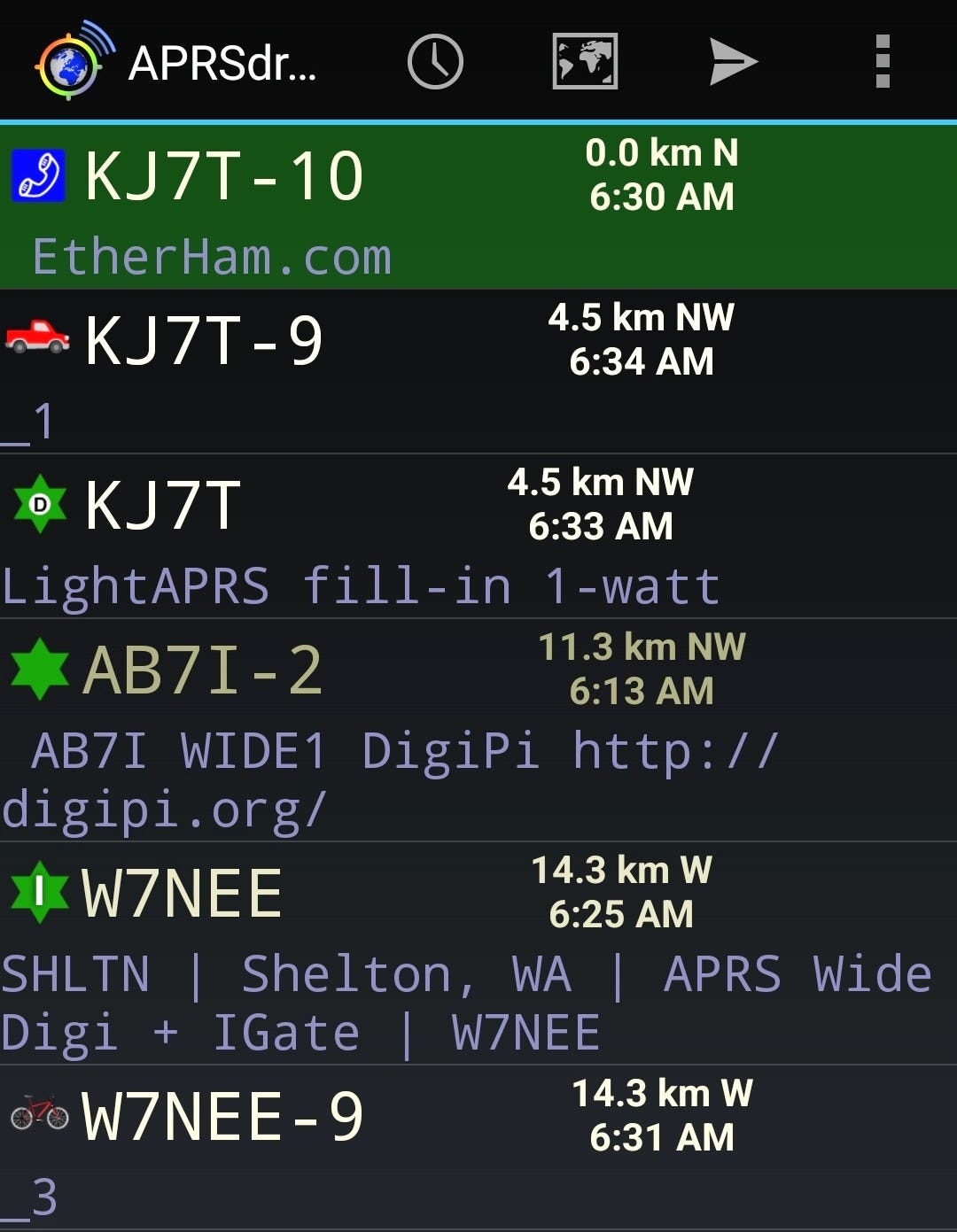
A few weeks ago I noticed something odd in APRSdroid’s Hub view on my Android smartphone: my mobile’s SSID was showing up as “KJ7T-9_1” instead of “KJ7T-9.” At first I assumed I’d fat-fingered something on the radio, so I changed the SSID to -11. Same thing happened — “KJ7T-11_1.” Then I saw Jeff’s portable, W7NEE-9, and it had its own additional underscore and number: “_3.” Whatever this was, it wasn’t just me, and it clearly wasn’t an SSID problem, since the SSID itself was displaying correctly in the title. The mystery character was showing up as a second line, like a comment.
The next step was to stop guessing and go look at the actual data. Pulling the raw packets for KJ7T-9 from aprs.fi’s raw packet view showed the underscore-digit baked right into the transmitted Mic-E packet. APRSdroid was not inventing this — it was real. And critically, aprs.fi wasn’t displaying it as a comment at all. That told me the “_1” was actual data that one piece of software was interpreting correctly and another wasn’t.
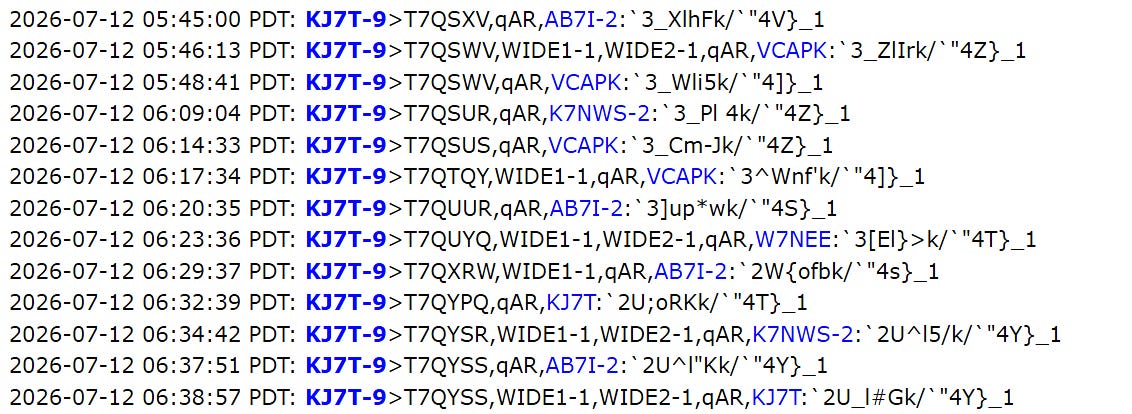
It turns out this is a documented part of the Mic-E spec. Bob Bruninga WB4APR (SK) produced a reference table of Mic-E “device identifier” bytes — a two-character suffix that radios append to the end of the Mic-E info field to identify themselves, positioned right after the base-91 altitude data. Per that table, “_1” decodes to a Yaesu FTM-300D and “_3” decodes to a Yaesu FT5D. The spec is explicit that receiving software should recognize these bytes and strip them from the displayed text (or use them to show the radio model) rather than showing them as if they were part of a comment. aprs.fi does this correctly. APRSdroid, at least as of the current release on my phone, doesn’t.
Bob Bruninga WB4APR (SK), created APRS in the late 1980s and maintained it for over three decades. He was still updating this Mic-E reference table in September 2021 — and passed just a few months later, in February 2022.
Rather than just grumbling about it, I filed a bug report on APRSdroid’s GitHub page. I made sure to include the actual raw packet as evidence, a link to the spec document that defines the correct behavior, a clear statement of what I observed versus what should happen, and a specific suggested fix. I also included my app version and Android version, since that’s the first thing any maintainer will ask for anyway.
I’d encourage anyone who runs into a quirk like this in ham radio software to consider doing the same thing. Many of these tools — APRSdroid included — are maintained by one or two volunteers in their spare time, often for free, and often for years. A report that says “this looks broken” is easy to ignore. A report with raw data, a spec citation, and a proposed fix is something a maintainer can act on in five minutes instead of an hour. It also means the next ham who hits the same weirdness can search the issue tracker and find an answer instead of struggling to figure out a diagnosis from scratch. Bug reports help the maintainer, but they also help the community.
10. Speaker-Mic for Uniwa F400 Phone
Will it work? That has been on my mind since I ordered this through Amazon (this is an affiliate link):
Portbale Microphone for UNIWA F400 and Anysecu W400 4G Network Radio
(Yes, portable is misspelled. That’s the way it is listed.)
It certainly makes the smartphone look more like a radio, but will it work? It arrived, I attached it, and it works well as a remote speaker. However, the push-to-talk button works the same as the PTT on the phone itself, which is to say it doesn’t work with DVSwitch Mobile or DroidStar. I didn’t really expect it to, but I also haven’t explored button mapping apps to see if I can get the PTT to work with one (or both) of those apps.
Two resources I’ll be exploring to try to get the PTT functioning the way I want.
-
Button Mapper: Remap your keys (by developer flar2) — the most established option, free, no root required for most actions, works via Android’s accessibility framework. Nearly 11,000 reviews on Google Play. Handles volume keys, camera buttons, headset buttons, and “custom buttons” (which is the category a PTT accessory would likely fall into). Find it in the Google Play Store.
-
Key Mapper (open source, by sds100) — more technical/granular option, popular in the XDA/hobbyist crowd. Supports multi-key combos and sequences, and unlike Button Mapper it’s fully open source if your readers want to see exactly what it’s doing under the hood before granting accessibility permissions — which is a reasonable thing for a security-conscious ham audience to want. Find it on GitHub.
Note that both of these apps rely on Android’s accessibility service to intercept the keypress. Also, remapping only helps if the target app already accepts input from some other bound key (like volume-down) that these tools can redirect the PTT press to. It’s a promising rabbit hole, not a guaranteed fix.
11. What’s On The Bench
-
Antenna Launcher — I still have my pneumatic antenna launcher to complete. The wiring diagram for the electrical trigger was not clear, so I requested (and received) additional information from the vendor. But that was months ago, so I need to review it all again before I commence with the last phase of soldering. Considering that my end-fed halfwave wire fell out of the tall Douglas fir tree, completing the launcher has become more urgent.
-
UHF/VHF dipole — A small dipole antenna is coming from a vendor in Oregon. I’ll strap this to a telescoping painter pole to get my LightAPRS Gateway antenna out of the garage and higher in the air. That should improve performance considerably.
-
T-Beam ordered — I plan to set up an APRS-over-LoRa digipeater on 70 cm. This is different than normal APRS on UHF because LoRa uses spread spectrum radio — the two types of APRS on UHF are not compatible. Maybe I’ll discover a few more people are doing this; I hope so. The device was shipped on July 16 and may arrive in time for Random Wire 192.
12. Recipes for Radios
I had a problem with APRS on my Yaesu FTM-300DR mobile radio. VFO B is set to use SmartBeaconing while I’m mobile…but it stopped working right after I made a backup copy of the frequencies and settings to a microSD card. Thinking about it, I realized I must’ve fumble-fingered a setting while trying to remember how to write a copy of the radio to the card. It’s also possible that a voltage spike scrambled some settings.
Short version: I got it working again. SmartBeaconing had been turned off and the beacon interval was set to manual. Enabling SmartBeaconing and setting the interval to Smart solved the problem, as shown in the track below for KJ7T-9:
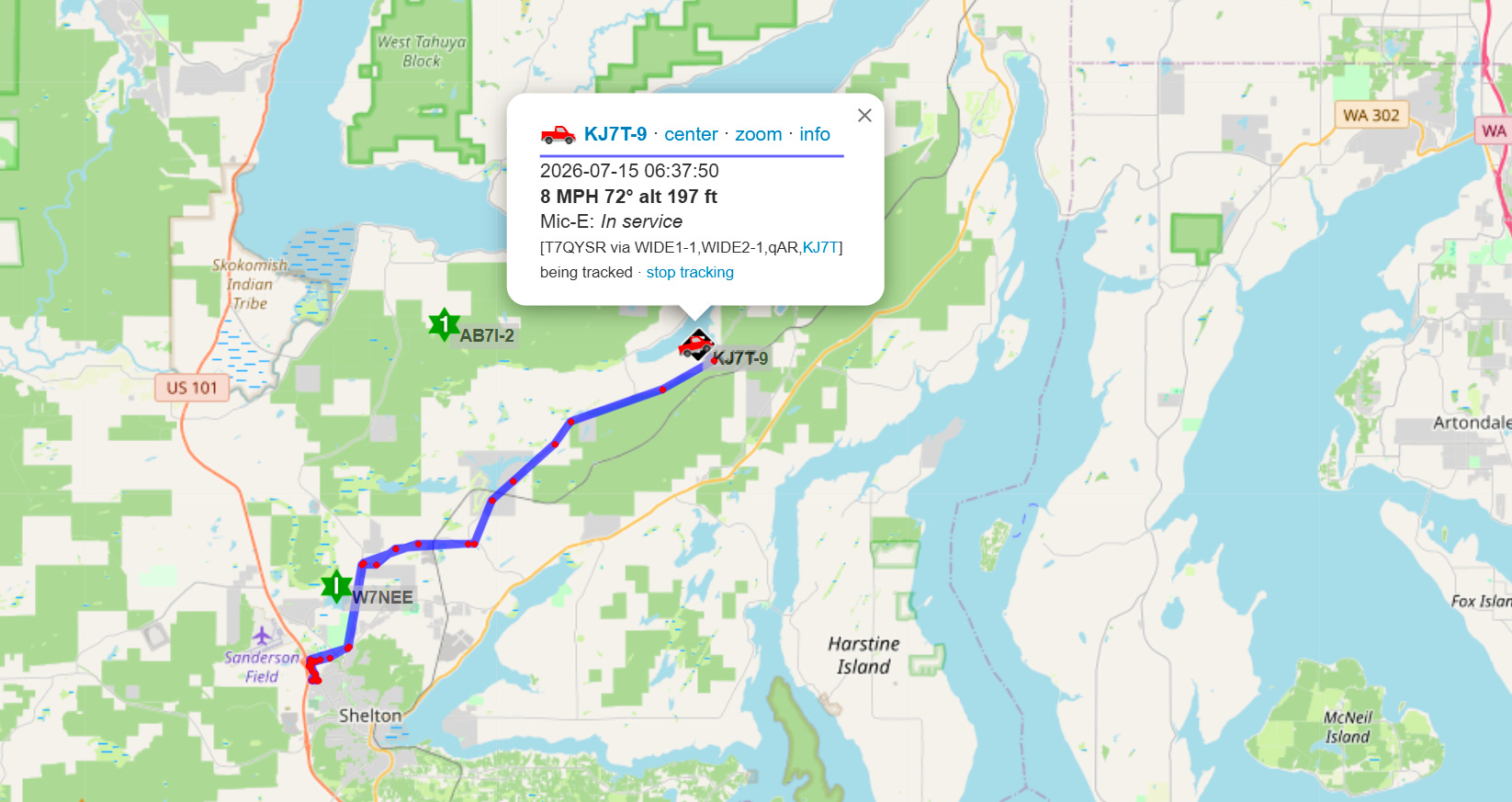
You can tell it is using SmartBeaconing because the dots are farther apart on the lengths of road with higher speed limits. Closer to town and in town, at lower speeds, the dots are closer together. (The other thing I’m happy to see is at the end of this track when I returned home, my own KJ7T digipeater picked up my beacon.)
The takeaway: I’m again reminded of the value of recipe cards. In the IT space, we call the step-by-step instructions to accomplish tasks not done very often by a special term: runbooks. However, I think of them as recipe cards. Even though I know some of my mother’s favorite recipes by heart, I always refer to the old recipe card while I’m making one of those dishes. The same kind of system — a recipe card for a particular configuration you want to work right every time — also works for your radios.
If keeping a notebook or computer file of particular steps seems too onerous, try some 3×5 cards contained in one group with a rubber band. This system does not need batteries or an internet connection.
For important settings you rarely change — or perhaps as memories fade with time — recipe cards can save you from an immense amount of frustration.
13. Short Stack
Community
-
Join Hams Over Video Conference 24/7 — What is this? It’s a Jitsi Meet server hosted by the same ham who runs AmateurWire (Roger Radcliff KE8LCM), and it appears he has a partner in this (Murray Green K3BEQ). I tested it in a browser on my laptop and in the Jitsi app on my Android phone, and both work fine. Ham radio is about connecting with others, and this service helps you do that.
Podcasts
-
HRWB 267 – Designing The Pebble Radio — “In this episode we meet Becky Spiceland N4BKY, Mike Spiceland N4FFF and Barb Asuroglu WB2CBA the amateur radio operators behind the Pebble radio project.”
-
Solder Smoke episode 265 is available — listen to it or watch it on YouTube.
APRS & Digital
-
aprs.world — “APRS World is a modern, open-source client for the global APRS-IS amateur radio network.” Accessible through a web browser and has an Android app.
-
DroidStar 9M2PJU Mod — I installed this customized build of DroidStar on my Android phone and found it works fine. I tested it on YSF, M17, and IAX. For those of us who have been waiting for DroidStar connections over IAX to be fixed, in this build, it works!
-
Learn About FlexRadio’s Aurora Transceiver from the Team that Developed It (Video) — “A few months before Hamvention, DX Engineering’s Michael, KI8R, caught up with Tony, K1KP, Steve, N5AC, and Gerald, K5SDR, from FlexRadio during Orlando HamCation for a deep dive into this breakthrough rig.”
Computing & AI
-
Microsoft Just Patched a Record 570 Flaws in Windows — The takeaway? Patch now as this release included patches for three zero-day vulnerabilities.
-
Someone connected a Raspberry Pi 4B to an old, unsupported Kindle, and now it’s an e-ink dashboard — Probably because I have old Kindles and some Raspberry Pi boards, this looks like a great way to combine old and new tech.
-
The People Who Will Thrive in the AI Age — “The general pattern that the research points to is that many people don’t use the time they save using AI to do less; they use the time to take on new tasks.”
14. QRT: End Transmission
I thought it would be an easier week but a plumbing leak in the kitchen dispelled that notion. As I type this, I have a fan going to keep air moving and a dehumidifier operating to try and dry out the wood under the kitchen linoleum tiles.
The good news is we have a new faucet. The bad news is the cost of the plumber to install the faucet was about what a new mid-range HF radio costs. When I heard the price, I was gobsmacked. But it works well and that is what is important.
I added a few nylon mooring cleats to my little dinghy to make it easier to tie to the dock. When I say little, I mean tiny: it is a six-foot-long fiberglass dinghy I bought for dragging behind the sailboat. Right now, though, it’s at the lake house with a small electric motor on it. As long as it’s not too windy or choppy on the lake, I feel perfectly safe out on the water. On the weekends when the wakeboard boats are generating big, sharp waves? The dinghy stays tied to the dock.
We have been settling back into a regular routine since last week’s ER visit. That gave me a little more time to work on the lawn and flower beds. My lavender plants really took off this year, making the bees very happy. I have a long line of nasturtiums coming up along a border and am looking forward to those flowering, too. The bees and hummingbirds are enjoying my flower pots on the deck, and that is where I sit with my Kindle e-reader and keep an eye on my spouse through a window.
Closer to radio, I realized it’s been a while since I logged into my Mastodon account: @kj7t@mastodon.radio. I think I need a weekly reminder to do that, so I don’t abandon folks who are waiting for a response.
I have much to be thankful for and appreciate my amateur radio hobby and radio friends very much.
73, and remember to touch a radio every day!