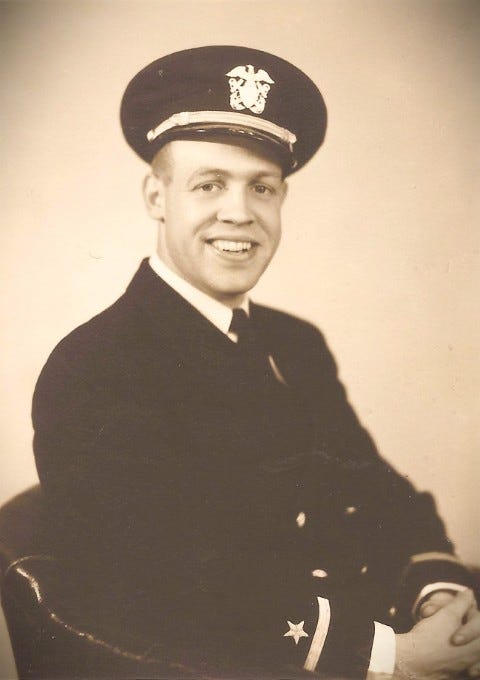
Hamvention® 2026 in Xenia, Ohio, officially begins on Friday morning, May 15. But several hundred hams arrived early to take part in pre-Hamvention activities. ARRL The National Association for Amateur Radio® was already on site at the Greene County Fairgrounds, exhibitors were busy setting up their booths. We snapped a few late afternoon photos of setup work at several booths, including Carlso…
Author: NA4DA
-
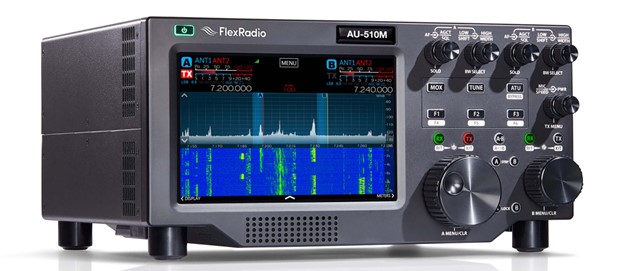
FlexRadio Announces DX Engineering as an Additional Distributor of Its New Aurora Series Transceivers
FlexRadio announced May 15 during the opening day of 2026 Dayton Hamvention® that DX Engineering will be selling the company’s new Aurora
 Series Transceivers, adding to the lineup of FlexRadio products it already carries.
(Image/FlexRadio) 
(Image/FlexRadio) With the announcement, DX Engineering becomes an exclusive distributor of Aurora 500-Watt HF/6-Meter SDR Transceivers in the U.S., extending its role within FlexRadio’s network of international distribution partners. In 2025, DX Engineering joined that network as an exclusive U.S. distributor of FlexRadio’s FLEX-8000 Series Transceivers, Maestro
Control Console, and accessories.All FlexRadio product support, warranty, and service will continue to be provided through FlexRadio.
Customers may also opt to purchase a DX Engineering Protection Plan for the Aurora Series and 8000 Series transceivers. The protection plan, which covers mechanical/electrical failure and other issues, begins after the end of the FlexRadio two-year manufacturer warranty. Get full details about the DX Engineering Protection Plan here.
Please check DXEngineering.com for current availability of the Aurora transceivers at DX Engineering.
“We are very excited for the opportunity to help amateur radio enthusiasts in the U.S. enjoy the benefits of these breakthrough transceivers,” said Tim Duffy, K3LR, DX Engineering CEO. “The Aurora is another example of FlexRadio’s commitment to designing products that advance the art and science of ham radio and improve the on-air experience for operators everywhere. We look forward to growing our partnership with their team of innovators for years to come.”
“Partnering with DX Engineering on the Aurora is a natural extension of the strong relationship we built around the FLEX-8000 Series,” said Matt Youngblood, KD5FGE, CEO of FlexRadio. “Tim and his team set the bar for customer service in this industry, and that matters when you’re putting a product as ambitious as the Aurora into operators’ hands. We designed the Aurora to redefine performance, efficiency, and usability in an all-in-one HF/6-meter transceiver, and DX Engineering is the right partner to help us get it to U.S. amateurs.”
About the Aurora Transceivers
At the heart of the Aurora is a revolutionary 500-watt PEP HF/200W 6-meter transmitter module that features a 500-watt solid-state power amplifier. The module achieves 80% nominal efficiency—a major leap over conventional MOSFET and LDMOS designs. This results in less heat to dissipate, a smaller heatsink, a lighter radio (18 lbs.), and exceptional RF performance. The Aurora’s compact, all-in-one design includes everything inside its rugged chassis: amplifier, automatic antenna tuner, and power supply with standard IEC plug accepting 80–264VAC.
Integrated remote operation is available with a Maestro, iPad, iPhone, or PC/laptop. Versions come with or without an eight-inch display which provides localized control at the radio. Like other FlexRadio transceivers, SmartSDR® software delivers a wide range of usability and signal processing enhancements.
Visit FlexRadio for full details about the Aurora Series transceivers. OnAllBands will be featuring much more of the Aurora in the days ahead, so stay tuned!
The post FlexRadio Announces DX Engineering as an Additional Distributor of Its New Aurora Series Transceivers appeared first on OnAllBands.
-

Youth Ham Radio Insights: How to Find a Mentor
The relationships I’ve formed with my mentors in amateur radio are some of the most meaningful relationships I have. These mentors have helped guide and encourage me through all my interests within the hobby—and even some outside of it—while being a constant source of support.
A number of hams (young hams particularly) get into the hobby as a result of the encouragement from a mentor (or “Elmer,” in amateur radio jargon), but not all of them. It can be challenging to find an Elmer on your own if you’re new to the hobby and don’t know many hams yet.
There are plenty of ways to go about connecting with Elmers, including finding them on the air, in person, or online. You may even discover that you need more than one mentor to explore different aspects of the hobby. If you’re looking for an Emer who lives relatively close to you (perhaps for help in setting up a shack, looking for advice on clubs, or exploring amateur radio opportunities nearby), local nets are a good way to search for someone. Typically, the people checking into these nets are active in the club that hosts the net.
Getting on the air outside of nets is also helpful. Simply rag-chewing on 40 meters for a few minutes may introduce you to someone who would be willing to mentor you or put you in contact with someone who can.
Finding a mentor online may be a good option if you don’t need someone who lives close to you. If you’re part of any large amateur radio group like the Young Ladies Radio League (YLRL) or Young Amateur Communications Ham Team (YACHT), you could reach out to someone on the board or to a very involved member and let them know you’re looking for an Elmer.

(Image/YLRL) This will be even more effective if you indicate exactly what you’re looking for in a mentor. Are you interested in learning CW? Need contesting tips? Want to get into digital modes? By being clear about your interests, whoever you reach out to can put you in touch with hams who are familiar with the specific topic in question.

(Image/DX Engineering) Another online option for finding a mentor could be turning to one of the numerous amateur radio groups on social media. It’s not uncommon for people to look for mentors in these groups, or to simply ask questions.
Finding a mentor in person can also be a good option. At many of the larger hamfests across the country, there are forums you can attend pertaining to specific topics. These will have a high concentration of like-minded hams who may be willing to help you get started in your area of shared interest. Clubs and organizations typically have booths you can visit at these conferences. Ask the people representing the club who would be good to reach out to with your questions.
Another effective method of finding a mentor is to find a local club and attend their meetings to get a firsthand taste of the club’s culture. For some clubs, events are only spread by word of mouth or through private social media groups rather than published online. The dates, times, and meeting places of your local clubs will, however, likely be posted online, making them easy to find for prospective attendees and members.
Some clubs also have a program in which members sign up to be mentors for other newer hams looking for some encouragement and assistance getting into the hobby. If you find a club that has a program like this, it’s an obvious choice and a great way to find a mentor.
Whether you already have a mentor or not, the best thing you can do is ask as many questions as you can when you don’t understand something. Most of the time, if you ask questions and want to learn, you’ll find plenty of mentors and build relationships with them naturally. Remember to let yourself be teachable —no matter your age, license class, or level of experience with the hobby. There is always something to learn from those around you.
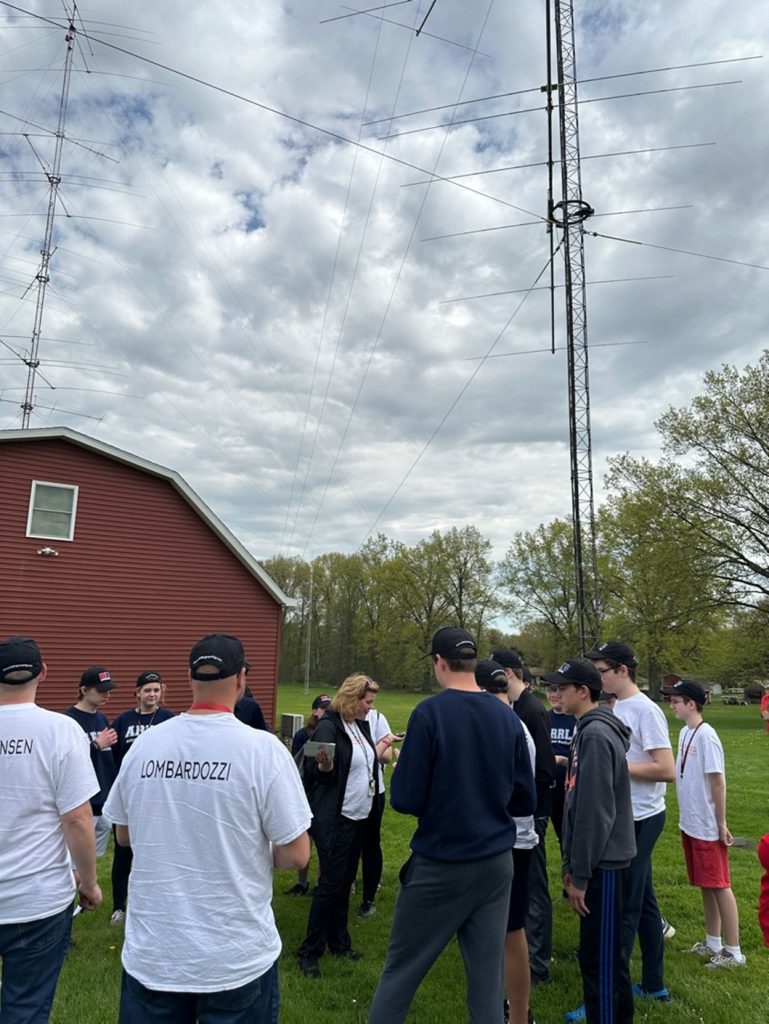
(Image/DX Engineering) You don’t always need a mentor to get involved with amateur radio, but finding one is well worth it. The most valuable parts of amateur radio are the connections and friendships that are made along the way, and relationships with Elmers are no different. Even if it’s challenging at first, once you do find a group of people who are willing to mentor you, they’ll become some of your biggest supporters—not just in ham radio, but in life overall.
The post Youth Ham Radio Insights: How to Find a Mentor appeared first on OnAllBands.
-
Tom Salzer KJ7TRandom Wire 182: Is the Yaesu DR-3X repeater real? We’ll probably find out at Hamvention!Random Wire℠
Would you rather listen? Issue 182 is creatively interpreted by a pair of AI voices, published as Random Wire Reflections. Don’t expect technical accuracy. I find the AI-generated banter humorous. Listen now.
00 QRV: Are You Ready?
Welcome to Random Wire issue 182. You are part of a wide-ranging, far-flung community of radio amateurs of all skill levels and interests. We are each unique, and at some level, that also makes us the same. You are welcome here.
It’s Hamvention
It’s time once again for the biggest amateur radio event in the world: Hamvention. I wish I could be there. To all of my ham radio friends attending, have a great time, be safe, and bring back stories to share!

01 Thank You…for Opening the Door
Last week, I thanked Cale K4HCK for his contributions to our community. This week, I’m looking further back—to the very first time the door to amateur radio was cracked open for me.
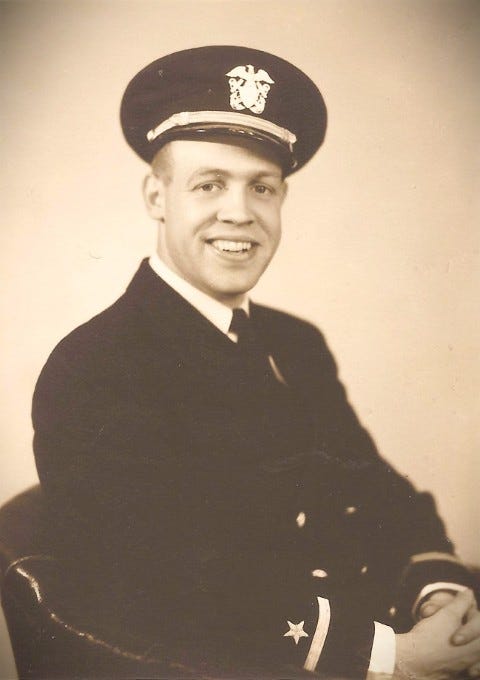
That door was opened by my uncle James W7FBS (SK).
Growing up in Hoquiam, Washington, Jim belonged to the “Homebrew Generation.” This was an era where you didn’t just buy a radio — you scavenged parts from old broadcast sets and built your own Glowbug transmitters. Jim was a CW operator who, as a teenager, claimed the attic room so he could run a thin wire out the window to a nearby tree.
Years later, long after Jim was gone, my curiosity about amateur radio finally took hold. I realized that Jim’s wire to the tree wasn’t just a piece of copper — for a kid in a small community, it was his connection to the world. I became a ham in part because of the magic Jim experienced by reaching out across the planet, all with a wire from the attic.
Thank you, Uncle Jim, for helping me glimpse something that has become an enjoyable, fulfilling activity: amateur radio.
02 Yaesu DR-3X: A Third-Generation Fusion Repeater, Right on Cue for Hamvention
Something interesting surfaced in the last couple of days, and the timing is too good to ignore: Yaesu appears to be preparing to announce a new repeater called the DR-3X, billed as the opening act for a third generation of System Fusion. The catch is that as I write this on Wednesday, almost nothing official has landed — and by the time you’re reading this on Friday morning, Hamvention will be underway and the picture may look very different.
So consider this a pre-Hamvention snapshot. I’ll do a proper write-up once the dust settles and Yaesu’s product page goes live.
What seems to be on the table. The earliest credible mention I can find is a Yaesu USA broadcast titled “Special Episode – Yaesu System Fusion 3 & DR-3X series,” posted to YouTube about a day before I started writing this. A Spanish-language post at xreflector.es went up the same day with what reads like a translation of the same announcement. Between the two, here’s what’s being claimed:
-
85 watts on VHF, 65 watts on UHF — a meaningful step up from the DR-2X’s 50W
-
100% continuous duty cycle — the DR-2X is rated 100% only at lower power; full-power continuous would be a real improvement for busy repeaters
-
DSP-enhanced analog audio — Yaesu pitching better-sounding FM, not just better digital
-
Backward compatibility with existing System Fusion radios
-
A new feature called IES (Interference Evasion System) that supposedly detects interference on the input frequency, instructs compatible radios to shift to an alternate access frequency, and reverts when the interference clears. Not frequency-hopping, more like a coordinated fallback. Requires both radio firmware updates and compatible radios — so whatever this is, it’s a feature for the future, not for the existing Fusion fleet.
The honest caveats. As of Wednesday morning, Yaesu’s own website doesn’t have a DR-3X product page. There’s no brochure, no spec sheet, no firmware notes. Independent coverage — the usual ham press, retailers, eHam, the podcasts — hasn’t caught up yet. The two sources I have appear to trace back to the same Yaesu USA announcement, so it’s really one source wearing two hats.
It’s also worth noting that Yaesu was running a DR-2X purchase incentive program as recently as December 2025, which suggests this rollout is fresh enough that the previous generation hadn’t been wound down yet. That’s not a contradiction — but it does mean clubs that just bought a DR-2X shouldn’t feel like they bet on the wrong horse.
Why this is worth watching. If the headline specs hold up, the DR-3X reads like Yaesu addressing two long-standing wishlist items at once: more honest continuous power, and a smarter response to interference than “turn it off and call the trustee.” The IES concept in particular is the kind of thing that only works if the radio side keeps pace — which means it’s also a signal about where the next generation of Fusion handhelds and mobiles is heading.
Hamvention reality check. Yaesu has already announced a four-hour System Fusion education class at Hamvention 2026, and the xreflector post explicitly says the full reveal happens at the show. So if you’re reading this Friday morning and the Yaesu booth has a DR-3X under glass, that’s the real announcement — not anything I’ve written here. I’ll have a proper feature comparison in a future issue once I’ve seen the brochure and, ideally, gotten ears on one.
If you’re at Dayton this weekend, stop by the Yaesu booth and tell me what you see. I’ll happily credit the first reader who sends a confirmed photo of the spec sheet.
03 What’s New on EtherHam?
It has been a very productive week with several new EtherHam.com posts:
-
Sizing Up the Enjoybot 12V 30Ah for POTA — I like the all-in-one nature of this battery with accessory ports, no case needed. (But here is a brief cautionary tale. I recall an incident with a battery when fishing with my daughter when she was about 10 years old. She pulled in her trolling gear which was on a stainless steel cable and the cable dropped right on top of the trolling motor battery terminals. Current flowed and the cable vaporized instantly. Be careful around unprotected battery terminals!)
-
Hardware: Assembling the Raspberry Pi 4 and Case — If you’ve never put a Pi into a case before, it might seem a little daunting. It’s not hard. I show you how.
-
One Sun, Two Rulers: Why Sunspot Numbers Don’t Match — I got frustrated that the sunspot numbers reported by two different tools were wildly different and wondered: why? There are two ways of calculating the number, and it’s helpful to understand which system your tool is using.
-
Reclaiming Disk Space on a Dell Wyse 3040 Running AllStarLink 3 — My 3040 was getting a bit low on space so I took a deeper look at what was consuming capacity. And then I fixed it.
-
Why Your Domain Renewals Keep Getting More Expensive (And Where This Is Headed) — My domain renewals (yes, I probably have too many domains!) are getting more expensive. Why? Here’s the answer along with my thoughts on where domain renewal prices are headed.
04 TIDRADIO TD-H9: Part 2
A bit more about the TIDRADIO TD-H9 — a 10-watt handheld with great features at a budget price. I’ve found two YouTube videos that proved helpful in understanding the radio, one by KM6LYW and the other by W6IWN (thank you, Ren, for this source).
W6IWN measured +9 watts output on 70 centimeters and on 2 meters, and he touches on many of the great features of the TD-H9:
I did get automatic beaconing working on my radio…well, maybe. I got a couple of packets to launch but so far, it has not been consistent. First, I turned OFF the PTT/Manual triggering of the beacon. I thought I could have that on with the radio also set to timed beaconing, but that does not appear to be the case. Once I turned PTT beaconing off and set timed beaconing to 180 (seconds, I assume), the radio did beacon on its own: once.
The other thing I did was switch to the “18.8inch Foldable Tactical Antenna” that came in the package. Once I did that, signals in and out of the radio improved. The path set in the radio is WIDE1-1, WIDE2-2. That is probably most appropriate in rural areas (like mine) but would be much too busy in an urban area. The more appropriate setting is probably WIDE1-1, WIDE2-1.
My APRS test is not definitive; I’m still working on it, which means I haven’t figured it out yet. Will it beacon? Yes, I’ve proven to myself that it will. Will it do it automatically? Not reliably for me, yet. I’d love to hear your report.
This radio has a built-in spectrum scope. That’s handy. (Press and hold the number 7 touchpad to activate the scope.)
Another feature I wasn’t aware of is the ability to find and load local repeaters. This is done with the radio connected to the Odmaster app on your phone via Bluetooth. The W6IWN video above explains how to do this. My first thought was: what a great radio to include in a go kit! You can look up local repeaters and move them to channels on the radio with the app.
Available on Amazon in green (I call it Ryobi green), clear, and black. However, it also comes in orange direct from TIDRADIO. I have to admit I like that orange color!
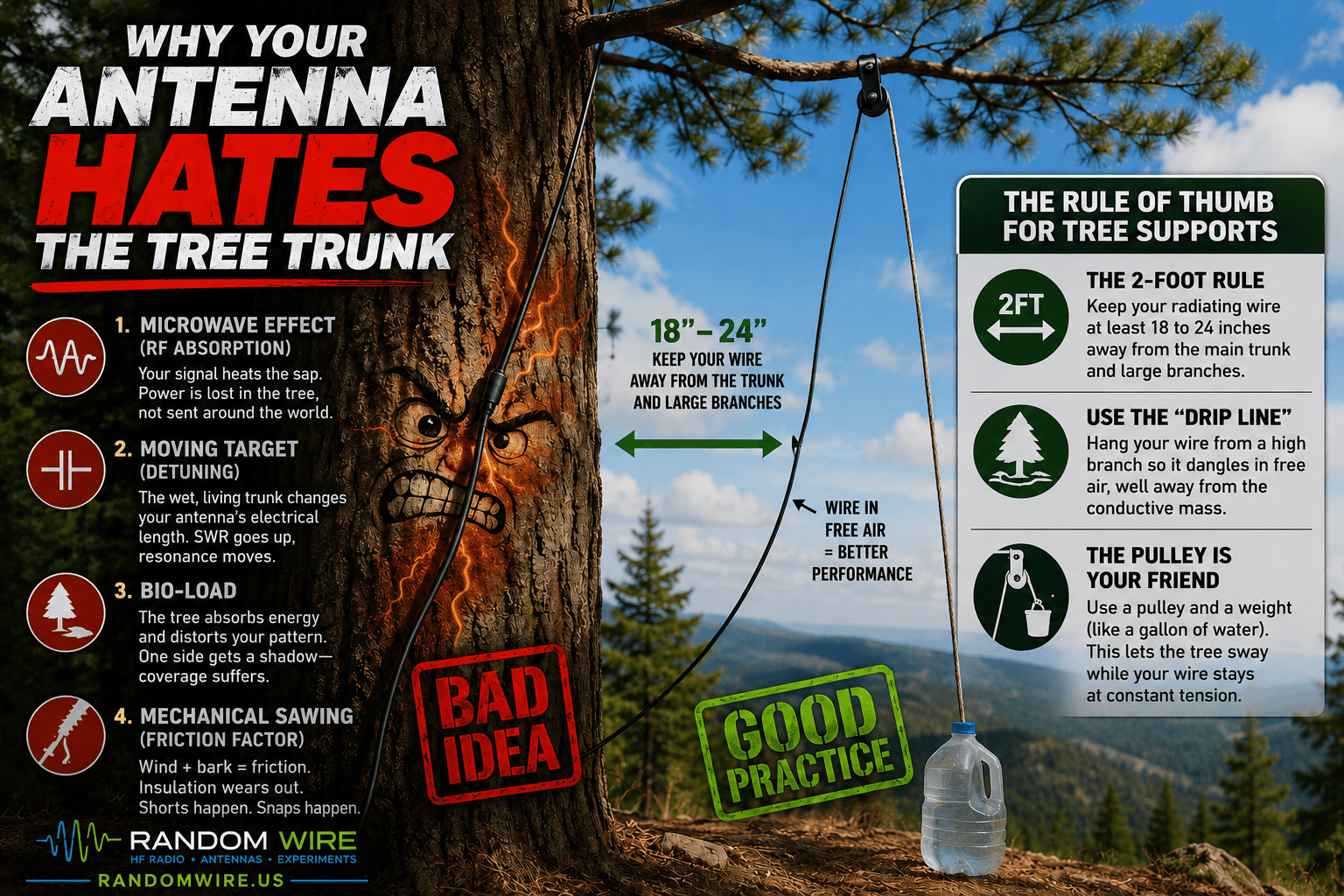
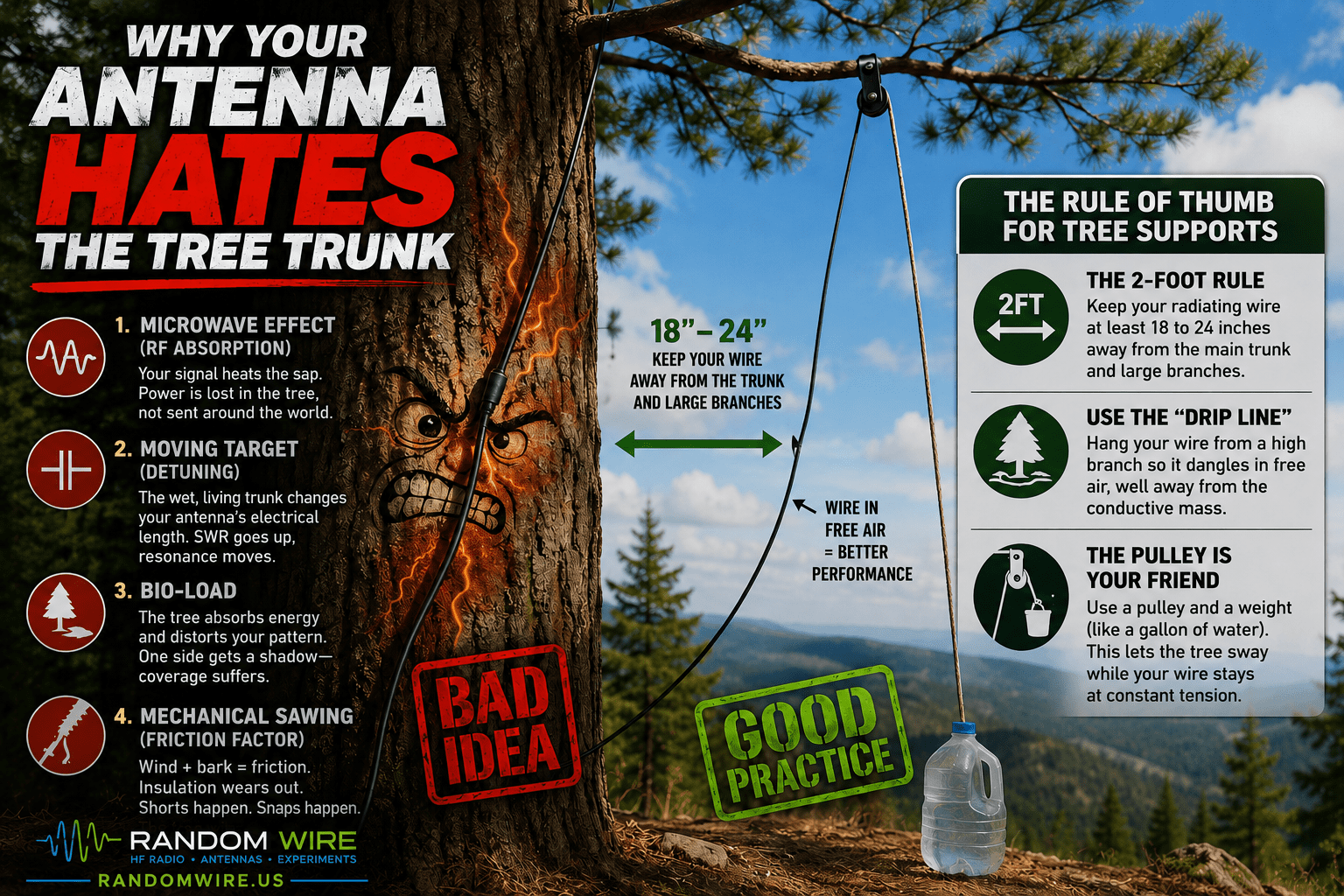
05 Why Your Antenna Hates the Tree Trunk
It is the ultimate temptation. You have a tall, sturdy tree and a long spool of wire. The easiest way to get that wire into the air seems to be running it directly up the trunk.
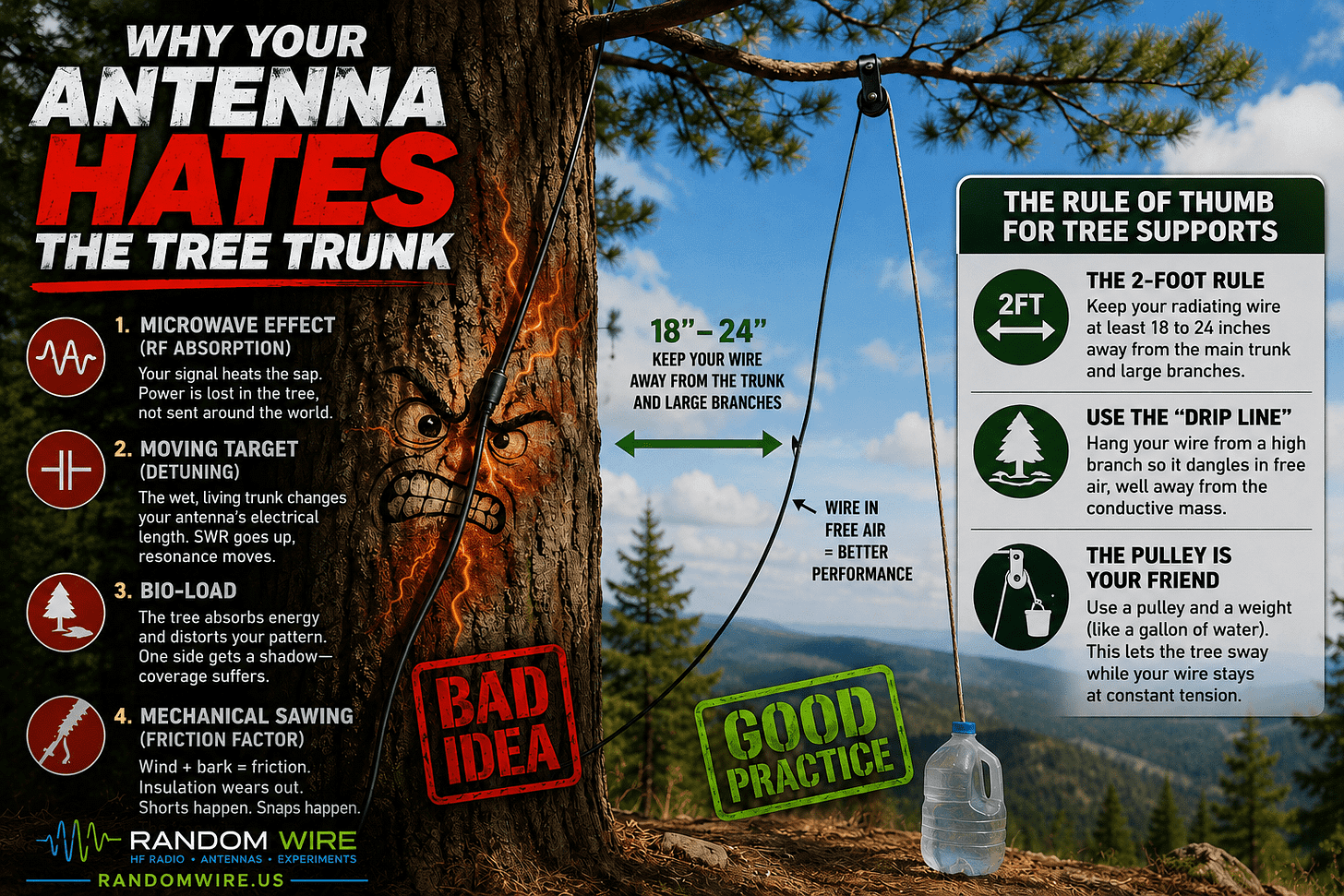
Why Your Radio Hates the Tree Trunk But before you do this, remember that to your radio, a tree isn’t just a support. It’s a giant, vertical, semi-conductive sponge. (While this sounds like something out of a 1940s Popular Science magazine, it is a real thing. Major General George Owen Squier of the US Army Signal Corps actually patented the “Tree Antenna” in 1904, calling it “floradventure.”)
1. The Microwave Effect (RF Absorption)
A living tree is full of sap — a complex solution of water and electrolytes. To an RF signal, that sap looks like a lossy conductor. When you run your wire right next to the trunk, the electromagnetic field around the wire doesn’t just radiate into space: it also couples with the tree.
Instead of your signal reaching Japan, a significant portion of your power is vibrating the molecules in the wood. You aren’t just an operator anymore. Instead, you’re trying to cook a 50-year-old evergreen from the outside in.
2. The Moving Target (Detuning)
The proximity of the tree trunk creates parasitic capacitance. This acts as a loading effect that electronically lengthens your antenna.
-
The SWR Mystery: You might get your antenna tuned perfectly on a dry Monday. But on a rainy Tuesday, the bark gets soaked and the sap flow increases. Suddenly, your SWR (Standing Wave Ratio) is through the roof.
-
The Velocity Factor: The mass of the tree changes the velocity factor of the wire. Because the dielectric environment is inconsistent, your antenna becomes a moving target that is nearly impossible to keep resonant on a single frequency.
3. The Bio-Load
If you run a wire too close to a tree, the tree becomes a part of the antenna system — but a very poor one. This is often called dielectric loading. The tree effectively clobbers your radiation pattern. Instead of a nice, clean signal lobe, your tree absorbs the energy on one side, creating a shadow in your coverage. You might find you can hear stations to the East just fine, but the West (where the trunk is) is a total blackout.
4. Mechanical Sawing (The Friction Factor)
Trees are not static. Even on a calm day, a tall conifer is swaying. If your wire is tight against the trunk or a branch, that movement creates constant friction.
-
Insulation Failure: Bark is essentially high-grit sandpaper. Over a few months, the tree will chew through the jacket of your wire, leading to a direct short against the wet wood.
-
The Snap: When the wind really picks up, a tree can move several feet. If your wire doesn’t have a system to provide slack (like a pulley and a counterweight), the tree will eventually win the tug-of-war.
The Rule of Thumb for Tree Supports
Trees are wonderful antenna supports, provided you treat them as living towers that are also conductive.
-
The 2-Foot Rule: Try to keep your radiating wire at least 18 to 24 inches away from the main trunk and large branches.
-
Use the “Drip Line”: If possible, use a throw-line to hang your wire from a high branch so it dangles in free air, well away from the conductive mass of the trunk.
-
The Pulley is Your Friend: Always use a pulley and a weight (like a gallon of water) at the ground end. This allows the tree to sway while your wire stays at a constant tension.
Keep your wire in the air, but away from the bark.
06 How to Support This Work
The Random Wire and EtherHam sites take time, energy, and money to keep going. I choose to not burden readers with a recurring subscription. Instead, if you find value in this work, please consider buying me a coffee or using other ways of supporting the Random Wire and EtherHam.
I just received a notice from the hosting company for the EtherHam website: they are raising their renewal prices. Costs are going up (I know this isn’t a surprise — we’ve all felt this in our own wallets) and they are adjusting prices accordingly. It’s going to cost me more to renew.
I’ve been noticing the past couple of years that domain prices have also been creeping up. That surprised me, so I researched it. What I learned is shared in Why Your Domain Renewals Keep Getting More Expensive (And Where This Is Headed).
If you are a company and would like to help sponsor the Random Wire and EtherHam, please contact me.
07 HamClock Upgrade to V4.24
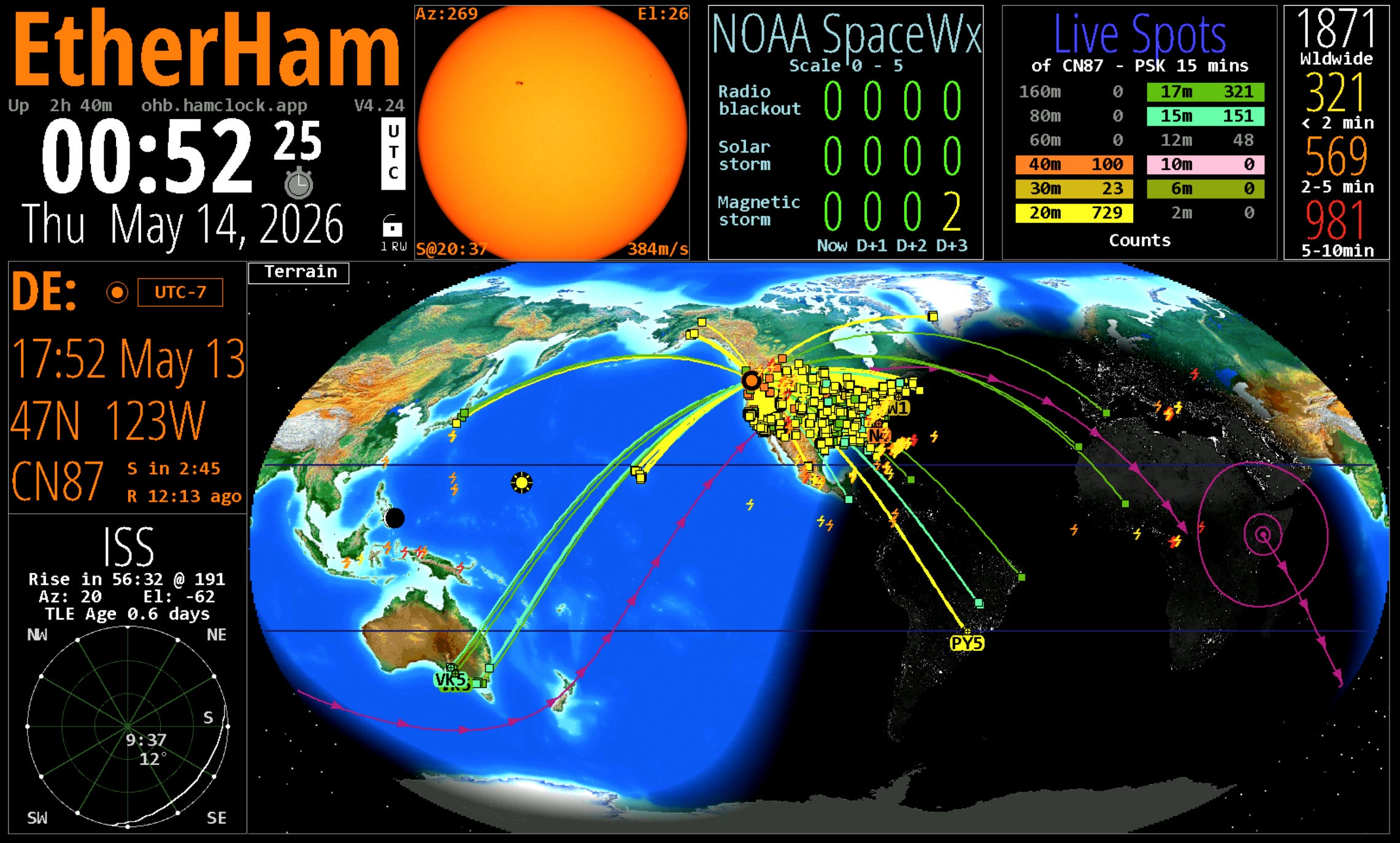
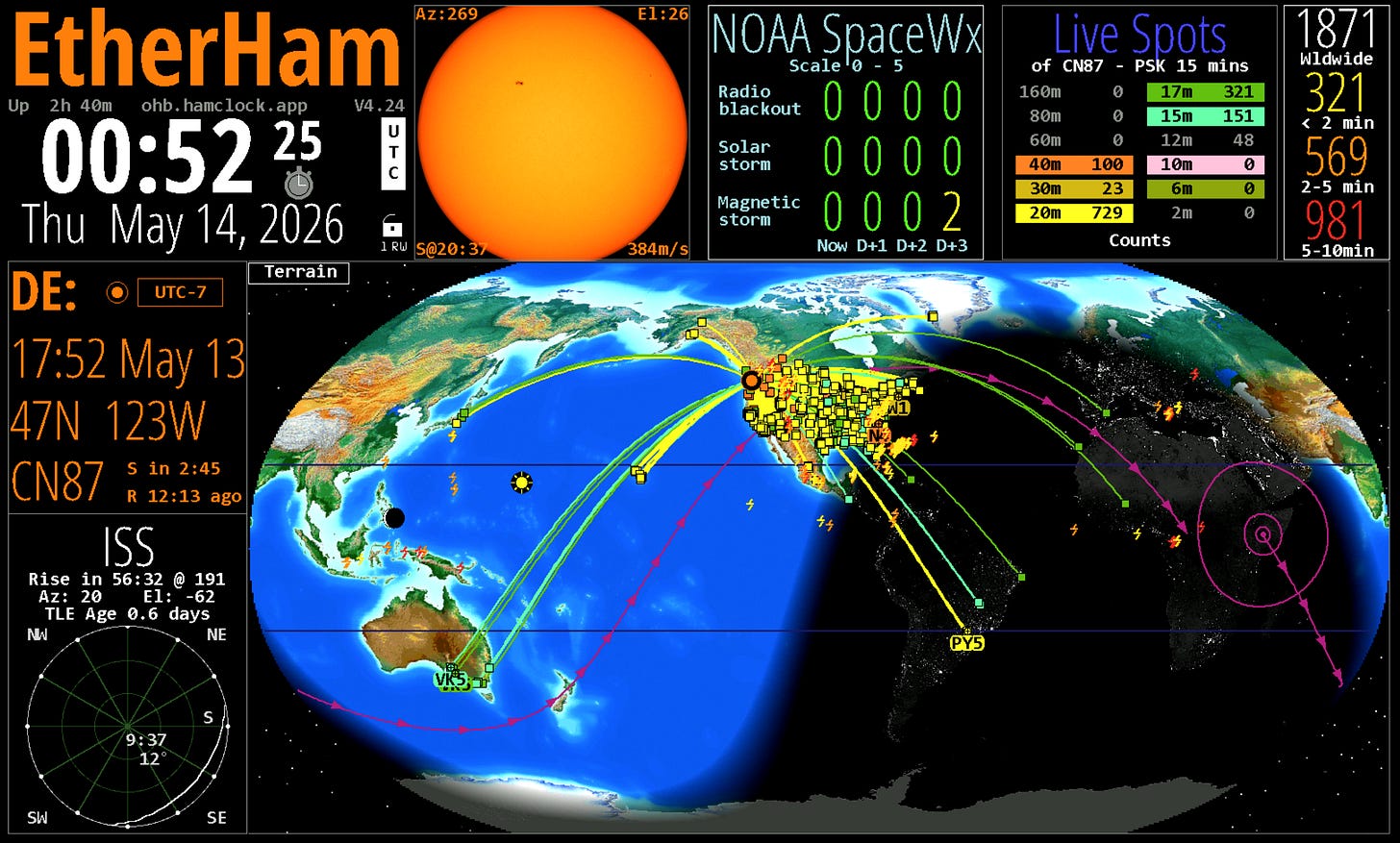
I’m using the OpenHamclock Backend on my HamClock, and yesterday, I noticed version 4.24 was available. Upgrading was painless. A new addition is lightning icons on the global view and an option to see lightning counts in the upper right panel.
08 I Listened to the Saturday M17 Net
Last Saturday, I used BlueDV on Windows with Bluetooth headphones to listen to the weekly M17 net on America’s Kansas City Wide Network, but I also used my HOIP phone. And you know what? The HOIP phone worked very well. Here’s how to do this if you have a SIP phone configured to use your HOIP number:
-
To monitor a QSO on the Kansas City Wide (KCWide) network using your Hams Over IP (HoIP) phone, dial extension 15135.
-
This extension provides a 100% digital connection directly to the KCWide digital network, allowing you to listen to ongoing conversations and nets from your VoIP desk phone or softphone app.
How to Use the Connection
-
To Listen (Monitor): Simply dial 15135 and listen to the audio stream.
-
To Transmit (Key Up): If you are a licensed amateur radio operator, dial *99 to transmit.
-
To Unkey (Receive): Dial # to stop transmitting and return to listening mode.
If you haven’t yet set up your HoIP service:
-
Register: Create an account and request an extension through the Hams Over IP Ticketing System.
-
Configure: Follow the Hams Over IP Wiki to configure your specific hardware (e.g., Cisco or Yealink IP phones) or softphone app (e.g., Groundwire or MicroSIP) with your provided credentials.
-
Alternative Monitoring: If you cannot use your HoIP phone, you can listen to a live, delayed feed of KCWide on Broadcastify.
And I did try listening to the Kansas City Wide Digital Fusion Room 28054 on Broadcastify, too, which also worked well. It’s great to have options.
09 The Short Stack
Most of these finds are sourced from the feeds published on EtherHam.com.
-
FreeDV 2.3.0 released — “FreeDV 2.3.0 has been released, including support for running it directly on a compatible Flex 8000 or Aurora series radio, enhancements to performance (thanks to the removal of Python) as well as improvements to FreeDV Reporter filtering functionality and other bug fixes.” More details available on the project’s GitHub page.
Radio
-
Tube Radio Passion Projects — “So, I had fond memories of this Capehart, and I set about restoring it. It was still in good shape — in fact, the tubes all tested strong, so I recapped it and tweaked the alignment and it came right back to life. I have used it to listen to my beloved Cardinals broadcasts.”
-
The Net Control Station’s Secret Weapon: How NetControl.app Is Changing the Way Hams Run Nets — “NetControl.app is a free web application built by Brian (N4AFK) specifically for amateur radio net control operators. It’s still in beta, but it’s already packed with features that make running a net cleaner, more engaging, and honestly, a lot more fun.”
Digital Radio (M17, PSK31, APRS, FreeDV)
-
APRS.world: The Browser-Based APRS Map That’s Changing How Hams See the World — “APRS.world is a real time map and callsign tracker for the global APRS network. It connects directly to the live APRS-IS internet feed. That means every beacon, message, and weather packet that reaches the global servers appears on your screen in seconds.”
-
A Return for FreeDV (Digital Voice) — “I will have to write a series of articles on this, as I have done some experimenting with FreeDV. I hope to chat with the FreeDV folk at Hamvention.”
SDR
-
RTL-SDR Blog V4 End Of Line — “The RTL-SDR Blog V4 has been a very popular product that we released back in August 2023…the Blog V4 relied on the Rafael R828D chip, which Rafael Micro no longer produces…Unfortunately, this stockpile has now been exhausted, and as far as we are aware, no other usable stockpiles exist, so no more Blog V4 productions will be possible…Going forward, the Blog V3 will remain in stable production.”
-
Feeling adventurous? RTL-SDR / LoRa / GPS / RTC, an All-in-One Expansion HAT for Raspberry Pi — “Software-defined radio, long-range communication, satellite positioning, and real-time clock — all on a single HAT. Designed for Raspberry Pi, covering everything from signal monitoring to full IoT deployments.”
Antennas
-
If you haven’t looked at SignalStick products lately, you’re in for a treat. Scroll through the online store at https://signalstuff.com/shop/ for more.
-
Elecraft Introduces the New AX4 Portable Antenna & BL3 Balun — “Elecraft has just introduced two new products that will likely attract the attention of many POTA activators and portable operators: the AX4 portable vertical antenna and its companion BL3 balun.”
-
Portable Ham Radio Insights—Deploying Your Wire Antennas — “This time let’s focus on how to actually get them into the air when you’re operating portable. There’s no single “right” way to do it, but here are a few methods that have worked well for me.”
Raspberry Pi
-
My Raspberry Pi 4 still has a job in my homelab, and it isn’t Home Assistant — “Along with a mini PC, the Pi 4 is an essential part of my home lab, keeping an eye on my network, whether I am home or not.”
10 📋Digital Radio News Digest
Executive Summary
It was a busy week in the digital voice and VoIP linking space. OpenRTX pushed firmware fixes addressing UI text input and Linux audio issues. AllStarLink released ASL3 version 3.18-1 with packaging updates and bug fixes, while the Amp-ASL project saw commits targeting buffer sizing and hang diagnosis. On the DMR side, a new Windows/Linux Brandmeister client called VoxDMR surfaced. And a native iOS AllStarLink client, OpLine, is in beta and recruiting TestFlight testers.
Per-Mode Breakdown
DMR
A new Brandmeister app for Windows and Linux called VoxDMR has been announced on Reddit — worth watching if you’re looking for desktop DMR options. Community discussion this week also touched on Bluetooth PAN connections and bridging between commercial and ham DMR systems.
D-STAR
Nothing notable this week.
YSF / C4FM / WiRES-X
Nothing notable this week.
M17
The M17 Foundation published its 2025 financial report. On the firmware side, OpenRTX landed several fixes:
_ui_textInputReset()wasn’t clearing the full input buffer, the M17 meta text input label was incorrect, and Linux builds couldn’t read baseband audio file sources. All three are now resolved.VoIP Linking
AllStarLink released ASL3 3.18-1 with .deb packaging updates and assorted fixes, including a restored ability to make outgoing calls (app_rpt #1046 — useful if that broke for you recently). The Amp-ASL project saw commits for period/buffer size tuning and hang diagnosis. AllScan picked up CSS optimization, row highlighting, and RPT link count display. OpLine, a native iOS AllStarLink client, is in beta and looking for TestFlight testers. Community discussion covered issues with adding private nodes and accessing the web admin portal.
Generated: 2026-05-14 18:17 UTC — 45 items collected. Click here to download the collected items with URLs.
11 📡Band Conditions This Week
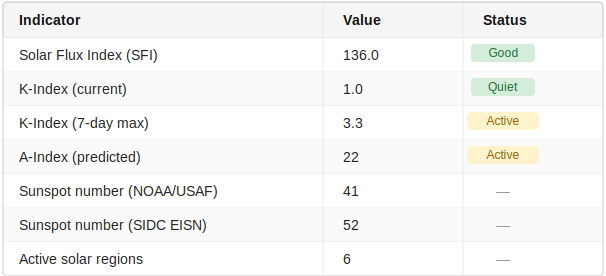
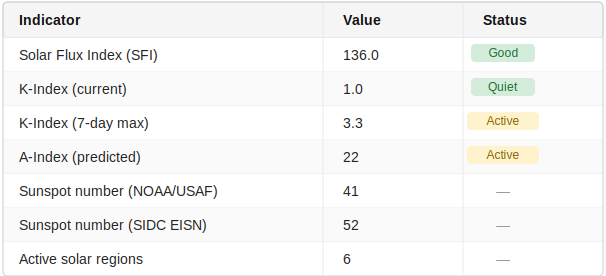
With an SFI of 136 and the K-index sitting at a calm 1.0 today, conditions look favorable — solid performance on 20m through 10m, with good DX opportunities and lively contacts across the higher bands. The week wasn’t entirely smooth sailing though; a 7-day max K-index of 3.3 tells us there were some unsettled stretches that likely rattled the higher bands for a stretch. The predicted A-index of 22 is worth watching — enjoy the quiet window while it lasts.
Source: NOAA Space Weather Prediction Center (swpc.noaa.gov) and SIDC (sidc.be). Generated: 2026-05-14 18:24 UTC
12 📻This Week in Radio History
Nothing new this week, but a piece on Samuel Morse is too good to sit on, so here it is:
On May 24, 1844, Samuel Morse tapped out “What hath God wrought” from the U.S. Capitol to Alfred Vail in Baltimore — 40 miles away, nearly instantaneous, and world-changing. The message itself was suggested by Annie Ellsworth, daughter of the Patent Commissioner, who had helped Morse secure the $30,000 federal grant to build the line. One of my favorite footnotes: the original machine printed marks on paper tape, but operators quickly realized they could just listen to the clicks and read the message by ear. The acoustic sounder was born, and with it, the culture of listening that still runs through every CW operator today.
13 QRT: End Transmission
Time to close the channel. It was quite the week, marked by a few notable events.
Website broke
The EtherHam website crashed. I found it odd that the home page didn’t crash, but visiting any post yielded an error page. What happened? An automatic plugin update broke the site.
Two hours of detective work later, I realized I had used a particular plugin on the pages with posts but not on the home page. I took a hard look at how I was using this complex plugin and decided I really didn’t need it, so it’s gone.
And then I wondered: did an automatic plugin update cycle bork any of my other websites? Yes! The misbehaving plugin on that site, though, was by a very responsive company and they had it fixed the same day.
Book manuscript
It’s been a busy week at the keyboard — my neck and eyes are feeling it. I’ve been pounding away at my book manuscript and when I saw I was three chapters from the end, I stopped reaching for my radio and instead spent more time at the keyboard. I managed to get the first draft done for all 17 chapters. They are now being looked at by three trusted reviewers.
There will be plenty more to do, including: get quotes (“Voices from the Field”) to amplify several points, get the ISBN, design a cover, select a printer, and more. While the timeline I created called for completing this work by this time next year, I think I’m on track to be in print by this fall.
I’ve been using AI to help with proofreading and assuring consistent formatting. Once in a while, a response from the AI engine makes me laugh, like this one yesterday:
The regex ate the
</w:pPr>closing tag on the H1 paragraphThat one tickled my funny bone.
This manuscript has been pulling a lot of memories to the surface. A few chapters have impacted me more than I thought they would. That probably means the takeaways are going to be more meaningful for others…at least I hope so.
73
With that, I’ll say 73. Remember to touch a radio every day. If it touches you back, better put a choke on that antenna line!
-
-
9X5KM – Rwanda
Al, F8FUA announces that he will be active from Kigali, Rwanda as 9X5KM during June 4-13, 2026. Holiday-style operation using an Elecraft K3, Hexbeam, dipoles and verticals; CW, SSB & Digi. Possibly QRV on low bands depending on local situation. Log uploaded to Club Log is internet access is available. Also QSL via H/c, LoTW. […]
-
Sierra Radio Systems Modules to be Featured by DX Engineering at 2026 Dayton Hamvention® (Videos)
Also find Sierra Radio Systems PackTenna Portable HF Antennas at the DX Engineering booth.
We know there’s a lot to absorb at Dayton Hamvention®. It’s always a good idea to plan ahead so you’re sure to hit all the must-see spots as you walk the Greene County Fairgrounds and Expo Center in Xenia, Ohio. This is especially true if you’ve only got one day to take it all in.
Here’s a little heads up from OnAllBands: If you’re in the market for high-performance modules and accessories to control and monitor repeater systems, remote stations, and more, check out the Sierra Radio Systems display at the DX Engineering booth in Building One.
As the exclusive worldwide distributor of Sierra Radio Systems products (outside of Sierra Radio Systems), DX Engineering carries their full lineup of modules and accessories relied upon by operators around the world.
But before you stop by the booth, we recommend you watch the following videos featuring George, KJ6VU, of Sierra Radio Systems. He walks you through the capabilities of some of Sierra’s remote-control modules while providing valuable insights into what you’ll need to successfully operate a remote station. Part 1 in this series, “A Detailed Look at the Station Controller Module from Sierra Radio,” is below:
Here are the other videos in the series, all featuring George, KJ6VU (Part 4 also includes insights from Mike, VA3MW, of FlexRadio:
- Part 2: “An Intro to the Node Red Programming Language”
- Part 3:“Learning the Ins and Outs of Control Modules.”
- Part 4: “Building Your Ideal Remote Ham Radio Station.”
What You’ll Find at Hamvention
Here’s a rundown of the Sierra Radio Systems products that will be ready for purchase at the DX Engineering Hamvention booth. Click on the links for complete details.

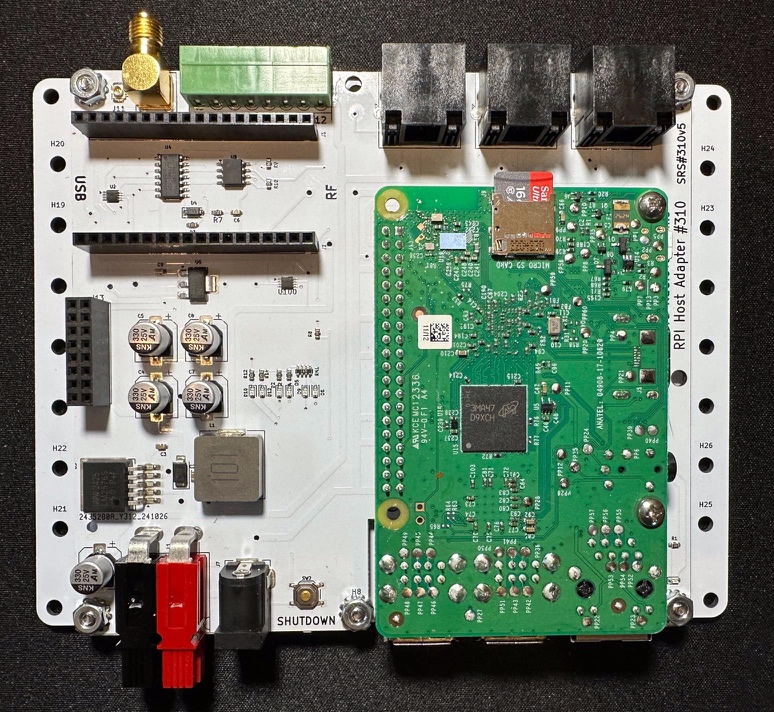
Raspberry Pi Host Adaptor (Image/Sierra Radio Systems) - General Purpose Input/Output Module (SIR-321)
- 4×1 or 1×4 Remote Coax Switch (SIR-331)
- VHF/UHF Remote Coax Switch (SIR-332)

VHF/UHF Remote Coax Switch (Image/Sierra Radio Systems) - 1 or 2 Port RF Wattmeter (SIR-335)
- Device Control Network Data & Power Hub (SIR-356)
- Universal Relay Control Module (SIR-361)

Universal Relay Control Module (Image/Sierra Radio Systems) 
(Image/Sierra Radio Systems) Also check out Sierra Radio Systems’ PackTenna Portable HF Antennas, which will also be available at the DX Engineering booth.

PackTenna 20/10M End-Fed Half-Wave Antenna. (Image/Sierra Radio Systems) You’ll also find these POTA-friendly PackTenna antennas featured in the new 2026 DX Engineering Amateur Radio Products Catalog. Click here to request your free printed copy or view a digital version online. If you’re in Xenia for the show, pick up your complimentary copy at the DX Engineering booth.

New DX Engineering catalog. (Image/DX Engineering) The post Sierra Radio Systems Modules to be Featured by DX Engineering at 2026 Dayton Hamvention® (Videos) appeared first on OnAllBands.
-
DX-World Weekly Bulletin
[#663] The latest FREE NON-SUBSCRIPTION DX-World Weekly Bulletin written by Bjorn ON9CFG is available to download. Click below to get the newest jam-packed edition which this week runs to 16 pages. Previous bulletins can all be found here. Please contact Bjorn with any updates or errors. DOWNLOAD THE LATEST BULLETIN =====
-
VP2VXX – British Virgin Islands
[NEWS] by team VP2VXX. We’re headed back to the British Virgin Islands for a DXpedition during October 19–27! Operators will be Brayden KC1KUG, Michael W3MLJ, and Violetta KN2P. We’ll be active during the CQWW DX SSB Contest under the callsign VP2VXX, and outside of the contest as VP2V/followed by our home calls. We’re planning to […]
-
Guide to Prepping for ARRL Field Day 2026: Part 2, LiFePO4 Batteries, Solar Panels & Generators
In Part 2 of our Guide to Prepping for ARRL Field Day 2026 (June 27-28), we’ll be examining ways to successfully operate your transmitting equipment from sources completely independent of the commercial power mains.
Besides earning bonus points that will go toward your individual or club Field Day score (read ARRL Field Day Rules here), using batteries, solar panels, wind, hydroelectric power, generators or other methods (bicycle power, anyone?) to run y0ur stations expands your portable operating capabilities when emergency communication is critical.
Plus, the techniques you hone during the 24 hours of Field Day can be used in your POTA, SOTA, and other outdoor setups throughout the year. Field Day is an opportunity to step out of your comfort zone, test your ingenuity, and try something new—including your club treasurer’s infamous five-alarm chili (note: add antacid tablets to your Field Day list).
Let’s look at a few options available at DX Engineering:
Bioenno Power LiFePO4 (Lithium Iron Phosphate) Batteries
Based in Santa Ana, California, Bioenno Power has been a trusted source for sustainable power solutions for the amateur radio community since 2010. Their batteries are assembled in the U.S. and undergo thorough testing before being shipped to your door. DX Engineering carries a great selection of these LiFePO4 batteries optimized for ham radio applications. Features include:
- High performance in a lighter package: These LiFePO4 batteries boast less than half the weight of their traditional counterparts while offering improved performance. This makes them ideal for portable ham radio setups, including 100W HF SSB radios. Users enjoy portability without the need for heavy, expensive battery-boosting equipment.
- Longer operational times: Designed for continuous use, they support extended periods of communication, making them perfect for Field Day and emergency situations.
- Durable and reliable: Built with advanced Protection Circuit Module (PCM) technology, these batteries ensure internal cell balancing and safeguard against overcurrent, under-voltage, over-voltage, and short-circuiting.
Proven Results
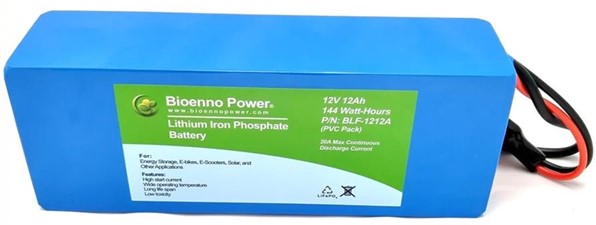
OnAllBands’ portable ops specialist and POTA maven John, WG8X, wrote that the Bioenno Power 1212A battery (12Ah, 20A, 240W, 3.31 lbs.) is one of his go-to choices, noting that it “supplies plenty of power for my adventures and is light and long-lasting.”

Bioenno Power 1212A LiFePO4 Battery (Image/Bioenno Power) In addition to the above model, choose from these 12VDC LiFePO4 batteries:
- BLF-1203W: 3Ah, 6A, 72W, .088 lbs.
- BLF-1203AB: 3Ah, 7A, 84W, .088 lbs.
- BLF-12045W: 4.5Ah, 9A, 108W, 1.10 lbs.
- BLF-1206A: 6Ah, 12A, 144W, 1.54 lbs.
- BLF-1208LB: 8Ah, 12A, 2.4 lbs.
- BLF-1209A: 9Ah, 12A, 288W, 2.65 lbs.
- BLF-1209WS: 9Ah, 18A, 216W, ABS Sealed Case, 2.60 lbs.
- BLF-1212AS: 12Ah, 20A, 240W, ABS Sealed Case, 3.5 lbs.
- BLF-1215A: 15Ah, 30A, 360W, 4.19 lbs.
- BLF-1215AS: 15Ah, 30A, 360W, ABS Sealed Case, 4.19 lbs.
- BLF-1220AS: 20Ah, 40A, 480W, ABS Sealed Case with Screw Terminals, 5.73 lbs.
- BLF-1220A: 20Ah, 40A, 480W, 4.19 lbs.
- BLF-1230A: 30Ah, 60A, 360W, 7.9 lbs.
Bioenno LiFePO4 batteries also come paired with a compatible charger.
Refer to these Bioenno Power LiFePO4 resources at DX Engineering to help you find the right battery model for your Field Day needs:
- Mobile Transceiver Duty Cycle Guide: 20/80
- Mobile Transceiver Duty Cycle Guide: 50/50 Heavy Duty
- Mobile Transceiver Compatibility Guide: Icom, Yaesu
- Mobile Transceiver Compatibility Guide: Alinco, TYT
- Mobile Transceiver Compatibility Guide: Elecraft, Kenwood, FlexRadio, Powerwerx
Solar Panels
DX Engineering makes it easy to expand the versatility of your temporary stations with Bioenno Power Foldable Solar Panels.
Available in 28-, 40-, 60-, 80-, 100-, and 120-watt models, these easy-to-use monocrystalline panel systems are perfect for Field Day and other applications when you’re outside with plenty of sunlight but no access to the power grid. Enjoy clean, modulated, and EMI/RFI-free silent output, easy portability, and durability with excellent wear and weather resistance.

(Image/DX Engineering) The Bioenno Power BSP-28 (above) is a high-strength PET polymer laminated solar panel, weighing 3.3 lbs. It’s integrated into a rugged polyester canvas (also known as PVC fabric). Features include 28W maximum power; 12-18VDC; 1.55A maximum output current; built-in 5VDC USB outlet for charging personal devices such as phones and tablets; and 2.1mm DC output jack. Dimensions when folded: 11.96″ L x 9.48″ W x 0.98″ H.
Find more Bioenno Power solar panels at DX Engineering.
For an all-in-one solution, check out Bioenno Power solar panel, charge controller, and battery packages. Solar charge controllers can also be purchased separately.
The Bioenno Power SOL-9A package comes with 40W foldable solar panel, 9Ah LiFePO4 battery, and 20A MPPT charge controller. (Image/DX Engineering) PowerFilm Foldable & Rollable Solar Panels
These thin, flexible, high-tech panels are designed to generate electricity even in cloudy, shady, and hazy environments and deliver proven performance in low-light conditions. They are perfect for keeping your batteries topped off when operating portable or for any activity where you want to keep batteries charged without the noise of a generator. The weather-resistant nylon fabric on the back side of the panels provides protection whether the panel is in use or being stored. Grommets on the corners of the panel keep it secure to prevent damage in high winds.
A charge controller is not required if the battery capacity is 100x greater than the panel output. For example, a 100Ah battery would not need a charge controller if the panel output is 1A or less. If a charge controller is required, it should be sized according to the output of the panel.
Rollable panels are available in outputs from 7 to 60 watts. Foldable models come in outputs from 20 to 220 watts.

PowerFilm Solar Panel unfolded (Image/PowerFilm) 
Rollable solar panel model (Image/PowerFilm) Find the full lineup of PowerFilm Solar Panels at DX Engineering.
DX Engineering also carries portable and foldable solar battery charging kits from Samlex. They include a solar panel, 10A charge controller, and case.
***
Generators
Using a portable generator can earn you bonus points on Field Day as an emergency power source (check Field Day Rules above for details). You’ll find a nice selection of generators from A-iPower, Firman, and Generac at DX Engineering.

The gas-powered, air-cooled A-iPower SUA3800I Inverter Generator boasts a maximum 3,800 peak wattage, 2.6-gallon tank, caster wheels for easy transport, muffler for quiet operation, and the capability for two generators to be linked for double the power. The California EO-approved unit weighs 134 lbs. (Image/A-iPower) ***
OnAllBands will be featuring more Field Day essentials leading up to the big weekend, including antenna analyzers, power supplies, headsets, portable antennas, and more.
The post Guide to Prepping for ARRL Field Day 2026: Part 2, LiFePO4 Batteries, Solar Panels & Generators appeared first on OnAllBands.