The Random Wire newsletter is a weekly amateur radio and tech journal by Tom KJ7T, with deeper technical content posted to EtherHam.com.

1. QRV: Are You Ready?
Welcome to Random Wire 189.
This past week was interesting as I worked on this Random Wire newsletter. The week prior, I got busy with projects while writing RW 188, including experimenting with the Arduino UNO Q. That struck a chord with about a dozen subscribers, and it was apparently not a welcome sound: they unsubscribed this week. I’m guessing about why they dropped, of course. At the same time, I welcome the several new subscribers who joined the Random Wire family this week.
As I’ve thought about this, I think it’s probably a natural outcome of how people choose to subscribe. They find something about the Random Wire newsletter in a publication or by word of mouth, and since they learn of this newsletter from amateur radio sources, they assume it’s all about amateur radio. And of course, it is about amateur radio, but it is not only about radio. I look at the modern, internet-connected, technology-focused side of amateur radio. For subscribers expecting “all RF, all the time,” this would be a disappointment.
I have my RF-only days, too. I get it. At the same time, focusing only on RF is a bit like driving a car with a manual transmission, manual steering, and roll-up windows: it works, but it isn’t as comfortable as a modern personal vehicle. We live in a technology-dominated world, and I choose to let tech augment my amateur radio play. Not everyone chooses to do that, and that’s okay.
For those of us who do marry technology and radio, you are in good company. I call us “EtherHams” and it’s why I named the workbench-focused side of this newsletter EtherHam.com.
And speaking of EtherHam.com, a big thank you to Jeff for purchasing a quality Champion-brand hoodie from the EtherHam store. Store purchases help support this newsletter and the EtherHam site. I wish I had permission to use his photo because it looks great!
2. Thank You…Paul N4FTD
Community shows up in all sizes — sometimes it’s a hoodie purchase, sometimes it’s something that changes how you see the whole hobby. This week I want to talk about the second kind.
Coming straight from the heart, this won’t be a highly polished thank you note.
I extend my sincere gratitude to Paul N4FTD who took time months ago to reach out and build a friendship with me. It turns out we share many of the same things, from caring for our spouses to how we grew up. It has been, and continues to be, a joy to recognize someone traveling alongside me, albeit on the other side of the country. You can find Paul’s radio writing in ROTA-Radio.
As radio amateurs, we usually talk with our radio friends about radios, antennas, and technology. But much of this hobby is really about connecting in a meaningful way with other radio amateurs. I’m reminded of how COVID impacted some of our most vulnerable amateurs who, it turned out, didn’t just look forward to being with like-minded people at their monthly ham radio club meeting — they needed that contact. When COVID took that away, they suffered. Socializing at the monthly meeting was vital for their well being. When meetings resumed, they made sure to attend each one. I noticed their joy at being back in the room with other amateurs.
We are important to each other in ways we may not always see or understand, but it is real and impactful. I hope you’ll choose to reach out to someone new to you in our wide, far-reaching amateur radio community, even if only to say hello.
That kind of connection is the reason I do any of this. But most of my hours this week were spent somewhere less sentimental — the workbench.
3. New on EtherHam
I didn’t do any original coding this week. Instead, I’ve been fixing code, testing my Arduino devices, and starting a few more projects.
-
Weekly Report: July 2, 2026 — Catch up with band conditions, digital radio news, and the Groups.io digest.
-
LightAPRS Gateway 1.0 — First Impressions — There are updates posted at the end of the article, because while I thought I solved the issue, it turns out I had not. RF beaconing has been reliable, igating has not. It does not appear to be a fault with the device but I’m not sure yet what the problem is. I worked on this for three days before reaching out to LightAPRS support for help. We’ve been changing parameters, letting the device run, then looking at logs. Hopefully this will get resolved very soon.
4. In The Shack
While the LightAPRS mystery simmers, a new radio showed up that deserves its own writeup.
4.1 Retevis RA89R: Very First Impressions
I saw a review of the Retevis RA89R radio and was intrigued. The $65 Retevis RA89R arrived Wednesday evening and I immediately put it on the charger. Thursday, I turned it on for the first time.
Retevis RA89R Ham Radio, Cross-Band Repeater, APP Setting, Dual Band Handheld Radio, High Power Two Way Radio, 2800mAh USB-C Rechargeable, IP54, Long Range Walkie Talkies for Emergency, Survival (this is an affiliate link)
My very first impression? Solid build. The radio with the battery installed has some heft to it. The battery back is rounded, making it fit nicely in your hand. The two PTT buttons take a moment to get used to, because if you are trying to use VFO B but are pressing the VFO A push-to-talk button, it’s not going to work (more on this in a moment).
When I went into the menu, I immediately noticed the radio was set to a wider frequency range than my license allows. I changed the start and end frequency to 144-148 MHz for VHF and 420-450 MHz for UHF, per the ARRL band plan.
I was able to set frequencies through the radio keypad but my CTCSS tone did not stick when I saved it (probably user error). So I cranked up the Retevis app on my Android phone, connected to the radio over Bluetooth, and set the tone there. Once saved to the radio, that worked fine.
In a few minutes, I was checking my audio on my duplex AllStar node 588418. That node intakes RF on 431.180 MHz and transmits to my radio on 147.47 MHz. The 431.180 frequency also requires a CTCSS tone. I have the RX frequency (147.47) in VFO A and TX (431.18) in VFO B. While testing and not having any success, I realized I was pressing the VFO A PTT instead of the VFO B PTT. It’s a simple thing, but it will trip you up if you’re not used to having two PTT buttons. (Note that the manual calls these Band A and Band B buttons.)
Here’s another counterintuitive “aha” moment: it doesn’t matter which VFO is active on the radio. If the arrow is pointing at VFO A and you push the VFO B PTT, you will transmit on VFO B.
The display is easy to read…indoors. Outside in the sunshine, it fades and is hard to read, even set to the brightest setting.
The radio sounds good…maybe not quite as nice as my BTECH UV-PRO, but the audio is clear and has plenty of volume for me.
USB-C charging is a welcome feature, with a USB-C charging port on the battery and on the desktop charger. This makes it easy to grab the radio and go, knowing you can recharge it in the field. However, I noticed that none of my Power Delivery-capable chargers would charge the radio. Instead, I had to use a small “dumb” wall wart like we used to get when we bought a Kindle e-reader. One advertisement indicates it requires a 5V 2A charger, and that agrees with my experience.
The belt clip attaches to the battery. I’m not a fan of this arrangement. The base of the radio is large enough and flat enough that it stands nicely on a desk or shelf.
The product page says it has airband receive, FM broadcast receive, and NOAA weather alerts, but I have not yet tested those capabilities.
One ad says the radio is “moisture resistant” but without an IP rating, I can’t determine what this means.
One other slight gripe is the functions associated with keypad buttons are not labeled on the radio. You have to look at page 6 in the manual to know what they do. Nobody wants to carry a manual with them. Fortunately, the manual is not just a sheet of paper — it’s a real mini-manual that is well written.
So two strikes right out of the gate are: dim display in sunlight and the belt clip attaches to the battery instead of the radio body. But on the plus side, this dual band radio has a solid build, good audio, and a 2800MAh battery, at a very attractive price point. If you need a tough analog VHF/UHF radio and don’t want to spend much money, consider the Retevis RA89R.
The Retevis will need more bench time before I trust a verdict. The other project living on my bench this week has already earned mine: the UNO Q ASL node.
4.2 The UNO Q ASL Node is Working Well
Last week I went all-in on the Arduino UNO Q, and after setting up and using a couple of different Q devices, I’m still a fan. They are working delightfully well. Unlike my Raspberry Pi devices, I worry much less about the Q-based devices because they use durable eMMC storage instead of damage-prone microSD cards.
The AllStar node I’m running on a UNO Q uses Ampersand-ASL for AllStarLink connectivity and an AllScan USB Communications Interface for audio. It’s a very compact package:
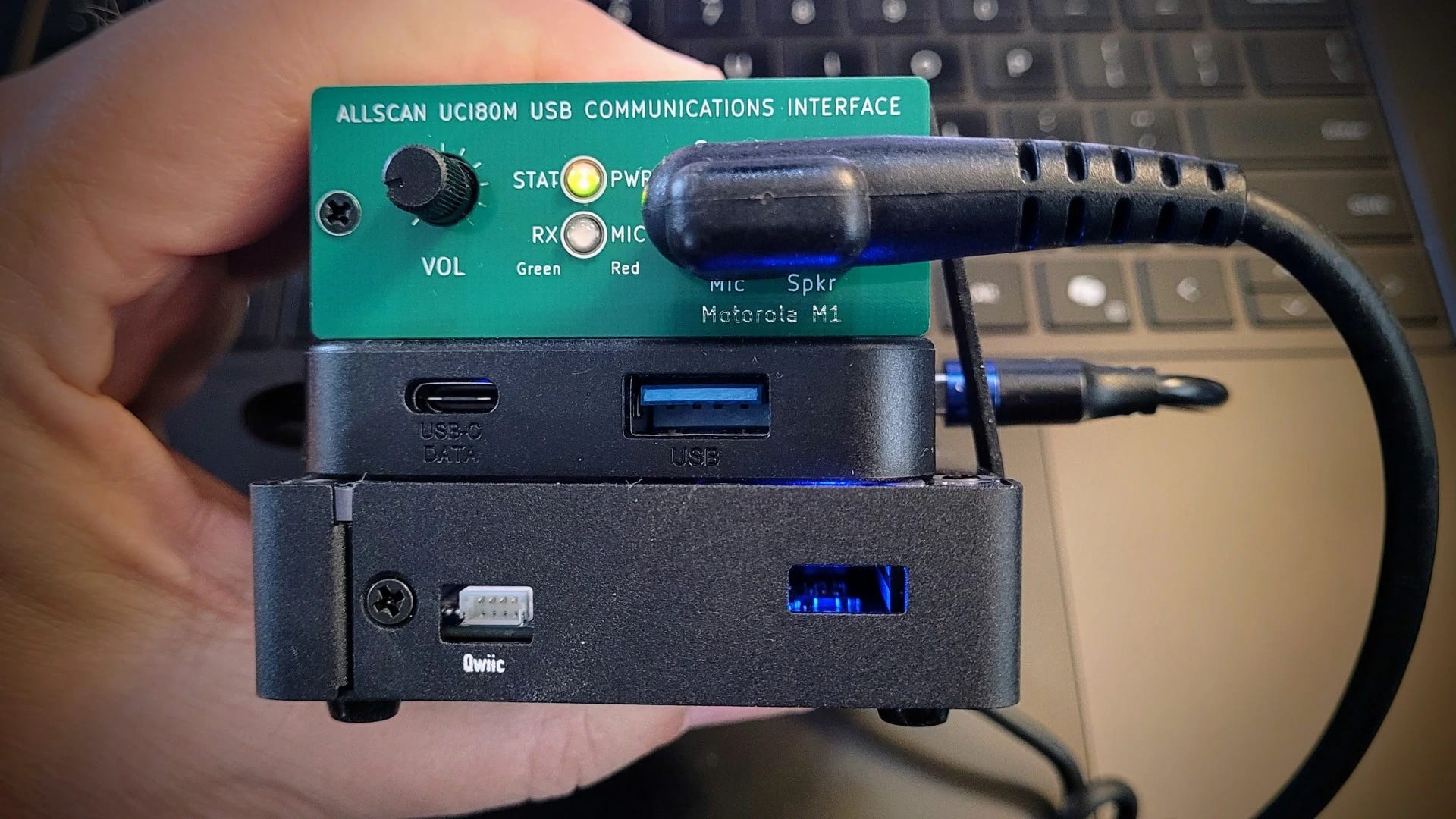
In the view above, the UNO Q is in a metal case, forming the bottom layer of this little cake. A small USB-C hub is the next layer up, and the AllScan UCI80M tops the pile.
The user interface (UI) for Ampersand-ASL looks different than what you may be used to. You add favorite nodes on the Configuration screen, then on the Home page, you select one of those nodes to connect to it. In the screenshot below, you can see the favorites (green buttons) I’ve set for node 588414 on the UNO Q:
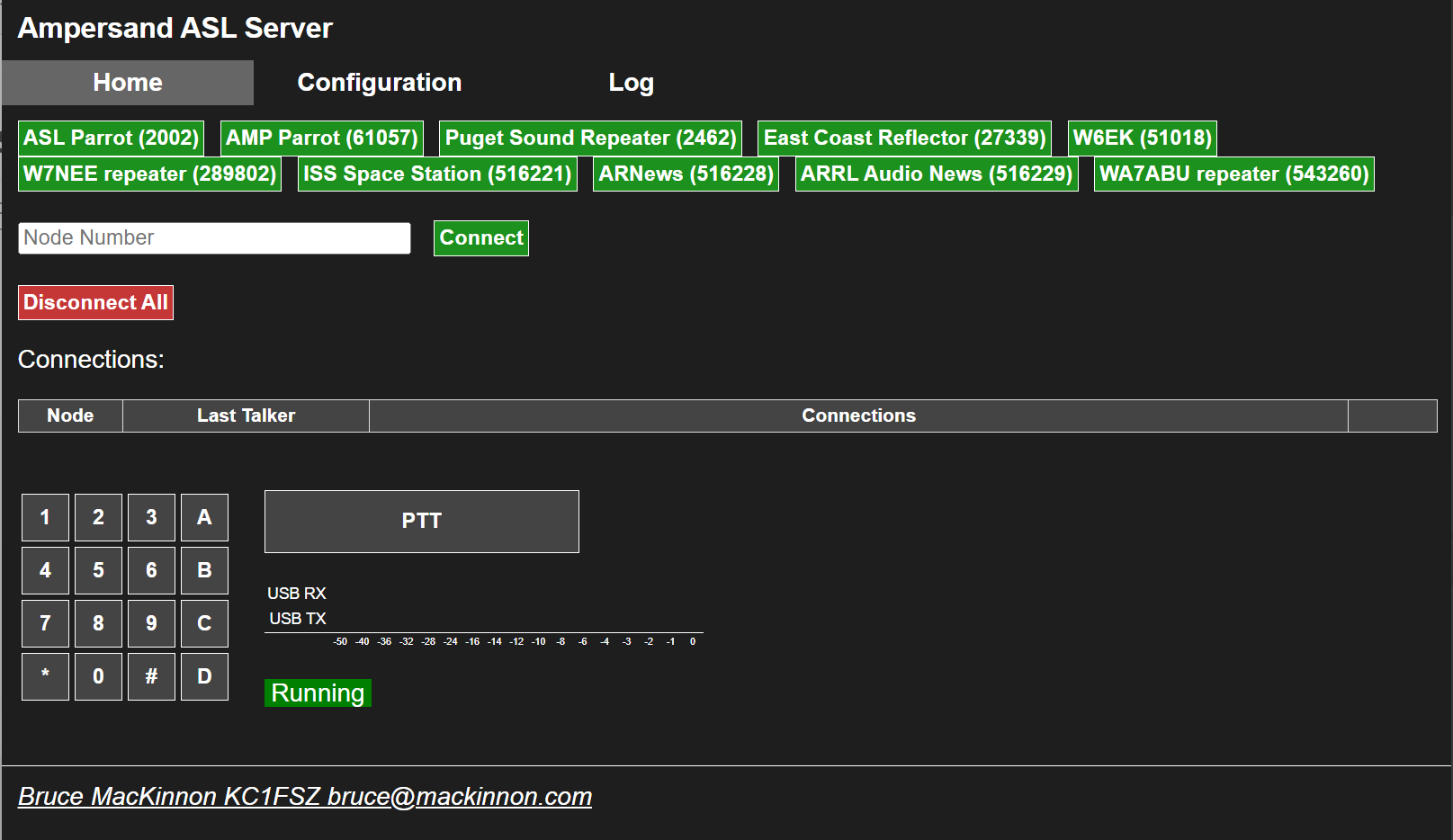
A quick note about the two different parrots. Node 2002 (ASL Parrot) is a standard parrot node running on the conventional ASL3/Asterisk and app_rpt stack. That stack has a hard-coded 8kHz sample rate. Node 2002 is locked to 8K audio because that’s simply what Asterisk/app_rpt does everywhere, including in parrot mode.
Node 61057 (AMP Parrot) runs on Ampersand-ASL, Bruce MacKinnon KC1FSZ’s from-scratch C++ reimplementation of the AllStarLink protocol that implements the IAX2 protocol directly, uses ALSA natively for audio, and does not use Asterisk at all. Because it was built from the ground up rather than inheriting Asterisk’s legacy code, it was easy to support 16Ksps codecs — that’s the whole point of the project’s design freedom. (16Ksps is 16,000 samples per second — a sampling rate of 16kHz. In contrast, standard telephone-quality audio that Asterisk-based systems use is 8,000 samples per second.)
4.3 Ampersand-ASL Gets an Update
Bruce MacKinnon KC1FSZ isn’t done improving Ampersand-ASL. He pushed a fresh update to Ampersand-ASL this week, and I applied it to my AllStar node without a hitch. The update tidies up compile warnings, fixes the sluggishness that had been making the Configuration tab painful to use, and folds the boot race condition workaround — the ExecStartPre=/bin/sleep 10 fix I documented on EtherHam — into the official user documentation. The full update procedure and what changed is covered in the updated EtherHam article, How to Run AllStar on the Arduino UNO Q.
I also discovered this week that Bruce was kind enough to mention KJ7T on the main Ampersand project documentation page — both as a link to the EtherHam article and in the project’s contributor acknowledgements. That’s genuinely appreciated. Bruce is doing interesting work, he’s responsive to feedback, and he’s building something that matters to the ham community. If you’re running an AllStarLink node — or curious about running one on hardware that ASL3 doesn’t yet support — the Ampersand project is worth your attention.
4.4 Amp-ASL and the Pi Zero 2 W — A Quick Experiment
I looked down on my bench and saw TomStick, a Pi Zero 2 W in a Geekworm USB dongle case, and wondered: could Ampersand-ASL by Bruce KC1FSZ run on this single-board computer? The Zero 2 W is arm64, Debian-capable, and a lot of hams have one sitting around. If it worked, it would be a compelling option for a low-cost, low-footprint AllStarLink node using hardware you might already own.
The short answer: you can’t build Amp-ASL on a Pi Zero 2 W. The compiler ran out of memory twice trying to compile WebUi.cpp, even with a 512MB swap file added. The second time, the OOM (out of memory) killer was aggressive enough to terminate the SSH session along with the compiler. TomStick was fine afterward, but the message was clear: you can’t build Amp-ASL on this platform.
This isn’t really a knock on Amp-ASL — it’s a build-time constraint, not a runtime one. On my Arduino UNO Q node, the running amp-server process uses about 4.2MB of RAM. The Zero 2 W would probably run Amp-ASL if you could get the binary onto it. The problem is getting there: WebUi.cpp is simply too large to compile on 512MB of RAM, and the OOM killer has the final say.
Could you cross-compile on a more capable machine and copy the binary over? Probably — but that’s a different project for a different afternoon.
The practical takeaway: if you want to build and run Amp-ASL on arm64 hardware, you need more than 512MB RAM. It’s worth noting that Bruce’s documented test platforms are a Raspberry Pi 5 and a Dell Wyse 3040 mini-PC — both with substantially more RAM than the Zero 2 W’s 512MB. I knew when I started this little side trip that the Pi Zero 2 W was going to be outside the tested envelope.
The UNO Q with 4GB RAM had no trouble at all. A Pi 3B+ (1GB) or Pi 4 (2GB or better) would be worth trying, and those results would be interesting. If you try it, let me know how it goes.
4.5 LightAPRS Digipeater: Hold the Phone
Not every experiment this week ended cleanly — and the LightAPRS saga from last issue still isn’t over.
The LightAPRS Gateway I mentioned last week turned out to have a subtle reliability problem: it was beaconing to APRS-IS once on startup and then going silent. I thought I fixed it with a watchdog script to restart Direwolf if it stopped sending packets. However, the timer interval was too short, creating a doom loop that prevented the 60-minute scheduled beacon from firing.
As I continued to monitor the device, I discovered my watchdog script didn’t really fix the problem. Even with the fix, Direwolf’s iGate beacons were reaching APRS-IS on startup but subsequent scheduled beacons were silently disappearing. They appeared in the local journal as sent, the APRS-IS connection shows as verified, and yet neither aprs.fi nor findU.com shows they were received.
The most telling clue is that packets marked qAR — those received via RF and gated by other iGates in the area — appear on aprs.fi consistently. Only packets marked qAC, sent directly from this gateway to APRS-IS, go missing after the initial startup beacon. I have reproduced this using different APRS-IS servers and can rule out local network issues. I’ve submitted a detailed bug report to LightAPRS support and am working with them on a solution.
4.6 GitHub, git, and Me
Bug reports and waiting rooms aside, I’ve been fighting a different kind of frustration this week: GitHub.
I am discovering that I don’t speak GitHub at all well. If you want to post some code on GitHub.com, there are several sequential steps you must follow. I’m sure for experienced coders who have adapted to GitHub, it all makes sense. For me? Not so much. The sequence to accomplish anything strikes me as a bit convoluted and arcane. The interface and sequential process were crafted by coders for coders, and it is taking me some time to get used to it.
It’s getting better, though. I still look at my “GitHub recipe card” when I’m updating code in my GitHub EtherHam space or creating a new repository, but I’m starting to think ahead of the recipe.
Behind the scenes, I’m also using git. If I thought GitHub was oblique, git doubles down on that. However, git is ultimately made simpler to use and understand because there is no graphical user interface like GitHub uses: git is 100% through the terminal. That means I don’t have to split my brain between terminal and GUI, and I do find that a bit simpler.
One thing I am certain of: it’s going to take me a while — months, maybe years — to really grok GitHub and git. These systems do not align with how my brain processes information and procedures. But as with all things about amateur radio, part of the joy is in learning new things, and GitHub and git are definitely stimulating learning! They no longer feel quite as new and raw when I use them.
4.7 Panasonic ToughBook CF54 Media Bay
GitHub isn’t the only thing that fought me this week. My ToughBook did too — just with screwdrivers instead of a terminal.
The batteries in my ToughBook appeared to be original and were no longer holding much of a charge, so I replaced the main battery. Talk about a night and day difference! Where I would get about an hour out of the main battery, now I get at least five hours.
The ToughBook’s media bay held a similarly worn-out accessory battery. Replacing it would be expensive at about twice the price of the main battery so instead I ordered a multi-drive.
Well. Installing the DVD multi-drive proved to be more complicated than I expected. It isn’t plug-and-play. Instead, the bottom plate on the laptop must be removed, then several bits of black plastic shielding need to be pulled back or removed to expose the socket. It takes a ribbon cable that is attached to the back of the drive. Once the drive is inserted, the ribbon cable goes in the matching socket…but this one looked odd. No release levers on it. No cover over it. It was not like any ZIF (zero insertion force) socket I’ve seen.
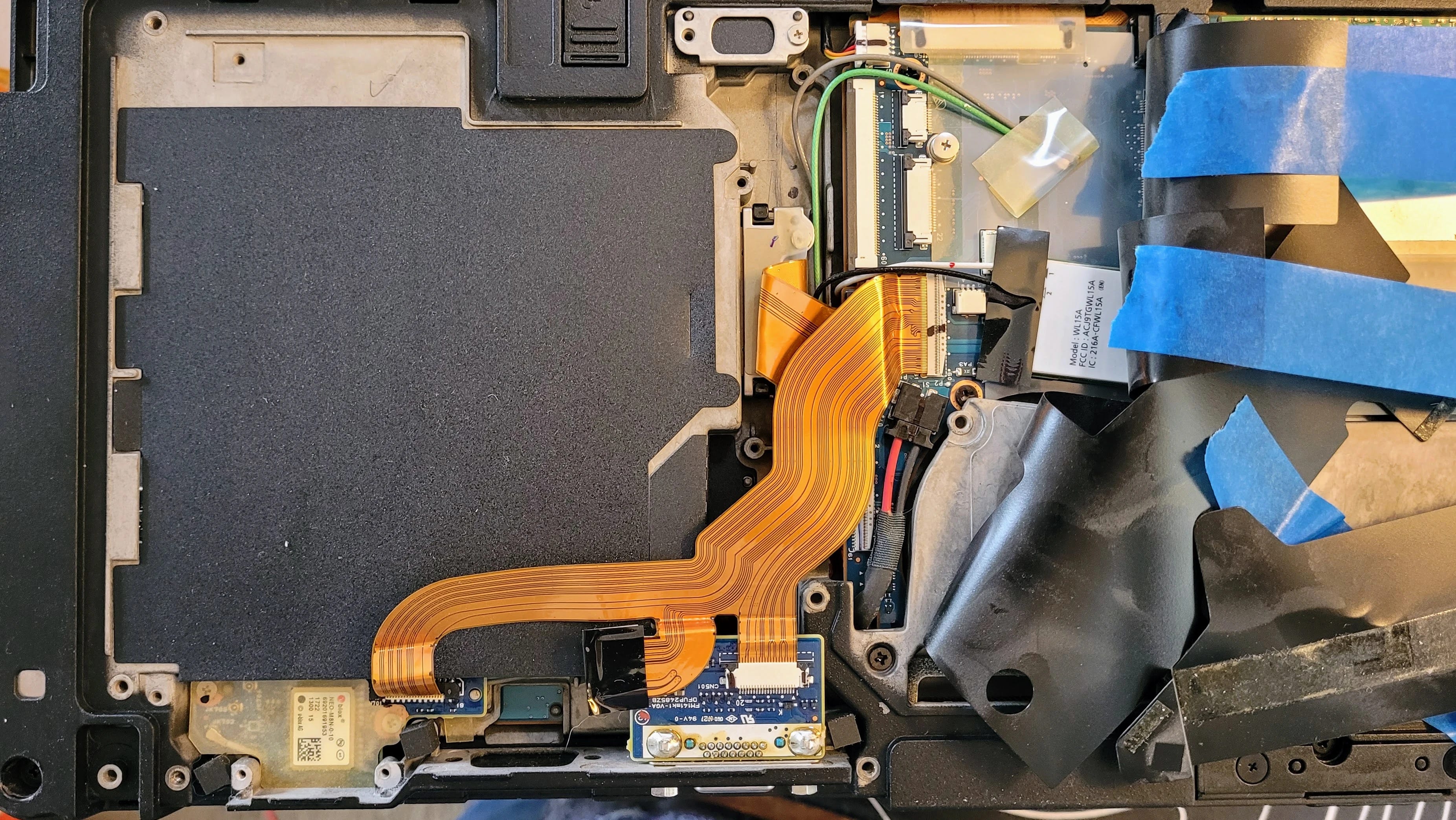
I tried sticking the ribbon cable under the socket — nope, no space. No place for it to go in the socket, either. Trying to manipulate the socket I could feel how brittle the plastic was. It wasn’t going to accept much force before breaking. I concluded that the cover on the socket had previously been broken off, so this was never going to work.
I backed out of this and reassembled the bits, then ordered a dummy plug to seal the media bay from dust and foreign objects. That will be good enough. I have an external USB drive for CDs and DVDs, and that will have to do. Once everything was buttoned up again, I tested to make sure the computer booted up cleanly…and it did.
4.8 Try the Random Wire Archive Search
After all that hardware wrangling, it was nice to end the week with a piece of software I wrote that just worked.
If you are a Substack author, you already know how abysmal is Subtack’’s search capability. I wrote Substack Search to be a full-text search index for your Substack archive, self-hosted on your own web server. The code and instructions are available in my EtherHam GitHub space.
For my subscribers, the value of building my own search function is in the improved search results. Try it yourself at: https://etherham.com/rw_search/index.html
The interface is very simple. If you want to search on a phrase, enclose it in parentheses.
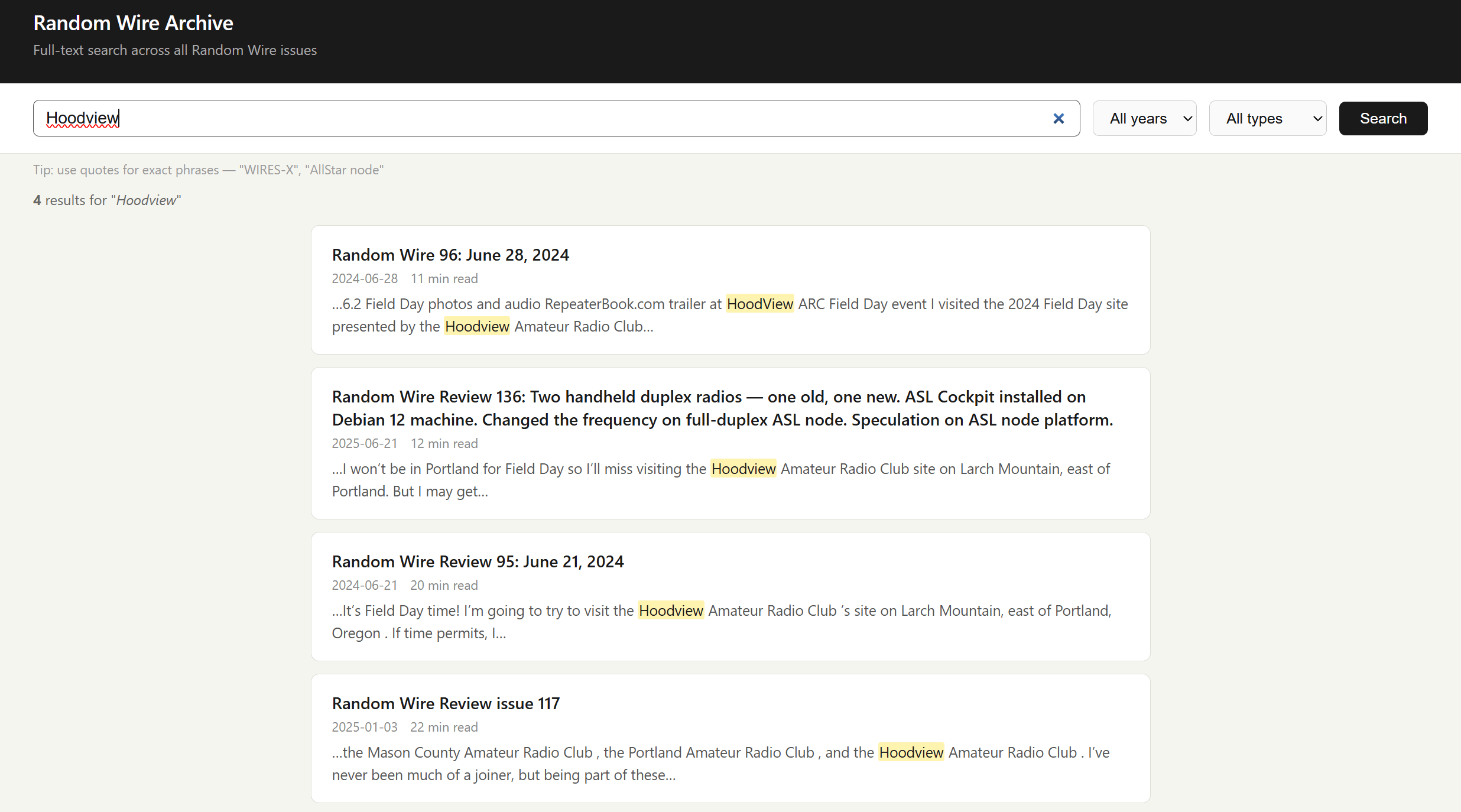
I’ve updated the code a couple of times to address update and search issues. All should be working well now, but if you encounter problems, please do let me know.
5. Are ESP32 Processors Used in F1 Racing?
Not everything on my bench this week was a repair or a tool, though. Some of it was just a question I couldn’t let go of.
While watching the Formula 1 Austrian Grand Prix race, I wondered: do the sensors on the race cars use ESP32 boards? The short answer: definitely not in actual F1 cars, but surprisingly, ESP32s show up around F1 in some really fun hobbyist ways. Here’s the full picture.
On the actual cars
Real F1 cars are a world apart from consumer microcontrollers. An F1 car has around 300 sensors, and the standard ECU — the TAG-320B — monitors over 4,000 parameters. Those sensors connect either through analog systems to the ECU, or through a series of CAN buses (Controller Area Network — an automotive-standard network bus). There are 17 separate CAN buses on a car in its typical configuration, each communicating with many different devices. (More: Feature: Data and Electronics in F1, Explained!)
Today’s F1 cars generate on the order of 1 terabyte of data per car per race weekend. Teams use high-bandwidth radio systems to send telemetry in real time to the garage, where engineers monitor car health and performance on multiple screens. The central data logger runs on an Intel Atom-based unit on a Linux RTOS, with 1 GB of integrated logging memory, GPS, and an integrated telemetry unit. (More: How Many Sensors Does Formula 1 Have?)
So the electronics are custom aerospace-grade hardware — nothing close to an ESP32 in terms of specs, hardening, or regulatory approval.
Where ESP32s show up
The hobbyist/maker community has embraced the ESP32 for F1-adjacent projects:
-
Makers have built F1 pit wall displays using an ESP32 CYD (a ~€10 board with a built-in 320×240 touchscreen and Wi-Fi) consuming live timing data from the OpenF1 API. The architectural lesson from that project is telling: the ESP32 works best as a display device, not a data processor — a Raspberry Pi or other server handles the API aggregation, and the ESP32 makes a single HTTP request for pre-digested data. (More: Build an F1 Pit Wall Display with ESP32 CYD and OpenF1 API)
-
In lower-tier electric racing (not F1), ESP32 microcontrollers have actually been used for real telemetry — handling analog data acquisition, local preprocessing, and wireless communication via LoRa in Colombia’s National Electric Drive Vehicle Competition. (More: An IoV-Based Real-Time Telemetry and Monitoring System for Electric Racing Vehicles: Design, Implementation, and Field Validation)
-
Sim racing enthusiasts use ESP32s to parse the UDP telemetry packets that the F1 video game series broadcasts, building physical dashboard displays for their rigs.
So ESP32s are great tools for watching F1, but the actual cars run purpose-built, FIA-regulated electronics at a scale and spec where a $5 Espressif chip would be completely out of its depth.
What about radios?
As I was diving headfirst into ESP32s and Formula 1, I also wondered: what radios are used in F1 racing? Are they anything we are familiar with? It turns out there are two distinct radio systems at work.
Vehicle telemetry data
According to a former F1 engineer, the telemetry system uses a proprietary WiMAX 802.16 implementation managed by McLaren Applied for all teams, based on technology from former startup Picochip. It runs on 3.5 GHz spectrum that’s virtually available worldwide. For each circuit, temporary base stations are built so the mesh provides complete coverage. (More: F1 telemetry dissected: from sensor to strategy in milliseconds)
Data is sent using 1,000 to 2,000 telemetry channels, transmitted wirelessly at around 1.5 GHz or a frequency allowed by local authorities. All data is sent in encrypted form, and the typical delay between data collection and reception at the garages is 2 milliseconds.
So the telemetry is operating in the 1.5–3.5 GHz range, depending on the source. The discrepancy in this range isn’t fully explained by what I found, but let’s agree these are outside the frequency ranges most radio amateurs use.
Team voice communications
Voice communications use a completely separate system. The vast majority of F1 teams and officials use a single TETRA digital trunked radio system provided by Riedel Communications, operating in the 420–430 MHz range (downlink) and 410–420 MHz (uplink). Some teams use alternate systems — Williams and McLaren switched to a Kenwood NXDN Nexedge system operating in the 446–473 MHz range. (More: Formula 1 (F1) by TheRadioReference Wiki)
In amateur radio terms: voice comms are solidly in the 70 cm UHF band, while the data telemetry is up in the microwave range — much more like 802.11 Wi-Fi territory.
6. Short Stack of Internet Finds
As you might expect immediately following Field Day, a Google search on “amateur radio” yields a trove of Field Day news items.
Radio
-
REMINDER: RadioID.net to require annual verification — “Beginning July 1, 2026, RadioID.net will implement an annual verification process. On the anniversary of each account’s creation, RadioID.net will send an email to the account holder requesting confirmation that the assigned ID(s) are still needed and that the account information remains accurate and up to date.”
-
Requiem For Long Wave, As The BBC Goes Silent — “Something happened…which will have been unnoticed by many, but which for a certain breed of radio enthusiast marks the end of an era. The BBC stopped broadcasting Radio 4 on their 198 kHz Long Wave frequency, ending over a century of transmission in the band.”
-
Measuring Radio Noise and Interference in Amateur Radio: Field Strength Meter, Gauss Meter, and Better Tools — “The short answer is this: for amateur radio interference, a radio-frequency field strength meter, SDR, spectrum analyzer, or receiver with a suitable antenna is normally more useful than a gauss meter or tesla meter.”
-
America’s 250th Birthday Bash Special Event Station — “Join me on JULY 4TH on the hf bands and help me help you celebrate America’s Birthday.
I have secured the special event callsign W2A.”
-
Overview of Retevis RA89R and RA89G — I’m intrigued by the RA89R as it advertises dual bands with cross-band repeat, suggesting that it might actually have independent VFOs. I doubt it, especially at this price point. I believe it is actually a half-duplex radio. But I do think it might work for pseudo-duplex use with a full-duplex AllStar node by configuring one VFO for transmitting and one for receiving, but I won’t know until I try it. With USB-C charging, Bluetooth programming, and up to 10 watts of output, it’s worth gambling $65 on this.
-
Ham Radio Digital Mode Frequencies Chart [HF Through 70cm] — “Unlike voice contacts, where activity is spread across an entire band, digital operators usually meet on well-established “watering hole” frequencies.”
-
HRWB 266 – All About AMSAT With Drew Glasbrenner KO4MA — “In this episode we meet Drew Glasbrenner, KO4MA, the new president of AMSAT, the amateur radio satellite organization.”
Computing
-
It’s now the Arduino Uno Q’s turn to get a price hike — “Two versions of the single-board microcomputer will be $15 to $20 more expensive starting next month.” Glad I stocked up with a few spare boards!
-
Best Raspberry Pi Alternatives: 4 Options to Consider — This is an article I wish I had written. It’s a good overview of alternatives, even if it doesn’t include the Arduino UNO Q board.
-
5 things to build with the $4 chip that’s outselling the Raspberry Pi — “There are tons of cheaper Raspberry Pi alternatives that work just as well, and one among them is the ESP32. It won’t run Linux or host your home server, but at just $5, this chip can do more than it lets on.”
-
Raspberry Pi Locator Website To Shut Down In July — “As announced by [André] on Bluesky, next month the much loved Rpilocator.com website will cease displaying the stock status and pricing of Raspberry Pi computers from various online retailers.”
7. June 17, 1936: The Day Radio Heard Itself Clearly
One story from ninety years ago felt worth pulling out of the noise…literally.
On June 17, 1936 — ninety years ago this month — Edwin Howard Armstrong walked into the Federal Communications Commission headquarters and changed what radio sounded like. He played a jazz record over conventional AM radio, then switched to an FM broadcast. A reporter in the room wrote that if the fifty engineers present had closed their eyes, they would have believed the jazz band was playing in the same room. No static. No hiss. No interference. Just music.
Armstrong had been working toward that moment for years. Frustrated by AM’s vulnerability to static and interference — a physics problem baked into amplitude modulation itself — he pursued a different approach: instead of varying the strength of the radio wave to carry sound, he varied its frequency. The result was a signal that natural static simply couldn’t touch. FM didn’t reduce interference. It eliminated it. The silence between the notes was actually silent.
You would think that kind of demonstration would change everything immediately but it didn’t. RCA’s David Sarnoff, who had been Armstrong’s friend, saw FM not as a breakthrough but as a threat. Thousands of AM transmitters and millions of AM receivers could become obsolete. The broadcast networks had enormous investments in AM. And Sarnoff had his eye on television — he didn’t have the bandwidth to also champion a new radio system. So RCA used its considerable influence to slow FM down: lobbying the FCC, disputing Armstrong’s patents, and eventually developing their own FM technology while refusing to pay royalties on his.
The fight consumed the last years of Armstrong’s life. By 1954 he was financially exhausted from the legal battles and deeply depressed. He died by suicide in January of that year, never knowing how the story ended. His wife Marion continued the patent fight after his death, and in 1967 the Supreme Court ruled that Armstrong had indeed invented FM. He was right all along — he just didn’t live to hear the verdict.
Every time you tune an FM radio, every time a silent passage is actually silent, you’re experiencing what Armstrong proved in that FCC hearing room in 1936. He didn’t get the recognition or the royalties he deserved, but he got the physics right. For radio amateurs, his story is a reminder that the people who build the tools don’t always get to enjoy the world those tools create. We work the bands they made possible, often without a second thought about who fought to make them available.
8. Gadgets: Headphones, DAC, and Player
I found myself thinking about Armstrong and audio fidelity again this week for a much lighter reason: new headphones.
I bought a pair of SENNHEISER HD 599 Open Back Headphones on special during Amazon Prime Days. They were roughly one-half their normal price. I’ve paired them with a Fosi Audio K5 Pro DAC. My digital music catalog is stored on my Beelink network-attached storage box, and I play that library with MusicBee on my laptop. Player Preferences in MusicBee is set to WASAPI (Exclusive) to bypass the Windows sound system.
If you’re a basshead, these are probably not the headphones for you. They deliver a flatter response across audible frequencies and present a more open, airy soundscape. Of course, you can dial up the bass with an equalizer or with the DAC. If I dial up the bass all the way on the DAC, audio is still clear but the deep tones overpower mid and high frequencies, at least for my ears.
I am not an audiophile but I do like clear audio where I can separate instruments and voices, and where I can feel like I’m in the hall with the performers. The open back headphones provide a wonderfully open sound without the sound pressure that some closed headphones can project. The funny thing about saying “I’m not an audiophile” is good quality recordings and equipment provide an experience that is viscerally and audibly better than poorer equipment. You don’t have to be an audiophile to appreciate good sound.
On the DAC, I have the bass and treble controls set at the one o’clock position. To me, this moves the sound stage a bit forward, as if the performance is closer to me. Need more bass? Try setting the DAC bass control to three o’clock or more. In MusicBee, I’ve set the equalizer to the Acoustic profile, which I find most pleasing for the music I listen to.
One of the wonderful things about this combination is the silence. Silence during pieces, and between songs, have no hiss, no hum, no thrumming sound, nothing. Just silence. That really plays well with The High Kings when they punctuate their tight harmonies with moments of silence before the next attack.
I would describe this combination of headphones, DAC, and player as a solid mid-tier setup for someone who likes to hear parts and harmonies. As I write this, I’m listening to acoustic sounds by The Wailin’ Jennys (40 Days album) and The High Kings (Grace & Glory, and The High Kings). Also, The Corrs, as well as Chris Botti.
Acoustic Highway by Craig Chaquico sounds amazing. I can hear the left and right background instruments clearly. There is more texture to his music than you might hear over a radio. And Jazz Samba by Stan Getz and Charlie Byrd is astounding: very present, very clear.
It’s not all quiet stuff. Earth Wind and Fire’s punchy, percussive music sounds delightfully crisp. The overtones of Eddie Van Halen’s high notes on Eruption come through with clear brilliance, and Ain’t Talkin’ ‘Bout Love sounds like it is being played on a wide sound stage. If you like that song but also like musical interpretations, I invite you to compare it with Ain’t Talkin’ ‘Bout Love by Scott Bradlee’s Postmodern Jukebox on the Lounge Language Models album.
9. QRT: End Transmission
Good sound isn’t the only thing that’s mattered to me this week.
Earlier this week, two women who taught alongside my wife for fifteen years came to visit her. My wife can no longer speak, but she was present in every way that mattered — attentive, tracking the conversation, trying to engage. Watching her with her friends, I was reminded of what I wrote earlier in this issue about Paul: we are important to each other in ways we may not always see or understand.
That evening, she looked over at me and said, “Hi Tom.”
This was more meaningful than it might appear, because twice in the past month, she has looked at me and asked: “Who are you?” So you’ll understand why two words — my name, spoken by her — stopped me cold.
I’m glad she knew me in that moment. I’m glad her friends came. Some things matter more than radio.
73, and remember to touch a radio every day!