00 QRV: Are You Ready?
Welcome to issue 181 of the Random Wire newsletter. I’m glad you’re here.
AllStar guide feedback requested
I’m looking for some experienced AllStar users to help check my work on a guide to getting started with AllStar using AllScan USB Communications Interface devices. It’s posted at Getting Started with AllStarLink 3 and an AllScan UCI and I could use critical feedback.
Hamvention 2026
Hamvention 2026 is sponsored by the Dayton Amateur Radio Association and will be held May 15-17. That means next week’s Random Wire issue 182 will land on the first day of Hamvention, and that means issue 182 will be too late to wish attendees well.
So this week, I’m sending my best wishes to all who will be attending — and I’m already looking forward to hearing what you bring back.
More? See The Adventure Begins in Xenia: Hamvention 2026.
01 Thank You to Cale K4HCK
I discovered that Cale K4HCK and I have something in common: we are both PseudoStaffers with Zero Retries. I also note that his popular website has a very spare design, and keeping things simple has been one of my goals with the EtherHam.com website. Birds of a feather.
This thank you is long overdue. I appreciate Cale’s wonderful contributions to our ham radio community. You might be wondering: what contributions?
-
Cale is the brain and energy behind Amateur Radio Weekly: “…an email newsletter featuring links to the most relevant news, projects, technology, videos, and events happening in Ham Radio.” There is always good content to be discovered through his newsletter. I put out a weekly newsletter, so I know how much energy can get invested in this work.
-
He also publishes Amateur Radio Daily with ham radio events and news updated several times per week. (If you visit https://daily.hamweekly.com/about/ and scroll down to Technical Details, I absolutely love Cale’s approach to generating and formatting this web-based content. If you want to see one site that influenced his design choices, check out sidebar.io.)
-
Net Finder is working toward a future in which every amateur radio net is cataloged in a central directory on the web.
-
Grid Mapper works with WSJT-X FT8 to display calling stations’ grids on a map, display previously worked grids on a map, display the station’s grid currently being worked on a map, and information about the station being worked showing up on a side panel. All in real time.
Any one of these deserves a thank you, but all four together? Amazing. I admire his work on behalf of our community, and I’m happy to extend a Random Wire & EtherHam thank you to Cale K4HCK.
02 Featured: Using a TinySA Ultra Frequency Analyzer
If you’ve been curious about spectrum analyzers but assumed they were expensive, complicated lab gear — the TinySA Ultra is a device that changes that calculus. It’s a small, palm-sized unit that connects to your antenna or radio via an SMA connector, sweeps a frequency range you define, and shows you a live graph of signal strength across that range. Taller peaks mean stronger signals. It runs on an internal battery, has a touchscreen, and costs less than 200 US dollars.
Getting started on the device itself is pretty straightforward — power it on with the slider switch, let it boot, and tap into the menu system to set your frequency range and mode. The included telescoping aerial screws into the RF port (there’s also a CAL port, so don’t mix those up), and you’re off. The display shows you markers, frequency range, and signal strength in real time. It’s immediately satisfying to sweep across 2 meters and watch a frequency spike appear when you key up a radio. In the words of Anakin Skywalker in Phantom Menace, you immediately know: It’s working!
The easiest on-ramp, though, is connecting the TinySA Ultra to a Windows PC via USB. A free application called TinySA-App gives you a much larger display, more precise controls, and — the real win — a built-in list of preconfigured band settings. Click the asterisk/snowflake icon next to the COM port selector and you get a menu of preset frequency ranges for common bands (amateur and others). No manual entry required to jump straight to 10 meters, 2 meters, 70 cm, Air band, FM broadcast, and more.
I recorded a short video of a session where I swept through several bands. On 70 cm, I could watch the signal jump when I transmitted from a handheld to one of my AllStar nodes. On 2 meters, two of my node radios showed up as consistent spikes — along with some regularly-spaced signals I wasn’t expecting. Checking the Air band turned up two frequencies with clearly elevated energy around 120 MHz and 132 MHz. One thing to watch: some bands look compressed vertically on the default scale, making it hard to read. Adjusting the vertical scale makes those spikes much more visible.
This is Part 1 of an ongoing series. There’s a lot more to explore — RFI hunting, marker use, and connecting to other software. For the full walkthrough including screenshots and video links, dive in at: Part 1: Using a TinySA Ultra Frequency Analyzer
03 Featured: TIDRADIO TD-H9: Dual Display and APRS
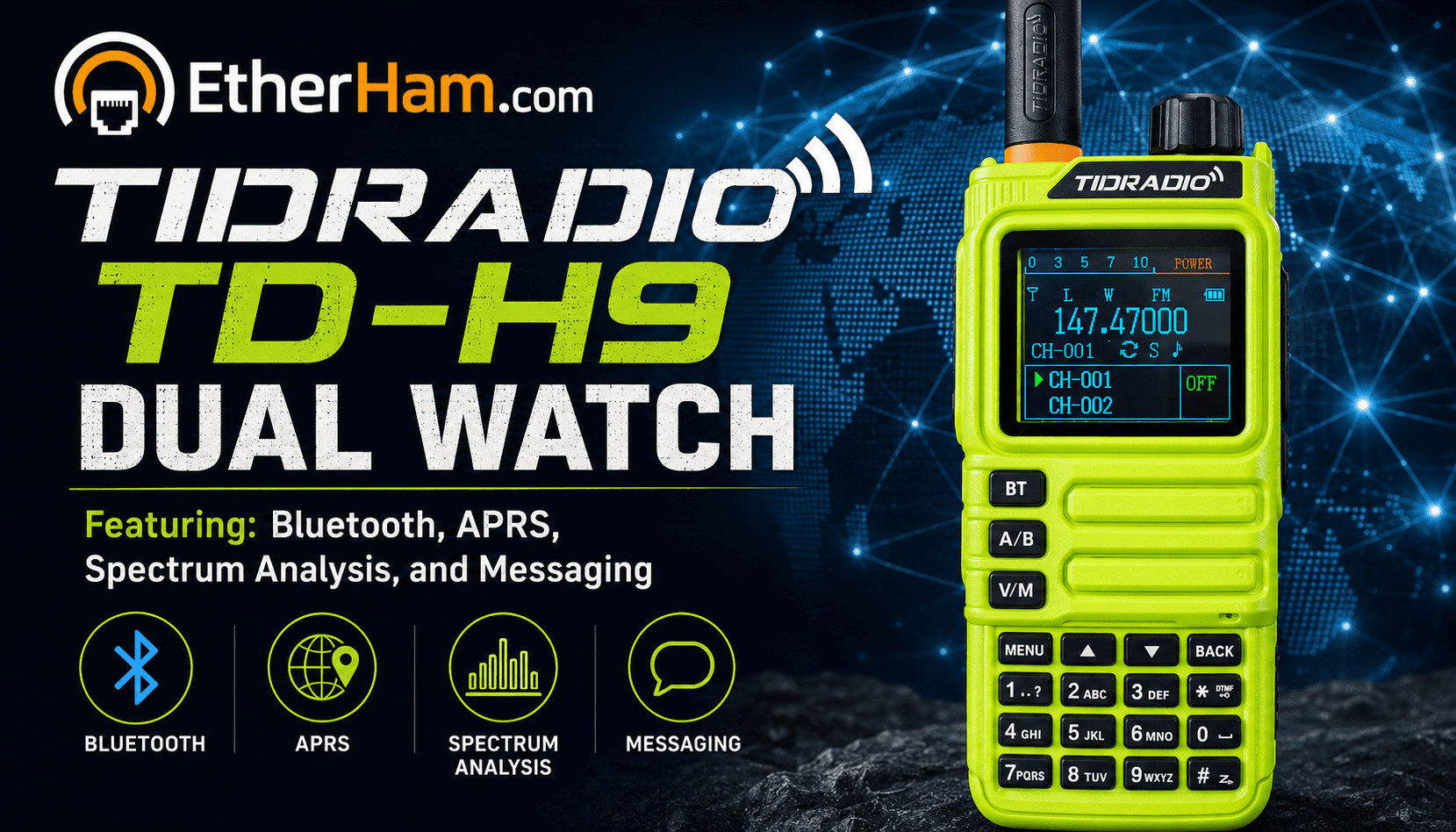
Over on EtherHam, I’ve posted a hands-on look at the TIDRADIO TD-H9 — a 10-watt GPS/APRS handheld with Bluetooth programming, spectrum analysis, and a color display, all for under $75. The post covers two things the manual doesn’t: how to actually get dual display working (it’s genuinely non-obvious and requires navigating several interdependent settings in the Odmaster app), and my experience trying to get APRS beaconing working. I got it beaconing in PTT/manual mode, but automatic beaconing remains a work in progress — like a lot of things with a radio this new, the community is still figuring it out.
Bottom line: solid radio, great value, awful manual, waiting for more radio users to help guide the community. Check it out at TIDRADIO TD-H9: Getting Dual Display and APRS Working.
04 Home: Streaming Audio to My Wife’s Room
My goal: FM audio from SDR++ on the iMac to an Ocean Digital WR-390 internet radio over Bluetooth. The WR-390 was already paired with the iMac, and displayed “paused” — which turns out to be normal; it just means the radio is connected and waiting for the iMac to push audio to it. However, although I could get wonderful audio through the iMac speakers, I couldn’t get the audio to the WR-390 speaker.
The situation was a little more complicated than you might think. My audio chain starts with an SDR USB dongle that is taking in the FM-over-the-air radio signal, but it isn’t attached to my iMac. The actual chain looks like this:
SDR —> rtl_tcp.exe (Windows) —> SDR++ (iMac) —> BT —> WR-390
The Windows 11 Pro mini PC is running rtl_tcp.exe, meaning that the SDR signal is sent via TCP to a listening app. In this case, that app is the SDR++ app on my Intel iMac. It sounds great directly on the iMac, but I wanted to push the FM music to my wife’s internet radio. Music has been central to our lives together, and as an elementary music educator, it was part of her daily work for decades.
The first step was going to System Settings → Sound → Output and explicitly selecting the WR-390 as the audio output device. That alone wasn’t enough, because SDR++ maintains its own independent audio sink selection rather than automatically following the macOS system output. A restart of SDR++ was required, after which the WR-390 appeared as an available audio output device within SDR++ itself. Once selected there, audio began flowing to the radio — but at very low volume even with both SDR++ and the WR-390 at maximum. The fix was simple: the macOS system output volume slider (in System Settings → Sound) had been turned down and needed to be brought back up. With that adjusted, the FM audio came through at full, usable, lovely volume.
Who helped me with this? Claude. I got all the pieces put together and working on my own, but got stuck on getting sound out of the WR-390 internet radio. Claude pointed me to the output volume slider in the iMac Sound settings. That was the missing piece.
05 LAN: RustDesk Server on Proxmox — Installation & Client Configuration Guide
Self-Hosted Remote Access with RustDesk
Most of my lab machines run headless, and when one goes offline it used to mean digging out the spare monitor and keyboard. I wrote up a full how-to on running RustDesk Server OSS as a lightweight LXC container on Proxmox — once it’s set up, every machine on the LAN registers against your own server, and you get in through the same RustDesk interface on Windows, Linux, or macOS. No dependency on RustDesk’s public infrastructure.
The guide covers the install script, service verification, grabbing your encryption key, port forwarding (or not, for LAN-only use), and client configuration. There’s also a section on headless Windows machines specifically — fixed passwords, startup behavior, and a virtual display driver that prevents the dreaded 800×600 fallback when there’s no monitor attached.
Full write-up at EtherHam.com: LAN Remote Access with RustDesk Server on Proxmox.
Why Proxmox? I find it pretty handy. I have some services I want to keep but I don’t want to devote an entire hardware stack for that single purpose. Solution? A Linux container on the Proxmox server. I have some services I’m just experimenting with. Again, I don’t want to commit a hardware platform to that one thing, so those are also on my Proxmox box. Spinning up a new container takes moments — not minutes, not hours, and no digging around to find the right power adapter and get the hardware all hooked up. If you like to experiment, or if you have limited space, running a Proxmox server can be very useful.
06 Got a Mac? Use AllStar? Try Transceive
I was honored to help test improvements to the Transceive app by Georges WH6AZ, available on the Mac App Store.
Transceive allows amateur radio operators to connect to their AllStar node from anywhere in the world. Operators can administer linked nodes, monitor traffic, and transmit audio, all from the comfort of their Mac.
I’ve been enjoying testing iterations that ultimately led to these key improvements:
-
New: Universal binary (native support for Apple Silicon and Intel). This is a significant milestone. Native Apple Silicon support improves efficiency while ensuring the app remains stable and maintainable on future macOS versions.
-
New: Reorder nodes with simple drag and drop
-
New: Add a memo to a node entry
-
Fix: DNS lookup issues when nodes use non-standard ports
-
Update: Authentication updated for AllStar public access
-
Improvement: More reliable node reachability indicators (green/red status updates more consistently, with less need to refresh)
The non-standard ports fix was a particularly welcome upgrade, because I run several nodes which means only one of my nodes is on a standard port. I usually use Transceive with a headset connected to my iMac and find the audio outstanding.
There is a more about Transceive to like. Visit the Mac App Store listing to learn more.
Transceive is great software. If you use AllStar and have a Mac, I think you’ll like it. I’m very pleased to award a Random Wire Recommended sticker to Transceive.
07 The Short Stack
Most of these finds are sourced from the feeds published on EtherHam.com.
Radio
Digital Radio (M17, PSK31)
SDR
-
SDR controls for Mac and iOS — There are too many individual package announcements to list here. If this is of interest, head over to Mac Ham Radio and browse their most recent posts.
-
RTL-SDR.com has a couple of items, too — P25-Survey: A Tool for Scanning and Logging P25 Control Channels with an SDR and Portable ADS-B Receiver Firmware for the ESP32-P4 Based LILYGO T-Display-P4 with RTL-SDR.
-
Top SDR Software Applications for Software Defined Radio — This was helpful to me when I went looking for SDR apps for my iMac. Nothing in the App Store looked good to me. It turns out that SDR++ has a package for the iMac, and not just the Apple Silicon iMac, but my Intel iMac, too. Win. “Unlike hardware guides, this page is a deep informational resource—because most SDR software is free or open-source, not sold on Amazon. Here’s the 2026 lineup.” (I’ve added the Radio Hobbyist feed to the list of feeds on EtherHam.)
-
Software Defined Radio (SDR): Complete Beginner to Advanced Guide — Also from the Radio Hobbyist website, this is a great resource. “Whether you’re just getting started with an inexpensive USB dongle or building a more advanced setup, SDR opens up a wide range of listening possibilities. This guide brings together everything you need to learn SDR, including beginner-friendly explanations, setup tutorials, real-world use cases, and recommended equipment.”
Antennas
08 📋Digital Radio News Digest
Executive Summary
Recent developments in amateur radio digital voice and VoIP linking modes include the release of OpenRTX version 0.4.4 for M17, updates to the Pi-Star dashboard for DMR, and various discussions and issues reported on the AllStarLink forum for VoIP linking. The M17 project has seen significant activity, with new features and support added to the m17-gateway and discussions on using the MMDVM_HS_Dual hotspot in M17. The AllStarLink forum has addressed issues with WIFI network selection, custom audio files, and DTMF for DVSwitch.
Per-Mode Breakdown
DMR
The Pi-Star dashboard has been updated with changes to the mmdvmhost functions, including replacing log-tail shell pipelines with PHP fseek+regex and caching config + DMR_Hosts.txt within request. There are also discussions on Reddit about the new AnyTone AT-D890UV and looking for DMRs that can do a PAN connection over Bluetooth.
D-STAR
There is no significant content collected for D-STAR.
YSF/C4FM/WiRES-X
There is a blog post about using the AllScan UCI80M USB Communications Interface paired with a Raspberry Pi 4 and a Motorola speaker-microphone, but no other significant content collected for YSF/C4FM/WiRES-X. (This is pretty funny. First, this references my Random Wire post from last week. Second, the Digital Radio News Gatherer script misclassified this AllStar content as YSF/C4FM/WiRES-X. I have more script modifications to make!)
M17
The OpenRTX version 0.4.4 has been released, with updates to the m17-gateway, including support for the SX1255 HAT and an experimental messaging bridge. There are also discussions on the M17 Users Groups.io about using the MMDVM_HS_Dual hotspot in M17, connecting to the M17 reflector, and recommendations for M17 UHF frequencies.
VoIP Linking
The AllStarLink forum has addressed issues with WIFI network selection, custom audio files, and DTMF for DVSwitch. There are also updates to the app_rpt and amp-server repositories on GitHub, including changes to the chan_echolink module and support for serial controls. A Reddit user has also built a modern AllStarLink and EchoLink client and is looking for beta testers.
Notable Firmware or Software Updates
-
OpenRTX version 0.4.4
-
Pi-Star dashboard updates (commit ce0ea3dc, commit 3984e758, commit bc5a05a5, commit 437d34e6, commit 73cc3458)
-
app_rpt updates (commit 0dec2b0e, commit 57e28c48)
-
amp-server updates (commit f4beffd4, commit 5fb78034, commit 4f850733, commit 6d19b78d)
Cross-Mode Developments
There are no significant cross-mode developments reported in the collected items.
Last run: 2026-05-07 15:18 UTC — 54 items collected. Download the collected items at https://etherham.com/download/179600844/?tmstv=1778167585
09 📡Band Conditions This Week
First: Sunspot Numbers
If you’ve been noticing that the sunspot number reported in this digest differs from what your HamClock is telling you, you are absolutely right: they are different. There is a reason. Reported sunspot numbers vary depending on the source. This digest uses the NOAA/USAF daily count, which tallies individual sunspot groups from their own observer network. HamClock and many online dashboards display the SIDC International Sunspot Number, which applies a different weighting formula across a global network of observatories — typically producing a higher figure. Both are valid. The simplified view: they’re just measuring the same sun with different rulers.
The same underlying measurement, two different scales
Both numbers are counting the same thing: sunspots, using the classic Wolf formula — R = k(10g + s) — where g is the number of sunspot groups, s is the total individual spots, and k is a personal correction factor for the observer’s equipment and technique. The difference isn’t what they count, it’s how they’re calibrated and aggregated.
Where NOAA/USAF gets its number
NOAA’s Space Weather Prediction Center (SWPC) produces what’s often called the “Boulder sunspot number.” It comes from observations at a single reference point (historically the USAF/NOAA network centered in Boulder, Colorado), using their own observers and equipment with their own calibration coefficients. Numbers from individual stations — including the Boulder number — are often 20 to 50% higher than the International Sunspot Number. This isn’t an error; it’s a calibration difference rooted in history.
Where SIDC gets its number
The SIDC International Sunspot Number results from a statistical treatment of data originating from more than 25 observing stations worldwide, with the Locarno station serving as the reference to guarantee continuity with the historical Zürich series. By aggregating across a global network and normalizing everything through that reference station, the SIDC number is inherently a consensus average — smoothed across many observers and sites.
The 0.6 factor — the core of the mystery
This is where it gets interesting from a history-of-science standpoint. Back in 1849, Rudolf Wolf deliberately chose to ignore the smallest short-lived spots and internal spot structure (multiple umbrae in a large common penumbra), even though he could see them perfectly well, in order to keep his counts compatible with earlier crude telescopic observations.
His successor Alfred Wolfer disagreed with that approach and started counting everything he could see. His counts were systematically higher. But they ran parallel observations for 17 years — long enough to derive a stable ratio. To bring the new higher counts to Wolf’s scale, they had to be multiplied by a factor of 0.6. Since that time, all modern raw sunspot counts used to produce the sunspot number have been multiplied by this constant 0.6 factor.
The SIDC applies this 0.6 factor consistently across its network. Individual stations like Boulder, if they don’t apply it (or apply a different k), will read systematically higher.
The 2015 SIDC recalibration (Version 2.0) — added confusion
Things got more complicated in 2015 when SIDC released a major revision of the historical record. The biggest difference in the revised series is an overall increase by a factor of 1.6 applied to the entire historical series. This was essentially the inverse of removing a correction factor that had been improperly applied for decades. The upshot: NOAA/SWPC recalibrated its prediction coefficients in 2019 to be consistent with Version 2 of the International Sunspot Number.
So NOAA’s official long-term predictions now reference SIDC V2, but their daily operational Boulder number is still produced separately on its own scale.
What this means for you practically
When you see, say, 185 on HamClock (SIDC) and 210-220 on your propagation checker (NOAA/Boulder), they’re both describing the same sun on the same day — just measured on slightly different scales. For ham radio propagation purposes, the relative trends matter far more than the absolute numbers. Both will tell you the same story: we’re past the Solar Cycle 25 peak, conditions on 10-12-15 meters have been excellent, and we’re watching for the gradual decline. Neither number is “wrong.”
The practical takeaway: don’t try to mentally convert between the two on the fly. Just learn which number your favorite propagation tools use and calibrate your expectations to that scale. If HamClock says 150 and conditions are good, 150 is your mental reference point for “good” — regardless of what NOAA reports.
I hope this helps you understand why you sometimes see two very different measures of sunspot numbers. (Hat tip to Claude for assistance in crafting this explanation.)
CORRECTION
After publishing the above explanation, I reviewed it more carefully and concluded: it was incorrect. Following is my correction, inserted into issue 181 after publication.
A correction on sunspot numbers
In a recent issue I included an explanation of why HamClock and other propagation tools sometimes show different sunspot numbers. The historical background — the Wolf formula, the Wolfer parallel observations, the 0.6 calibration factor, the SIDC global network versus the NOAA/Boulder single-station approach — was accurate. But I got the conclusion exactly backwards, and that’s the part you actually use.
I wrote that HamClock (SIDC) would typically show a higher number than NOAA/Boulder. The opposite is true: NOAA/Boulder has historically run 20 to 50 percent higher than the SIDC International Sunspot Number — a fact the SIDC documents plainly on their own FAQ page.
There’s a wrinkle that muddies the water further. In 2015, SIDC released a major revision of their historical data series (Version 2.0). The most significant change was removing the 0.6 Zürich scale factor that had been applied for over a century, effectively resetting the SIDC series to the scale of raw modern counts. This made V2.0 numbers roughly 1.6 times larger than V1.0 numbers across the board. NOAA recalibrated its long-term prediction models to V2.0 in 2019, but the daily operational Boulder number is still produced on its own separate scale — and the relationship between the two in day-to-day use doesn’t follow a simple fixed rule.
The practical upshot, confirmed by real-world observation: on any given day, HamClock (SIDC) will often show a higher number than a propagation tool pulling the NOAA/Boulder daily figure. Today, for example, HamClock reported 68 while my propagation script reported 61. The original article had that exactly backwards.
The core advice still stands: don’t try to mentally convert between the two on the fly. Pick one scale, learn what “good conditions” looks like on that scale, and stick with it. The trends are what matter for ham radio purposes, and both sources will tell you the same story about where we are in the solar cycle.
Apologies for the error.
Second: Not My Band Propagation Summary
This comes from the Northern Lights Alerts group on Facebook:
A cluster of coronal hole “blobs” on the Sun is now rotating into an Earth‑facing position, and one of the western features is expected to become geoeffective within the next 24 hours. These regions release high‑speed solar wind streams that can disturb Earth’s magnetic field and create aurora activity even without major solar storms or official G‑scale watches.
Right now, space weather models suggest G0–G1 conditions (Kp 4–5) are possible from today through Friday. While this is not a major geomagnetic storm, it is exactly the kind of setup that often produces surprise aurora bursts, especially when the solar wind speed increases and the Bz tilts south for sustained periods. Coronal hole activity is known for creating long, steady pulses of aurora rather than explosive CME‑style storms, but these pulses can still light up the sky beautifully.
Finally: My Propagation Report
-
Solar Flux Index (SFI): 155.0 — Excellent — upper HF bands wide open
-
K-Index (current): 1.0 — Quiet — excellent conditions
-
K-Index (7-day max): 6.3 — Storm conditions — significant HF disruption
-
A-Index: 11 — Unsettled (predicted)
-
Sunspot Number (NOAA/USAF): 39
-
Active Solar Regions: 9
With an SFI of 155 and a current K-index of just 1, the upper HF bands — 10, 12, and 15 meters in particular — are wide open and worth a serious look for both DX and domestic contacts right now. That said, don’t let today’s quiet conditions fool you into thinking it’s been a smooth week; a max K-index of 6.3 tells us a geomagnetic storm rolled through and likely rattled the lower HF bands for a stretch, so if you’ve been frustrated with 40 or 80 meters lately, that’s probably why. The predicted A-index of 11 suggests a touch of unsettledness still lingering, but with nine active solar regions on the disk keeping that flux elevated, conditions are trending in a direction most of us are happy to see.
Source: NOAA Space Weather Prediction Center (swpc.noaa.gov). Generated: 2026-05-07 15:10 UTC
10 📻This Week in Radio History
Notable events from May 4 through May 8 across the years.
1933 — Armstrong Demonstrates Wideband FM
Edwin Howard Armstrong publicly demonstrated wideband frequency modulation (FM) and filed key patent applications that would later be granted through the late 1930s. His system dramatically reduced static and noise compared to AM broadcasting, making high-fidelity radio practical for the first time.
Armstrong’s work eventually transformed commercial broadcasting and influenced generations of amateur radio operators. Decades later, FM repeaters built by hams in the 1970s became the backbone of local VHF and UHF communication networks still used today for public service and emergency communication.
1945 — VE Day and the Return of Amateur Radio
On May 8, 1945, the Allied celebration of Victory in Europe Day marked more than the end of the war in Europe. For amateur radio operators, it signaled the gradual return of civilian radio activity after years of wartime shutdowns and restrictions.
Many amateurs had served as military radio operators, engineers, and instructors during the war. When peace returned, they brought home new technical skills and access to surplus equipment that fueled an extraordinary postwar boom in amateur radio experimentation. The years that followed saw rapid growth in VHF operation, weak-signal experimentation, mobile radio, and eventually FM repeater systems.
1950s — The Foundations of Packet Radio
During the 1950s, researchers and radio experimenters began exploring digital communication techniques that would eventually influence packet radio and computer networking over the air. While amateur packet radio would not fully emerge until decades later, the ideas taking shape during this era laid the groundwork for digital modes that hams would later embrace.
By the late 1970s and early 1980s, amateur operators adapted these concepts into practical systems using the AX.25 protocol, opening the door to keyboard messaging, bulletin board systems, APRS, and early wireless networking experiments long before Wi-Fi became commonplace.
1970s — The Amateur Satellite Era Expands
The mid-1970s marked a period of rapid growth in amateur satellite communication following the success of the early OSCAR satellites. Organizations such as AMSAT helped drive innovation in small satellite design, telemetry, and low-power communication systems.
For many radio amateurs, working through an orbiting satellite became both a technical challenge and a glimpse into the future of personal space-based communication. Amateur satellite programs also inspired generations of students, engineers, and experimenters who later contributed to commercial and scientific space programs.
Looking Back
Radio history is filled with moments where experimentation by individuals and amateurs eventually reshaped global communication. From Armstrong’s fight to prove FM viable to the rise of packet radio and amateur satellites, innovations once considered experimental often became essential tools for communication around the world.
History note: Dates and milestones are drawn from historical records and may reflect broader developments that unfolded over months or years rather than a single day. (Hat tip to ChatGPT and Claude for assisting in researching these items.)
11 Opinion: AI Advancing at the Speed of Fright
I was thinking about this topic when I listened to the latest Ham Radio Workbench podcast that includes a lot of back-and-forth about using artificial intelligence engines. I think the overall tone was: this is a positive step but we have concerns, even misgivings.
What does seem clear is that AI is here to stay. The AI genie is out of the bottle and we’re not going to be able to put it back. Our choices boil down to: ignore it (head in the sand tactic), use it (grudgingly learn to live with it), or embrace it (use it for more than simple chats and web searches).
I’m in the embrace it camp, even though I have concerns. (I’m probably one of those I don’t want to be left behind people.) I’m worried about unethical uses of this powerful technology. In my email inbox, I’m already seeing much more sophisticated attempts to get me to do things that may not be good for me or others. It’s getting harder to see at first glance which emails or website comments are real and which are generated by bad actors using AI.
I use AI to help with structuring content. Specifically, the book project I’m working on was simply a giant whirling mess in my mind until I asked ChatGPT and Claude for help. Claude asked me questions for an hour and then produced a very detailed structure for the book. That helped immensely as now when a key memory resurfaces, I know where to plug it into the manuscript.
I also use AI for proofreading and some editing, but I often “re-voice” what an AI suggests. I also notice both ChatGPT and Claude really like the em dash — so now, when I see that, the first thing I wonder is: did an AI write that content? Unfortunately or fortunately — depending on your point of view — I have tended to use em dashes in my writing for many years. To me, it more closely reflects how I think and speak. (My use of the em dash is not grammatically correct in that I add a space before and after the dash — like that. Without that space, it looks too much like a shortened-and-hyphenated phrase.)
I run a large language model engine on my Raspberry Pi 5 and yes, it is limited and slow. I also run an LLM on my Proxmox server where I have more capacity, but it is also pretty slow. I need a computer with a modern GPU; my Proxmox box is too old and so all AI work is done by the main CPU. Of course, since AI is advancing so rapidly (at the speed of fright!) by the time I save up for a capable machine, it won’t be capable any longer.
It feels like we are at a turning point in human history. We discovered fire. We learned to farm. We harnessed the power of steam, electricity, and fossil fuels. We became manufacturing wizards. The computer age landed and shook the world. Now AI is doing the same thing. It is happening fast, and yes, it is a bit frightening. With great power comes great responsibility and I pray that we can live up to our potential as good humans.
12 QRT End Transmission
Time to close the channel.
Thank you, subscribers (yes: you!)
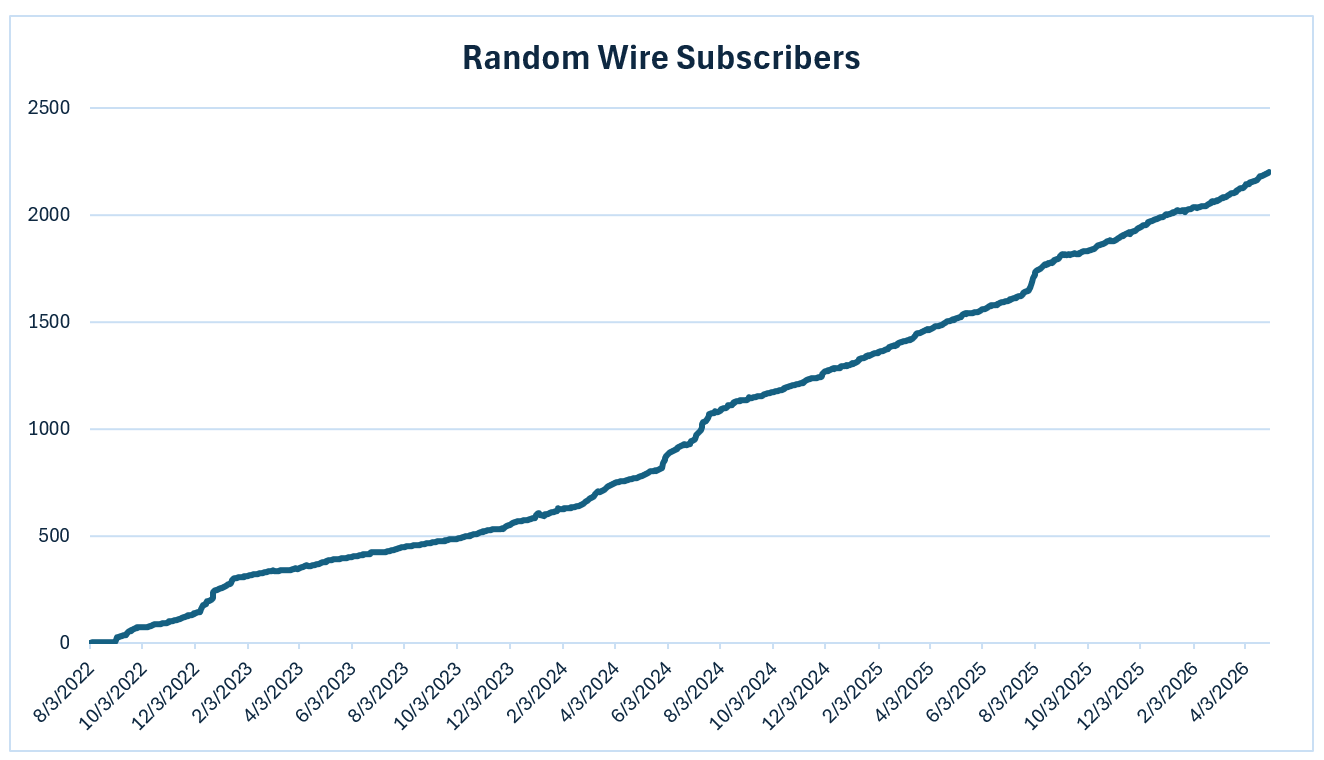
The Random Wire newsletter has seen steady growth since I launched it in 2022:
Notably, this week total subscribers climbed over the 2,200 mark. I’ve said before that I try not to look at the subscriber numbers very often. I don’t want a number to influence what I write about, or how I present that information. Nevertheless, 2,200 feels like a milestone of sorts. Thank you. As always, I am happy to hear your ideas for topics and improvement.
It feels good to write
The longer I write within our amateur radio community, the more familiar it becomes. You get to know some leading lights and also work with less experienced hams who need a hand from time to time. It’s a great feeling to help others.
I remember when I first started. My Kenwood TS-520S HF radio had been well loved, and the ham who sold it to me (W7FBI, now SK) gave me a really, really good deal, including some extra vacuum tubes. Gary AC7VA gave me a manual antenna tuner. I built a small OCF antenna and strung it from the eave of the house to an old sailboat mast strapped to a fence post. The list goes on, and I used all of that low-and-no-cost gear as I got started in amateur radio.
In retrospect, I think it was those experiences that contributed to me wanting to help other hams. It is very satisfying to contribute to the hobby by helping to lift fellow hams. The very best part is getting to know others in our hobby: learning what they are doing, how they got started, what they are struggling with, and successes they’ve enjoyed. It’s really not about radio — it’s about you.
73
With that, I’ll say 73. Remember to touch a radio every day.