ARRL The National Association for Amateur Radio® announced today a historic and transformational $1 million gift from Dr. James M. Galm, W8WTS. An entrepreneur and amateur radio operator who spent his career solving complex energy and engineering challenges, Galm is now investing in the next generation of problem solvers through his support of ARRL.
The gift will directly support ARRL programs a…
American Radio Relay League | Ham Radio Association and Resources Read More
Amateur radio operators in western New York and other northeastern states have an opportunity to help track an educational balloon. Drew Deskur, KA1M, Director of the Kopernik Observatory, a public observatory and informal STEM education center in Vestal, New York, said the balloon was expected to be launched August 19 at 10 AM Eastern (1400 UTC) with Automatic Packet Reporting System (ARPS) an… American Radio Relay League | Ham Radio Association and Resources Read More
Weekly Highlights and Forecast, August 17, 2026, by NOAA Space Weather Prediction Center:
Solar activity ranged from very low to low levels throughout the period. No R1 (Minor) or greater events were observed. The largest flare was a C8.2/Sn at 16/1928 UTC from Region 4506. An associated CME was observed in LASCO C2 imagery following the C8.2 flare, but analysis is ongoing in order to determine an…
American Radio Relay League | Ham Radio Association and Resources Read More
ARRL The National Association for Amateur Radio® reports that amateur radio operators in Colombia are providing significant communications support following the major earthquake and aftershocks that struck the country on August 10, 2026. The death toll has reportedly exceeded 200 people, with many more still missing, and major damage is reported to buildings and infrastructure.
International Ama…
American Radio Relay League | Ham Radio Association and Resources Read More
ARISS, Amateur Radio on the International Space Station, has been honored with the prestigious Challenger-7 Recognition, a national honor celebrating organizations whose work reflects the spirit, vision, and values of the seven crew members of the Space Shuttle Challenger mission STS-51-L.
“This recognition is a tribute, not a competition,” says the Challenger Center. “It honors those who embody…
American Radio Relay League | Ham Radio Association and Resources Read More
A brand-new young ham in Arizona got more than he was expecting after passing his amateur radio Technician class license exam earlier this month. Along with getting his call sign, KM7HFU, from the FCC, 10-year-old Reynaldo Mangual was presented by the Maricopa Amateur Radio Association (MARA) with an almost-new Yaesu FT-857D HF/VHF/UHF multimode transceiver, an LDG YT-100 automatic antenna tune…
American Radio Relay League | Ham Radio Association and Resources Read More
Last week it was a Debian 13 update with security vulnerabilities plugged. This week, it’s Windows: Microsoft Plugs Nearly 400 Security Holes. One of the most fundamental ways to protect yourself is to keep your computer updated.
August 11, 2026: Microsoft today released updates to remedy at least 398 security vulnerabilities in its Windows operating systems and supported software, including one weakness that is already being actively exploited and two others that were publicly detailed prior to today.
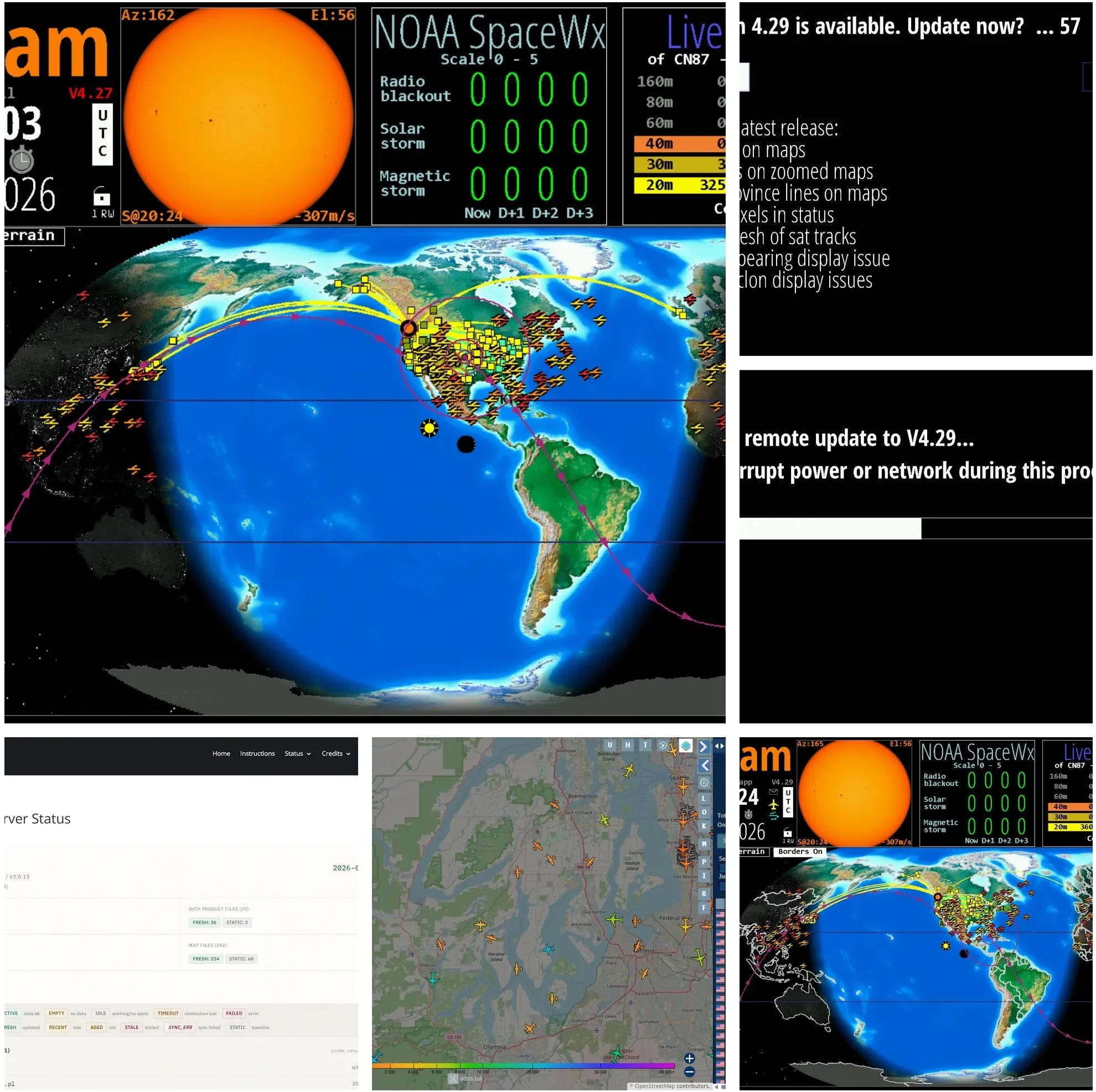
HamClock OHB
If the version number on your HamClock OHB display is red, an update is available. Click that red version number and follow the prompts to upgrade. Nice additions since I last upgraded:
An email icon that presents a link to the OHB status page. Useful.
An airplane icon that opens an ADSB flight tracker for your location. Interesting.
A blue wind icon that opens the Windy.com website.
Screens are presented as a collage below because inserting them all here would take up too much space:
HamClock version upgrade collage
1. QRV: Are You Ready?
It’s been a rather frustrating week. Usually, I’m gleeful when I find problems to fix. This week, I just wanted things to work…but they didn’t. Resolving issues this week dramatically diluted my writing time. That I do find frustrating.
And I’ll gripe a little bit (again) about Claude’s Sonnet 5 model because it jumps to conclusions. That ended up costing me several hours of time this week as I chased a couple of long, involved issues down dark and twisty rabbit holes, when time was in short supply. The Opus 5 model does much better but it also burns through my credits much faster. The problem here is really twofold: I don’t know Sonnet is going to make mistakes until it makes them, and I’d rather not spend the money on Opus if I don’t have to.
Huh. Here I am complaining about AI. I wonder if this is going to become the new normal on repeaters. You know the drill: what’s the weather, what equipment are you running, how is your health, and now, what have you been doing with AI?
I have to say, though: it is so very easy to overlook all the great help now available to me through the many AI engines available. I have far more successes than difficult detours. It feels a tiny bit uncomfortable to say this plainly, but I will: at this moment in time, I am grateful for AI.
2. New on EtherHam
Writing EtherHam Content: Untangling the Ball of Yarn — Meetings (and radio nets) rarely move in a straight line. Someone circles back to a point you thought was closed thirty minutes ago, and a strict outline can’t keep up. Thirty years of facilitating meetings taught me why; mind mapping taught me how to actually capture it. This piece walks through that shift — from a hallway conversation with a frustrated note-taker decades ago to the technique I still use today, turning a tangled ball of yarn of ideas into the straightened, sequential pieces you read on EtherHam.
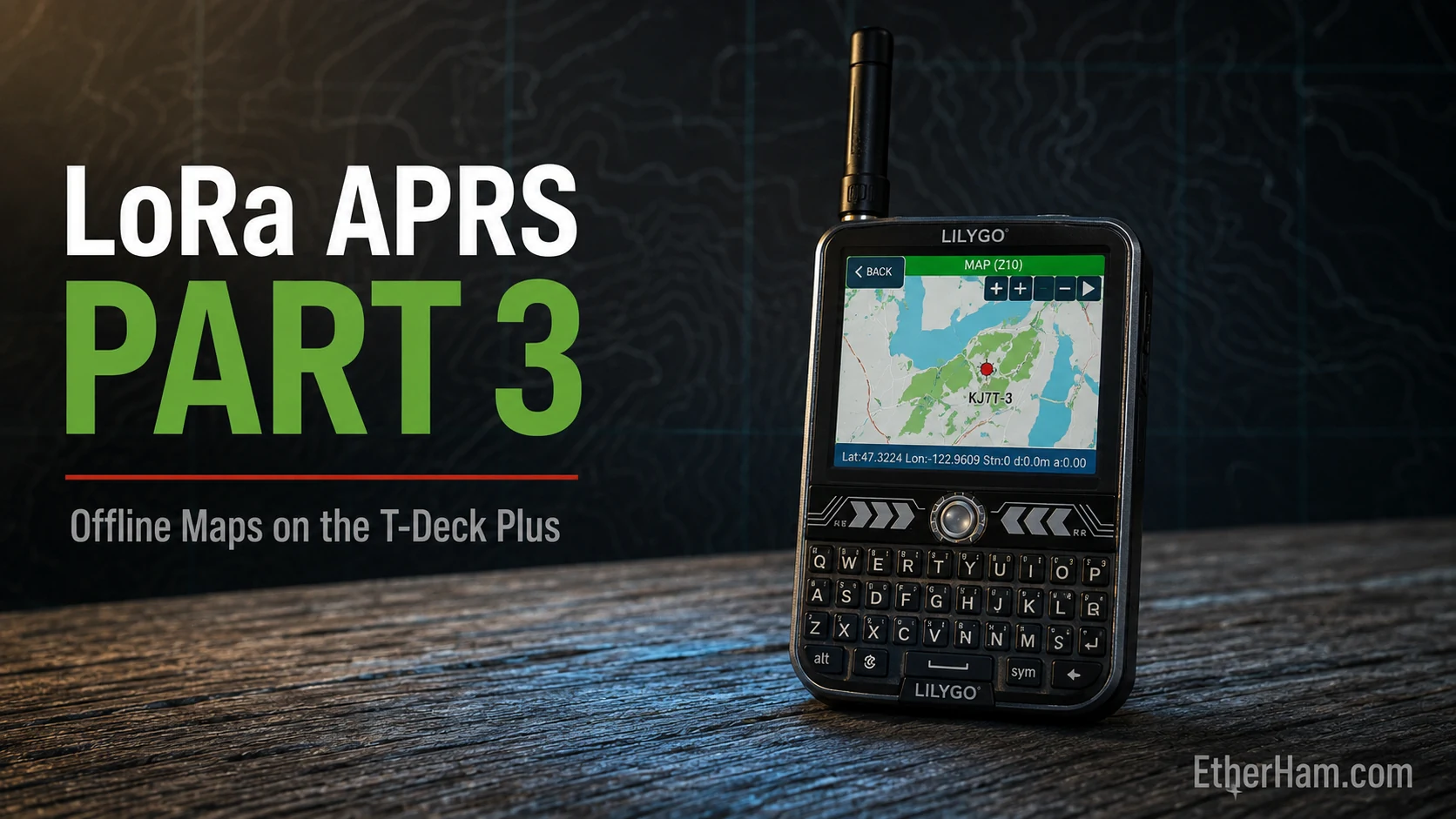
LoRa APRS: Part 3 — A T-Deck Plus Tracker, Offline Maps, and a Long Detour Through OpenStreetMap’s Terms of Service— A LilyGo T-Deck Plus running LoRa APRS will render an offline vector map of the terrain you’re standing in, hold threaded APRS conversations, and pass Winlink email — none of which a plain tracker does. Getting there took most of a day and five stacked failures, each one hiding the next: a wiki that contradicts the firmware it documents; an SD card in the wrong filesystem; 1,793 downloaded map tiles that turned out to be OpenStreetMap’s “Access blocked” graphic saved 1,793 times; a tile generator that had to be compiled from source inside Linux; and — after all of that — a map that had been working the whole time but wouldn’t render until I pressed the zoom button three more times. Somewhere in the middle, the tracker started reporting itself in the Southern Ocean while its own screen showed the correct coordinates. If you just want something that beacons your position, buy a T-Echo and enjoy long battery life. If you want the map and the messaging, here’s the whole path with the wrong turns left in, because the wrong turns are the part worth reading.
Over the years, the conversations around the intersection of amateur radio and technology have grown incredibly rich. While the newsletter is a great way to share these concepts, I want to give us a dedicated space to hold deeper, multi-sided discussions.
Today, I am excited to officially launch the EtherHam Groups.io Community.
This is our new clubhouse on the web—a text-based space where you can ask technical questions, share project updates, discuss technology integration, shape future Random Wire and EtherHam topics, and connect directly with other subscribers.
⚠️ A Note on Capacity (First-Come, First-Served)
Because we are launching on a lean, independent infrastructure, space is strictly limited to the first 100 members.
To protect our space from automated bots, spam, and bad actors, membership requires manual approval. We are prioritizing licensed radio amateurs, though tech-minded enthusiasts are welcome too.
You will receive an automated email asking for your amateur radio callsign (or an explanation of why you want to participate).
Reply to that email immediately to lock in your application for review.
Once we hit our 100-member cap, the doors will close while we settle into this new space. If you want to help shape the foundation of the EtherHam community from day one, please submit your application today.
See you in the ether,
Tom KJ7T Editor, Random Wire www.randomwire.us
4. IP400: The Story Behind This Important Project
I’m sure you’ve noticed the changes over time on VHF/UHF repeaters: coordinated frequencies sitting quiet, hardware from the 1990s doing the same voice relay job it’s always done, and a shrinking pool of operators who show up to keep it maintained. For years, my friend Steve Stroh N8GNJ has been touting a project called IP400, and for good reason. A recent section of his Zero Retries newsletter will likely convince you that IP400 really is an exciting initiative in our amateur radio hobby. Why? Because he’s right.
But where did IP400 come from? It traces back to a longtime radio amateur, Martin Alcock VE6VH — who spent years designing commercial broadband wireless systems before focusing that experience toward amateur radio. Alcock looked at what already existed — AREDN, HamWAN, New Packet Radio — and noticed they all shared the same limitation: they either ran on license-exempt spectrum with real power restrictions, or they came with enough administrative overhead that they never spread much beyond a dedicated core of builders. What amateur radio didn’t have, in his view, was a data and mesh networking system built from scratch for the hobby, on ham bands, without those constraints. That observation became IP400, developed under the Alberta Digital Radio Communications Society (ADRCS), the group Alcock helped found in 2022 and where he’s been able to line up grant funding — including a 2025 ARDC grant — to keep development moving.
As the project has developed, it became clear that IP400 is not trying to replace DMR, D-STAR, C4FM, or your local FM repeater. Instead, it sits next to them. IP400 is additive to our hobby, not subtractive. The hardware — a controller board called the AMNC — talks to a radio you already own and adds a data layer compatible with AX.25 KISS framing, with an eye toward working alongside Winlink, AllStarLink-linked repeaters, and eventually AREDN’s mesh network. The goal is to give existing infrastructure a reason to be upgraded rather than replaced.
What’s running today rides on ordinary FM audio, but that’s really just the first step. Alcock’s longer-term plan involves dedicated software-defined radios with a direct I/Q interface, aimed at speeds well beyond what’s possible when squeezing data through a mic jack. Where that lands, and how fast, is exactly the kind of thing Steve is covering well.
I think there’s another reason for this, one that’s a little harder to say out loud: a lot of newer hams just aren’t as focused on voice communications as the hams who came before them. These new hams grew up in a data-driven, IP-enabled world, and IP400 speaks that language. I’d bet this brings a fair number of tech-fluent people into the hobby who might not have bothered otherwise.
In my view, IP400 is one of the most exciting and fundamental developments in amateur radio today. I’ve not covered it in the Random Wire newsletter because Steve does such an outstanding job of keeping his subscribers updated on IP400. This project is worth digging into, getting excited about, and supporting. IP400 may well be one of the most important technology improvements we’ll see in amateur radio.
For more, I suggest following this topic in the Zero Retries newsletter where it is sure to be very well covered by the ZR team.
5. Curious About 44Net?
Here is your chance to learn about 44Net and about John Burwell KI5QKX, on Eric Guth’s great podcast series, QSO Today, in Episode 539.
John Burwell, KI5QKX, found his way into amateur radio through 44Net, the Class A public IP address space set aside for amateur radio almost 50 years ago, now managed by ARDC. John’s interest in connecting devices over the Internet led him to this remarkable ham radio resource. In this interview, we go deep into IP addressing and networking, opening the door to new ways licensed amateurs can learn, experiment, and build Internet-connected projects. KI5QKX is my QSO Today.
6. QSO One 3.8.5 — Your Update Has Arrived
3.8.5 is live for beta testers, and this one is almost entirely about audio. From the announcement:
The mic gain scale actually works now, a real 0 to 100 instead of everything living in the bottom sliver. There is a new audio test for every network, you talk, it meters you, and it grades you hot, good, or quiet while you adjust. And the clever part, once the app has heard enough stations on a network, it grades you against how that network actually sounds, not against a number from a lab. Every network also gets transmit protection now so you cannot blow anyones ears off, Windows choppy audio got a real fix, and Bluetooth PTT buttons finally respect your PTT mode setting.
I’ll just say this here: this new headset from Heil isn’t just for Parks On The Air, but it’s a great choice for POTA. From Michael Martens KB9VBR:
8. Waiting on Two Radios: DMR & M17
Retevis RT3S DMR Radio
I ordered this a few weeks ago:
RT3S Dual Band DMR Radio Non-GPS/Built-in GPS
Why? Because I want to try OpenGD77 as the codeplug editor, and OpenGD77 says the RT3S is compatible. In fact, there are plenty of blog posts and reviews available on this exact pairing. (I’m not hyperlinking this radio here because I’ve not received or reviewed it yet.)
I got interested in this after a subscriber asked me how to get into DMR at a reasonable cost. Of course, I do like my AnyTone 878 radio very much, but that’s a more premium option than a $100 radio and free CPS software.
I promised a part two on DMR that I’ve been picturing as a how-to on developing your own codeplug. The RT3S with OpenGD77 is going to fit right into that slot. I’m looking forward getting this working and sharing the journey with you.
A few days ago, the RT3S radio was in Chicago. Wednesday, I received the extra bits: a speaker-microphone, antenna, and spare battery. Maybe the RT3S will arrive in time for initial impressions…but probably not.
What comes up on that page is a 6-pack of radios. I ordered the single radio for $55.
Then I got an email: “We noticed that you purchased the (EU version) radios. To avoid any issues, would you like us to change your order to the US version[gmrs] instead?”
I paused and thought for a few minutes about this, then replied: no. The experimental work being done by the M17 Project with the C62 is happening — I believe — in Europe, so perhaps I should stick with that version. We’ll see, of course, if it works once it gets here and I load OpenRTX on it. If it works I’ll have an M17 handheld for $55! If it doesn’t work, I’ll have another radio for the unused radio bin.
9. APRS OTA
I’ve not tried this yet, but APRS OTA does sound interesting:
APRS OTA combines the vibe of a POTA activation with a native APRS messaging bot and a website to show what’s happening. Find an operator on the air, send one message and a position report to work them, and your contact is logged, mapped, and scored here as it happens.
A bot serves as a relay and automatically logs contacts:
APRS OTA is an activity and a bot…the OTA bot relays the exchange and logs every contact as it happens. There is nothing to install and no account to create: if you can send an APRS message, you are already in.
It’s a three-part system, with a host, a bot, and chasers.
Intrigued? Visit https://aprsota.org/ for more. If you try it, let me know what it’s like!
10. And Then I Had an APRS Messaging Moment
I was driving to get my morning coffee, watching carefully for deer. Sure enough, I had to hit the brakes so a young buck with velvet antlers could bound across the road. I’ve learned to look where the deer came from, too, and saw a doe and fawn turn back into the bushes. It was at that moment that I saw my APRS radio and a thought completely unrelated to wildlife popped into my mind.
I’ll write this up in long form and post it to EtherHam.com, but my EtherHam website is offline at the moment due to a major power loss at the web host’s Phoenix data center. No word on when services will be restored (and I hope “power loss” is not code talk for “fire in the data center” because that would be very bad).
What was that APRS thought? I wondered if I could send an APRS message from APRSdroid (I’m running the 9M2PJU Mod version) to my LoRa APRS tracker. Surely that could not work, because one system flows over cellular data and the other is LoRa radio. But the aha moment for me was realizing that both probably pass messages via APRS-IS. So I tested this by sending a message from my phone (KJ7T-5) to my tracker (KJ7T-3).
I was surprised and delighted to find this worked perfectly. Replying from the tracker to the phone also worked, so APRS messaging works in both directions.
Let me just pause and sit with that for a moment, because it was a revelation to me. We get pretty locked in about whether we’re working over RF or cell or satellite or wifi or whatever. Hung up on this, even. Lost in those details is the realization that APRS shares a common backbone: APRS-IS.
APRS-IS stands for the APRS Internet System, and it’s the quiet piece of infrastructure that ties every flavor of APRS together. Stations riding RF — my LoRa tracker included — reach it through something called an IGate: a small relay station, often nothing more than a radio and a cheap computer in someone’s attic (or in my case, the garage), that listens to local radio traffic and forwards it onto the internet. Apps like APRSdroid skip the radio step entirely and log straight into APRS-IS over cellular data.
Once a packet lands on APRS-IS, its origin stops mattering. It’s all just APRS-IS traffic from that point on — it can get relayed back out over RF somewhere else, or handed off to a site like aprs.fi to show up on a map. That’s what clicked for me on the drive: my phone and my tracker aren’t two separate systems that happen to talk to each other. They’re two different doors into the same room.
And this is the secret sauce that makes APRS such a powerful tool: different radios, different frequencies, different modes, different mechanisms can all communicate cleanly because they all use the same pipeline behind the scenes.
There is more to this test, because I also tried Winlink between my laptop and my APRSdroid app. That test yielded a surprising-but-educational result I’ll share once EtherHam.com comes back up.
Finally, in a “why not?” moment, I tried checking in to #APRSThursday from the tracker (LoRa APRS as KJ7T-3) and from APRSdroid (KJ7T-5). Unfortunately, both ANSRVR and APRSPH did not respond to messages or commands. I hope the #APRSThursday folks get that fixed.
11. Short Stack from the Interwebs
Well, with EtherHam.com offline, I had to resort to a special mega feed URL which fortunately worked. The following Short Stack items were harvested from this week’s aggregated ham radio feed, covering items from August 5–13, 2026.
Checking your Own Signal on FlexRadio — With Varying Frequency – Amateur Radio Ponderings — A quick how-to on using FlexRadio’s built-in features to self-monitor your transmitted signal.
DX Explorer and the Thinknode Meshcore M1 transceiver — Roger G3XBM’s (Mainly) Amateur Radio Blog — A rundown of a new video on the Thinknode M1 LoRa transceiver, with a reminder that Meshcore vs. Meshtastic popularity varies a lot by region.
Travel Internet CW — With Varying Frequency – Amateur Radio Ponderings — A cautionary field report: internet CW over shipboard wifi via a vBand adapter proved unusably laggy, and a backup Vail Adapter hit its own snag mid-trip.
Gear, Builds & Reviews
Pebble HF ordered — With Varying Frequency – Amateur Radio Ponderings — The Pebble HF kit opened for purchase this week, and K9ZW put in his order.
Mark’s First Impressions of the PK MW Loop — The SWLing Post — A Scotland-based listener’s first impressions of Paul Karlstrand’s PK Loop magnetic loop antenna, ordered after a chance conversation while traveling in Greece.
QMX (not QMX+) is becoming a firm favourite — Roger G3XBM’s (Mainly) Amateur Radio Blog — A nod to QRP Labs’ tiny QMX rig, which keeps showing up as a favorite in the field despite its small footprint.
Ford F-150 Radio Install – VGC N7600 — Above Average Terrain — Bob K0NR traded in his 2013 F-150 for a 2025 model and walks through installing a mobile rig in the new truck.
Rob spots a rare Hygain Galaxy R-1530 on eBay — The SWLing Post — A vintage-radio spotting: a Hygain Galaxy R-1530 listed “for parts or not working” at $749.95 — buyer beware, no returns accepted.
Margaret – A New SOTA Machine — N1CLC — An extensive build log on outfitting a new Subaru Outback Wilderness for SOTA work: mobile radio install, dedicated power distribution, a Starlink Mini, and a full house battery/solar system.
Silly me, did not take inventory on order arrival woes — With Varying Frequency – Amateur Radio Ponderings — A DigiKey order for a touch-paddle project turned up short a hundred MOSFETs, discovered only after months of sitting unopened.
KK6IK: Summer Mornings, Iced Coffee & QRP — Q R P e r — Scott Nacey weighs the Elecraft KH1 against the KX2 for travel-friendly POTA operating during a Rhode Island visit.
Parks on the Air (POTA) — Lincoln County Amateur Radio Club — The club has set up a POTA activation account under its call sign, aiming to give newer members an easy way to get started.
ANS-221 AMSAT News Service Weekly Bulletins — AMSAT — This week’s bulletin covers registration for the 44th AMSAT Space Symposium, ongoing board elections, and a new ARISS associate director appointment.
Perseid MS shower — Roger G3XBM’s (Mainly) Amateur Radio Blog — A reminder that the Perseid meteor shower peak is prime time for meteor-scatter VHF contacts, with longer-than-usual returns.
Podcasts, Community & Events
Paul Taylor VK3HN Talks about Homebrew and SOTA — SolderSmoke Daily News — Charlie NJ7V of Red Summit RF interviews longtime SolderSmoke friend and Melbourne homebrewer Paul Taylor, VK3HN.
Open Sauce 2026 in San Francisco — SolderSmoke Daily News — Early reports trickling in from Open Sauce, including sightings of WSPR circumnavigating balloons and homebrew CubeSats.
Morse Code Skills Maintenance — With Varying Frequency – Amateur Radio Ponderings — Scheduling conflicts push K9ZW toward Long Island CW Club sessions in the interim before the next CWOps course opens.
Zero Retries 0259 — Zero Retries — This issue covers OFDM-AB and a refactored IP400, new hardware and modulation aimed at making high-speed VHF/UHF mesh networking genuinely practical.
Berryville Hamfest 2026: Wet but wonderful — News – Shenandoah Valley Amateur Radio Club — Record rainfall didn’t keep hundreds of visitors away from this year’s hamfest.
Mods on the Air – GB64MOD Event — With Varying Frequency – Amateur Radio Ponderings — A special-event call active through all of August for fans of the Mod scene and modern hams alike.
International Lighthouse Lightship Weekend! — MichiganOne DMR Tech Net — This year’s ILLW (Aug 15–16) will see the group operating as K8L from Michigan’s Eagle Harbor Lighthouse.
Lighthouse Activation — Lincoln County Amateur Radio Club — The club activates the Yaquina Head Lighthouse for ILLW on Saturday, August 15, from 10am to 2pm.
Question pools should make teaching classes easier — KB6NU’s Ham Radio Blog — Dan KB6NU reflects on teaching a Tech class at DEFCON’s Ham Radio Village with 66 students and a freshly updated question pool.
Why we had Radio Free Europe and how Ham Radio might fit in — With Varying Frequency – Amateur Radio Ponderings — A look at the winding-down of Radio Free Europe’s cross-border broadcasts and where amateur radio might step into that gap.
I finally finished editing the 17 chapters in my book on conservation district management and governance. The first draft of the content happened swiftly back in May. Then I invited some experts to review the draft chapters. Now that the review phase is over, I’ve been trying to make final edits. Editing of chapters 1 through 9 went smoothly. Then life got very busy and I set it aside for a week…then two weeks…then two months. This past weekend, I pulled it up and got through editing the remain chapters, and then sent the manuscript to the publisher. I’m sure I will have another round (or two) of edits coming up, but the core content is complete and good.
“Writing a book” is far more complicated than I thought it would be. I thought writing would be the hardest part, but what I discovered is that when you care deeply about a topic and have solid life experience in it, the book almost writes itself. I spent months crafting a very detailed outline and that proved to be the turning point for the manuscript, allowing me to get started and stay on track. So what was difficult? All the other steps that come with it, like finding a publisher, selecting graphics, choosing a format, hiring a service to convert it for e-book publication, and more. As I travel this road, I’m learning a lot.
Along the way, I realized that a good purpose-built tool for managers to keep regular short notes on employee performance just wasn’t available. A diary-like approach can be very helpful for capturing such notes, and reviewing that history is invaluable when it comes time for performance reviews and implementing other employment-related actions. But finding nothing like that, I made one. It’s simple and rather austere, but it does the job. With a few Python commands, you can turn it into an EXE file to run on Windows or an APP file for macOS. Find it on GitHub.
I could have made a template for something like this in Notion, but then if someone used the template, their data wouldn’t be held locally. I prefer to be in 100% control of employee information at all times.
Coding
I also had some WordPress coding fun, creating a plugin that converts a text-based schedule of meetings to an online display. Some of the text descriptions are rather complicated, e.g.:
The [fill in the blank] Board meetings are on the second Wednesday of October thru May. Meetings in September, October, March, April, and May are at 7 p.m. Meetings in November, December, January, and February are at 6:00 p.m. Meetings are in the US Post Office Building Conference Room.
I built a parser to extract the key pieces and convert the data into a CSV file, then rendered the CSV in a monthly calendar format, with a list-based schedule below the calendar. When meeting dates or locations change, I simply download the CSV, update it, and upload it back to the server. I also added the ability to temporarily mark a meeting “canceled” without going through the whole CSV download-and-upload sequence.
All that is built into a custom WordPress plugin that produces a shortcode for use on any page on the website. It’s working great.
And then, since I was on a roll writing plugins, I wrote one to convert my 518-row spreadsheet of high school classmates into a database maintained on the class website. It has two roles: data admins and data reviewers/approvers. I included a real change log that allows changes to be rolled back. It renders output with shortcodes to display a full class list, our missing classmates, and classmates who have walked on before us. Fun little project.
That should do it for me for a week or two with WordPress plugins!
Home
I’m not really a big fan of tomatoes, but I make an exception for home grown tomatoes harvested on a sunny day at the peak of ripeness. Since I’m the only one who eats them, I have one plant growing in a pot on the deck. Unfortunately, a chipmunk (we named it Chippie) has decided it likes my tomatoes, and it is much faster to harvest them than I am! To try to protect them, I’ve covered the plant — ripening tomatoes and all — with a net. I left the net loose on the bottom the first day and the chipmunk got in and decimated a few almost-ripe tomatoes. The net is now tied tight, and I’m hoping it keeps Chippie out so I’ll get to enjoy the fruits of my own labor soon!
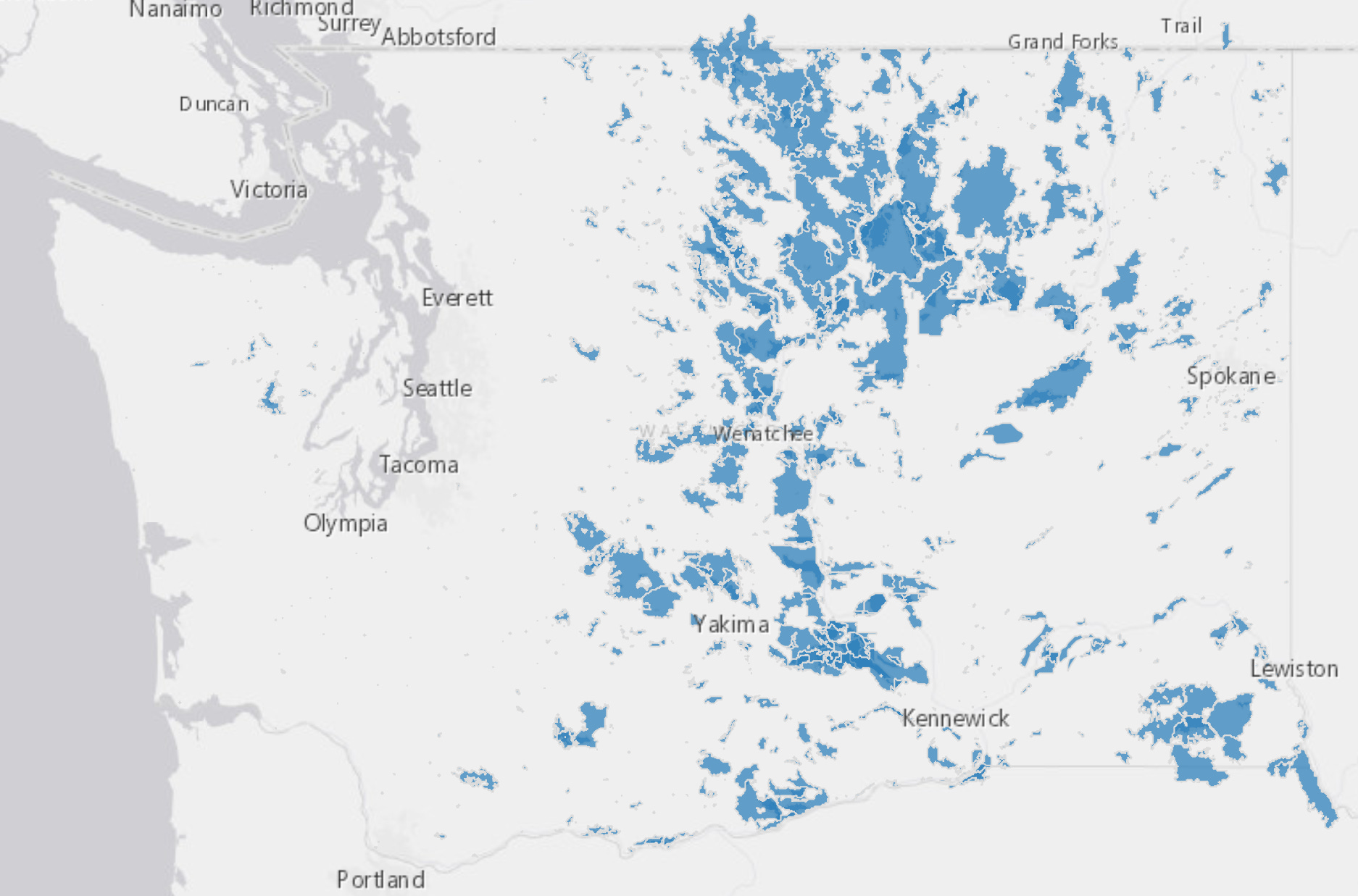
And speaking of home, my childhood home may, or may not, have been affected by the wildfires that have destroyed parts of Spokane, Washington. I wish I knew the status of the old neighborhood as I have many great memories of growing up there. I’m sure I’ll try to make a road trip this fall just to reassure myself that all is well with the old house in northwest Spokane.
Wildfire has been an active force on Pacific Northwest landscapes, particularly east of the north-south Cascade Mountain range:
Thursday morning dawned with a different kind of tech problem: a message from the EtherHam web hosting company!
We’re currently responding to an emergency caused by a power outage at our Phoenix datacenter…undergoing emergency maintenance…experiencing network issues. Websites may be slow, unavailable, or return 503 errors. Hosting panel access may also be affected.
Starting my day with a web outage is always a bit unsettling. At least it wasn’t something I caused (and yes, that has happened before, more than once).
As Thursday draws to a close, resolution is in sight, but it still hasn’t happened. By Friday morning, the EtherHam.com website should be is back online.
ARRL received the following report from Carlos Alberto Santamaría González, CO2JC, Emergency Communications Coordinator, International Amateur Radio Union, Region 2 (IARU R2).
Monday, August 10, 2026
This morning, several regions of Colombia were shaken by an earthquake. According to data from the Colombian Geological Service, the quake occurred at 07:34 local time, with its epicenter located in …
American Radio Relay League | Ham Radio Association and Resources Read More
ARRL The National Association for Amateur Radio® has published its 2025 Annual Report, which includes a summary of the year’s program activities, along with the 2025 and 2024 financial statements and an independent auditor’s report.
The report shares accomplishments across education, advocacy, emergency communications, publications, technology, and member services, while recognizing members, vol…
American Radio Relay League | Ham Radio Association and Resources Read More